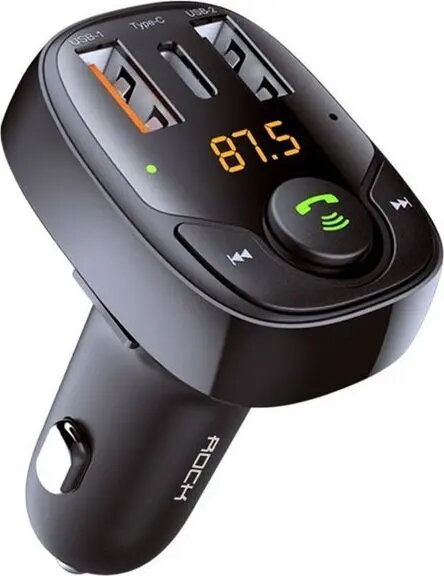
The Rock B301 FM transmitter is a multifunctional car accessory designed to bridge the gap between modern mobile devices and older vehicle audio systems. By converting digital audio signals into FM radio frequencies, it allows you to stream music from your smartphone or storage media directly through your car speakers. Beyond its audio capabilities, the device serves as a high-performance charging hub, ensuring your electronics remain powered during long journeys.
Advantages
This transmitter stands out due to its comprehensive connectivity options, which include Bluetooth for wireless streaming and a microSD card slot for direct playback of stored audio files. The integrated charging system is highly efficient, offering a total power output of 36W across multiple ports. This allows users to charge several devices simultaneously without compromising speed or stability. The compact design ensures it fits neatly into the cigarette lighter socket without obstructing vehicle controls, while the intuitive interface makes switching between music sources and managing calls straightforward.
Suitable for
- Streaming music wirelessly from smartphones via Bluetooth
- Playing audio files directly from microSD cards
- Fast charging mobile phones and tablets while driving
- Adding Bluetooth functionality to vehicles lacking built-in wireless audio
This device may not be suitable for vehicles that do not have an FM radio receiver or for users who require high-fidelity audio transmission, as FM signals can occasionally be subject to interference from local radio stations. It is also not intended for use in vehicles where the cigarette lighter socket is positioned in a way that prevents the transmitter from maintaining a stable connection.
Key specifications
- Total power output: 36W
- Connectivity: Bluetooth, 2x USB-A, 1x USB-C
- Media support: microSD card slot
- Compatibility: Standard vehicle cigarette lighter sockets
To use the Rock B301, plug the device into your car's cigarette lighter socket and tune your car radio to an empty FM frequency. Match the frequency on the transmitter display to the one set on your radio. Once connected, pair your smartphone via Bluetooth or insert a microSD card to begin playback. You can then use the device's interface to control volume, track selection, and call management.
What to consider before purchase
- Check if your car radio has a clear, unused FM frequency available in your area
- Verify that your vehicle's cigarette lighter socket provides consistent power
- Ensure your charging cables are compatible with USB-A or USB-C ports
For the best audio quality, always select an FM frequency that is completely free of local radio station broadcasts to minimize static and interference.