Save time and money with our discounts!
In cart {{totalProductsCount}} item(s)
Your cart is empty
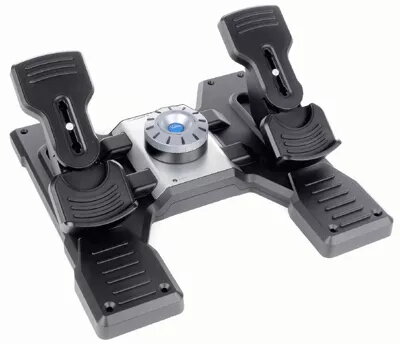
Logitech G Saitek PRO Flight Rudder Pedals for PC Flight Simulation, Wired USB 2.0 Black and Silver
Enhance your flight simulation experience with the Logitech G Saitek PRO Flight Rudder Pedals for PC Flight Simulation. Designed for PC gaming, these wired rudder pedals feature a reliable USB 2.0 interface and offer realistic analogue and digital control technology for precision aircraft handling. Ideal for flight simulation enthusiasts, the durable black and silver unit integrates seamlessly into your setup and supports multiple Windows operating systems for immersive virtual aviation.
The Logitech G Saitek PRO Flight Rudder Pedals add another layer of realistic control to your flight simulation setup by allowing you to control the rudder and toe brakes of your aircraft with your feet, just like actual pilots. The smooth and accurate self-centring rudder pedals provide precise command of your aircraft, both in the air and on the ground when taxiing. A simple twist of the adjustable tension dial lets you match the resistance to your preference, whether you prefer the lighter response of a small aircraft or the more robust feel of a heavy jet. Furthermore, differential toe brakes deliver the full control you need when bringing your aircraft up to its stand on the runway, and the adjustable foot rests accommodate a wide range of sizes with non-slip materials to help keep the pedals secure during virtual flight.
This device may not be suitable for gamers who do not play flight simulation titles or those who lack sufficient floor space for a dedicated pedal unit. Additionally, users who require wireless connectivity will need to look for alternative options.
To use the Logitech G Saitek PRO Flight Rudder Pedals, connect the wired USB 2.0 cable to an available USB port on your compatible Windows PC. Position the pedals on a flat, stable surface where the non-slip materials can prevent sliding during operation. Adjust the foot rests to fit your shoe size comfortably, and set the tension dial to your preferred resistance level. Configure the device settings within your preferred flight simulation software to map the rudder and differential toe braking axes accurately before beginning your virtual flight session.
For the best flight simulation experience, place the pedals on a solid non-slip floor surface and regularly adjust the tension dial to match the specific aircraft type you are piloting.
{{highlightedFeature.featureTitle}}:
{{getProductFeatureValueById(product, highlightedFeature.featureId)}}
{{ productComparisonGenerationError }}