Save time and money with our discounts!
In cart {{totalProductsCount}} item(s)
Your cart is empty
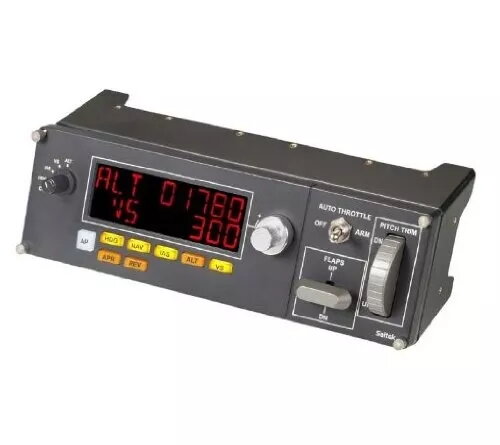
Logitech G Saitek Pro Flight Multi Panel Flight Sim Control for PC with USB Wired Interface and Black Colour
Enhance your flight simulation setup with the Logitech G Saitek Pro Flight Multi Panel designed for PC gaming. This wired USB control device features a black finish and analogue/digital gaming control technology, providing precise management for flight sim enthusiasts and virtual pilots seeking realistic cockpit control during simulation sessions. It functions as a full autopilot LED display that works with compatible flight simulator software, effectively removing the need to use onscreen controls. An integrated dial adjusts settings for quicker selection of your required altitude, while additional functions allow adjustment of your aircraft's throttle, flaps, and elevator trim.
The flight sim control panel offers a modular and interchangeable design, allowing Saitek instrument panels to be stacked or placed side by side in your preferred configuration. This enables you to upgrade your cockpit gradually until you have every instrument display needed for your virtual aircraft. Physical dials and buttons immediately trigger in-sim actions, eliminating the need to zoom into onscreen controls. A built-in trim wheel with precise resistance helps you maintain your desired pitch and attitude.
This device is not designed for gaming platforms other than PC and cannot be used with consoles. It may not meet the needs of users who prefer purely software-based controls or those who do not play flight simulation games.
Connect the device to your PC using the wired USB cable. Mount or place the panel within your simulation setup, ensuring it is positioned for easy access to the physical dials and buttons. Configure the panel through your supported flight simulator software, such as FSX, X-Plane, or Prepar3D, to map the autopilot, throttle, flaps, and trim functions. Use the physical controls during your flight sessions to manage aircraft settings directly without relying on onscreen menus.
Keep the USB cable securely connected during use and avoid exposing the panel to excessive dust or moisture to maintain optimal performance of the physical buttons and dials.
{{highlightedFeature.featureTitle}}:
{{getProductFeatureValueById(product, highlightedFeature.featureId)}}
{{ productComparisonGenerationError }}