Dreame vacuums for fast and efficient cleaning!
In cart {{totalProductsCount}} item(s)
Your cart is empty
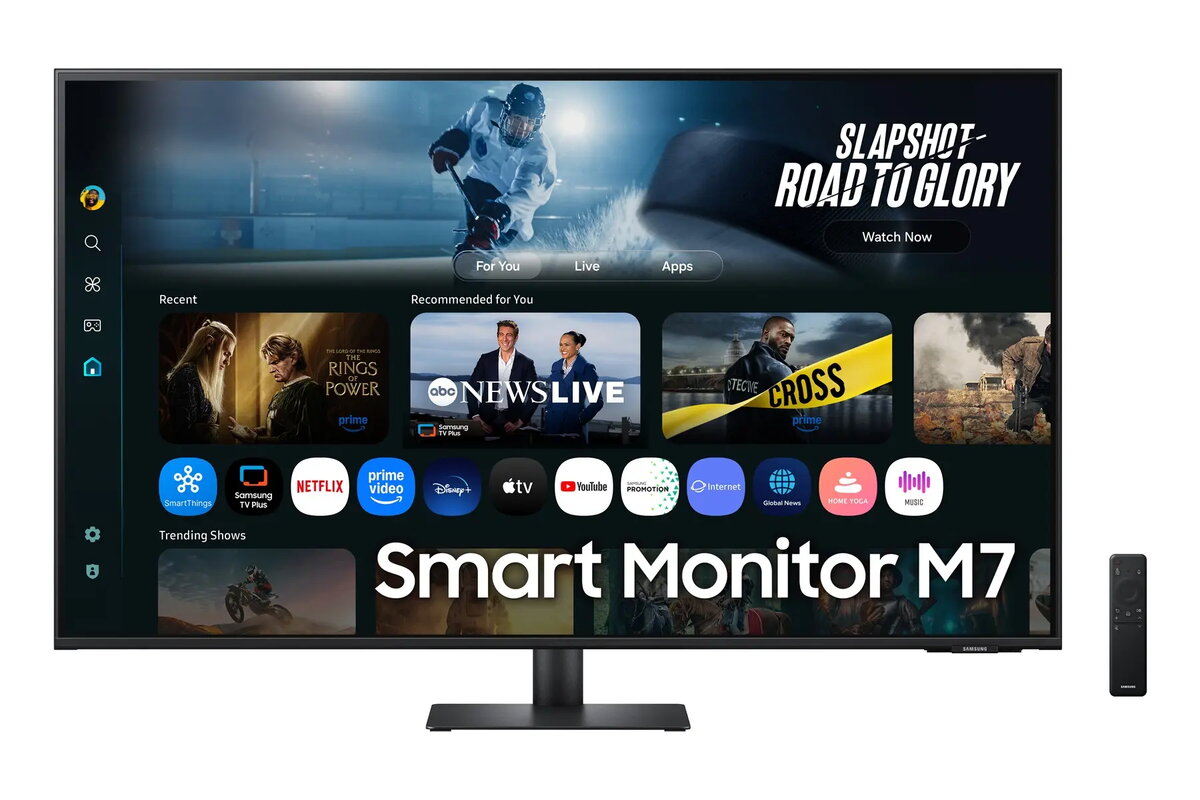
Monitor Samsung Smart Monitor M70F 43" 4K UHD 60Hz (LS43FM702UUXDU)
The Samsung Smart Monitor M70F 43" 4K UHD 60Hz combines a 43-inch 4K panel with built-in smart features to serve as both a desktop display and an independent media device. The monitor delivers 3840 x 2160 resolution at a 60 Hz refresh rate, offering clear text rendering and detailed imagery for everyday productivity, video streaming and casual content consumption. Integrated apps and network connectivity let you access streaming services and cloud content without a connected PC, while conventional monitor inputs and a remote control provide familiar operation for workspace and living-room setups.
The M70F provides a large 4K screen that enhances multitasking and makes viewing high-resolution content more comfortable. Native 4K resolution with a 60 Hz refresh rate ensures crisp document rendering and smooth video playback for most media. Smart functionality reduces dependence on a separate computer for streaming and app access, and a compact set of physical inputs maintains compatibility with laptops and desktop PCs. The included remote control and on-screen menus simplify navigation of apps and network features.
Connect the Samsung Smart Monitor M70F to a power source and use the HDMI or other supported input to attach a laptop or desktop when using it as a traditional monitor. To use the smart features without a PC, connect the monitor to a local network via Wi‑Fi and sign in to supported streaming apps through the on-screen interface. Adjust picture settings, sound level and input selection using the remote control or the on-screen menus. Position the monitor at a comfortable viewing distance and angle for extended work or media sessions.
For best clarity during document work, set the operating system scaling to match the 43" 4K screen and use a viewing distance that reduces eye strain. When streaming, ensure a stable network connection for smooth playback. If connecting multiple devices, label inputs or use an input source manager to switch quickly between PC and media sources.
{{highlightedFeature.featureTitle}}:
{{getProductFeatureValueById(product, highlightedFeature.featureId)}}
{{ productComparisonGenerationError }}