Filters you can trust. Pure water every day.
In cart {{totalProductsCount}} item(s)
Your cart is empty
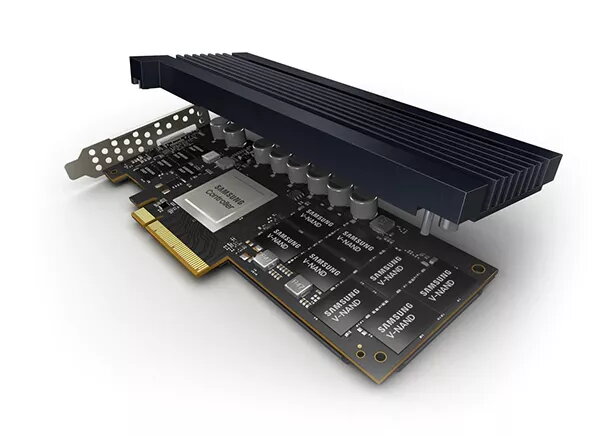
SSD disk Samsung 3.2 TB Half-Height/Half-Length PCI Express 4.0 NVMe PM1735
The Samsung PM1735 3.2 TB SSD is a high-performance enterprise-grade storage solution designed for demanding server and workstation environments. Utilizing the PCI Express 4.0 interface, this drive delivers exceptional throughput and reliability, ensuring that data-intensive applications run smoothly and efficiently. Its Half-Height/Half-Length (HH/HL) form factor allows for flexible integration into various server chassis, providing a robust upgrade for systems requiring high-speed data access and consistent performance.
This SSD offers significant performance gains by leveraging the PCIe 4.0 standard, which effectively doubles the throughput compared to previous generation drives. With read speeds reaching up to 8000 MB/s and write speeds of 3800 MB/s, it drastically reduces latency and accelerates data processing tasks. The drive is engineered for high endurance, making it suitable for continuous operation in environments where data integrity and uptime are critical. Its optimized architecture ensures that it can handle heavy workloads without compromising on speed or stability.
This drive may not be suitable for standard consumer desktop computers or laptops, as it requires a PCIe 4.0 slot and is designed specifically for enterprise-grade server hardware. It is not intended for use in devices that lack the necessary cooling infrastructure or physical space for an HH/HL form factor card.
To install the Samsung PM1735, ensure your server is powered down and disconnected from the power source. Insert the drive into an available PCIe 4.0 x8 slot on your motherboard. Secure the bracket to the chassis to ensure proper physical support. Once installed, power on the system and configure the drive through your server's BIOS or operating system disk management utility to initialize the storage space for use.
Usage recommendations: For optimal performance and longevity, ensure that your server environment provides adequate airflow to maintain the drive within its recommended operating temperature range. Regularly monitor the drive's health status using enterprise management software to track endurance metrics.
{{highlightedFeature.featureTitle}}:
{{getProductFeatureValueById(product, highlightedFeature.featureId)}}
{{ productComparisonGenerationError }}