
Dreame vacuums for fast and efficient cleaning!
In cart {{totalProductsCount}} item(s)
Your cart is empty
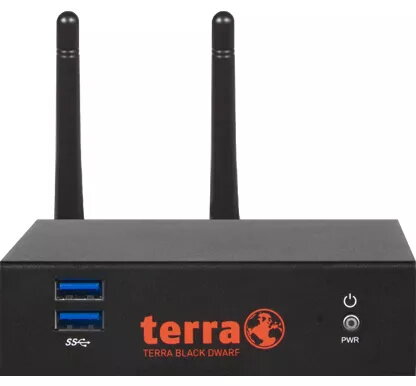
Hardware firewall SecurePoint Black Dwarf VPN as a Service — Desktop, 1.85 Gbit/s throughput, 0.31 Gbit/s VPN, dual-band Wi‑Fi, 10 users
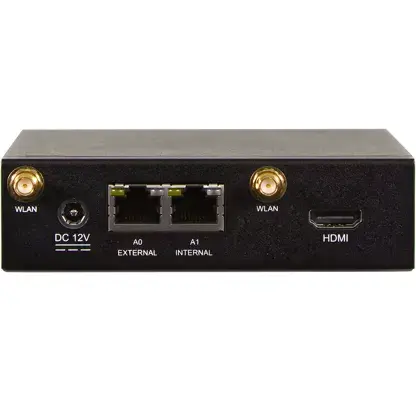
The SecurePoint Black Dwarf VPN as a Service is a compact desktop hardware firewall designed for small offices and remote-branch protection. It delivers up to 1.85 Gbit/s firewall throughput and 0.31 Gbit/s VPN throughput, supports TLS inspection at up to 300 MB/s, and integrates dual-band Wi‑Fi (2.4 / 5 GHz) with Wi‑Fi 4/5 compatibility. The device offers wired gigabit Ethernet ports alongside an external antenna design and AES-based wireless security, and it is sized for deployments of up to 10 users.
The appliance combines high firewall throughput with integrated VPN capabilities to protect network edges without requiring large rack space. TLS inspection capability helps maintain visibility into encrypted traffic, and the external antenna design improves wireless coverage where needed. Built-in dual-band Wi‑Fi and AES security simplify connectivity for small teams while wired gigabit ports provide consistent uplink performance.
This desktop firewall is not intended for larger enterprises or locations with more than 10 concurrent users where higher VPN or firewall throughput is required. Sites that need rack-mountable appliances, extensive modular expansion, or carrier-grade throughput should consider higher-capacity models.
Place the SecurePoint Black Dwarf on a stable desktop surface and connect the WAN and LAN networks using the gigabit Ethernet ports. Attach the external antenna(s) and position them for optimal wireless coverage. Access the device management interface through a web browser or management tool to configure network policies, VPN tunnels, TLS inspection settings and Wi‑Fi parameters. Apply AES-based wireless security settings and register up to 10 user endpoints. Monitor performance and logs regularly to ensure throughput and inspection operate within expected limits.
For reliable performance, enable only the necessary inspection modules, keep firmware up to date, and place the unit centrally for Wi‑Fi coverage. If encrypted traffic inspection is critical, verify that peak inspected throughput requirements fall within the specified 300 MB/s limit and consider segmenting high-bandwidth services to dedicated links.
{{highlightedFeature.featureTitle}}:
{{getProductFeatureValueById(product, highlightedFeature.featureId)}}
{{ productComparisonGenerationError }}
