{{ totalProductsCount }}

In cart {{totalProductsCount}} item(s)

Total:
{{sum | formatAmount}}

Your cart is empty

header-product Sharp Computer Monitor 19 Inch 1280 x 1024 Pixels HD Non-Touch

Sharp Computer Monitor 19 Inch 1280 x 1024 Pixels HD Non-Touch

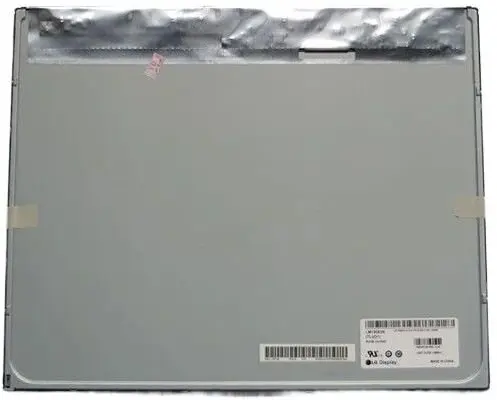
Sharp CoreParts MSC190X30-379M Computer Monitor Photo 1
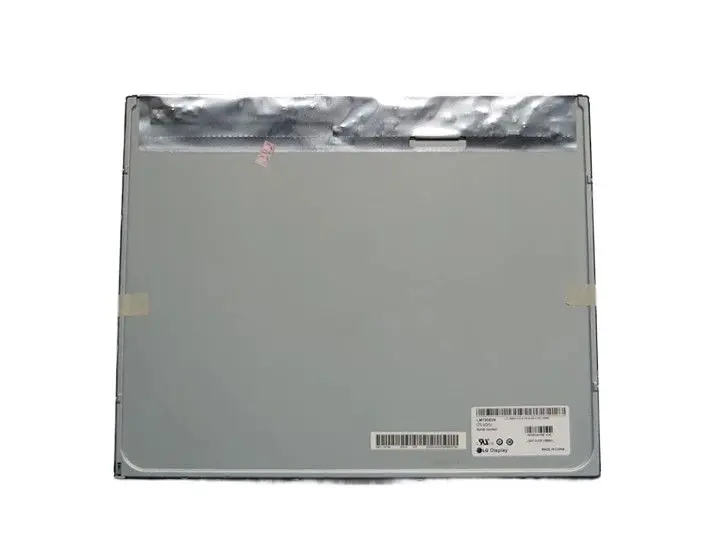
Sharp CoreParts MSC190X30-379M Computer Monitor Photo 2
Sharp CoreParts MSC190X30-379M Computer Monitor Photo 1
Sharp CoreParts MSC190X30-379M Computer Monitor Photo 2

Short description

Sharp 19-inch computer monitor delivering clear HD visuals with a 1280 x 1024 pixel resolution. Designed for reliable daily office tasks and home computing use. Features a standard non-touch display configuration, offering a practical solution for standard desktop workspaces.
Warranty: 2 Years
SKU: 12698706

delivery
Information regarding the items availability for purchase will be posted on this site
price
Item cost information will be published on this site
Together cheaper
{{product.price | formatAmount}}
{{product.title}}
{{productBundle.reference.specialPrice | formatAmount}}
{{productBundle.title}}
{{productBundlePreviousPrice | formatAmount}}
{{productBundleSpecialPrice | formatAmount}}

You saving {{productBundleYouSave | formatAmount}}

Product information

Description

The Sharp Computer Monitor 19 Inch 1280 x 1024 Pixels HD Non-Touch is a reliable and practical desktop display designed to meet the demands of everyday office environments and home computing tasks. Manufactured by Sharp and distributed by CoreParts under model MSC190X30-379M, this monitor combines certified quality with consistent performance. It provides clear visuals and a standard non-touch screen interface, making it a straightforward choice for standard workstation setups where simplicity and dependability are paramount.

Advantages

This monitor is built using high-end components sourced from trusted suppliers, ensuring dependable operation for daily tasks. Every unit undergoes rigorous testing and certification processes to meet strict quality standards, offering matching performance to original equipment. Additionally, supporting the right-to-repair movement, this display serves as a sustainable and practical replacement option for existing desktop configurations.

Suitable for

  • Daily office and administrative tasks
  • Home computing and web browsing
  • Standard desktop workspaces
  • Replacement screen setups

When it may not be suitable

This device is not designed for high-end graphic design, professional video editing, or advanced gaming that requires high refresh rates, ultra-high-definition resolutions, or wide color gamuts. It is also not suitable for applications that require touch screen interactivity.

Key specifications

  • Display diagonal: 19 inches
  • Display resolution: 1280 x 1024 pixels
  • HD type: HD
  • Touchscreen: No

How to use

Connect the monitor to a compatible computer using the appropriate video cable, then plug the power supply into a standard electrical outlet. Adjust the physical position and tilt of the screen to achieve a comfortable viewing angle. Use the built-in display settings menu to calibrate brightness, contrast, and other visual preferences according to your workspace lighting conditions.

What to consider before purchase

  • Verify that your computer has a compatible video output port for connection
  • Ensure the 19-inch screen size and 1280 x 1024 resolution meet your workspace requirements
  • Confirm that touch screen functionality is not required for your intended applications

Usage recommendations

For optimal viewing comfort and to reduce eye strain during extended work sessions, position the monitor at eye level and maintain adequate ambient room lighting. Regularly clean the screen with a dry, soft microfibre cloth while the device is powered off.

Specifications

Display diagonal: Size of the display for this product, measured diagonally, usually in inches.
19 "
Display resolution: The number of distinct pixels in each dimension that can be displayed. It is usually quoted as width × height, with the units in pixels: for example, "1024 × 768" means the width is 1024 pixels and the height is 768 pixels. The higher the number of pixels, the sharper the image.
1280 x 1024
HD type: Type of supported High Definition (e.g. Full HD, 4K Ultra HD).
HD
Touchscreen: A screen of a laptop, smartphone, etc., that responds to touch so you can control the interface using your fingers.
No
All features

Logistics data

Quantity per pack:
1 pc(s)

Packaging data

Package weight: Weight of the packaged product.
600 g
Package height: The distance from the top to the bottom of the packaging.
70 mm
Package depth: The distance from the front to the back of the packaging.
390 mm
Package width: The distance from one side of the packaging to the other.
620 mm

Weight & dimensions

Weight: Weight of the product without packaging (net weight). If possible, the net weight is given including standard accessories and supplies. Please note that sometimes the manufacturer leaves out the weight of accessories and/or supplies.
0.5 kg
Height: The measurement of the product from head to foot or from base to top.
70 mm
Depth: The distance from the front to the back of something.
390 mm
Width: The measurement or extent of something from side to side.
620 mm

Display

Touchscreen: A screen of a laptop, smartphone, etc., that responds to touch so you can control the interface using your fingers.
No
HD type: Type of supported High Definition (e.g. Full HD, 4K Ultra HD).
HD
Display diagonal: Size of the display for this product, measured diagonally, usually in inches.
19 "
Display resolution: The number of distinct pixels in each dimension that can be displayed. It is usually quoted as width × height, with the units in pixels: for example, "1024 × 768" means the width is 1024 pixels and the height is 768 pixels. The higher the number of pixels, the sharper the image.
1280 x 1024

Description

Machine translation.

Similar products

{{product.title}}
Show details Hide details

{{highlightedFeature.featureTitle}}:

{{getProductFeatureValueById(product, highlightedFeature.featureId)}}

{{product.price | formatAmount}}

Product comparison

This Sharp Computer Monitor 19 Inch is compared against several alternative 17-inch and 19-inch models featuring a 1280 x 1024 pixel resolution. While all devices share a standard square display format, they differ notably in touch input capabilities, panel technologies, and primary intended usage.

⚙️ Below is a comparison of key characteristics such as display diagonal, panel technology, touch support, and connectivity options for each model.

ParameterSharp Computer Monitor 19 InchDell P1917Siiyama ProLite T1931SR-1IIYAMA ProLite T1932MSC-W2AGElo Touch Solutions 1915Liiyama T1731SR-B5Practical significance
Display diagonal19 inches19 inches19 inches19 inches19 inches17 inches19-inch models offer more workspace, whereas the 17-inch option provides a more compact footprint.
Resolution1280 x 10241280 x 10241280 x 10241280 x 10241280 x 10241280 x 1024All options deliver identical image clarity in a traditional aspect ratio.
TouchscreenNoNoYesYesYesYesSharp and Dell are built for standard non-touch desktop use, while the others are designed for interactive touch applications.

◎ The table below evaluates which product is most suitable for various user needs and practical usage scenarios.

Use caseRecommended productWhy
Standard office and home tasksSharp Computer Monitor 19 Inch or Dell P1917SThese models lack unnecessary touch layers and are ideal for everyday non-interactive desktop tasks.
Interactive kiosks and POS environmentsiiyama ProLite T1931SR-1, IIYAMA ProLite T1932MSC-W2AG, Elo Touch Solutions 1915L or iiyama T1731SR-B5They feature touchscreen capabilities specifically built for professional retail, hospitality, and commercial checkout use.
The Sharp Computer Monitor 19 Inch differs from the alternatives by offering a standard non-touch configuration tailored for reliable daily office and home computing. It is most suitable for users who need a straightforward desktop display for traditional office applications without paying for specialized interactive touch features.
Might be useful
{{product.manufacturerName}}
{{product.categoryName}}
{{product.title}}
{{product.specialPrice}}
{{product.price}}

Customer reviews

Customer questions

FAQ

What payment options are available?

AiO.lv offers several payment methods: Bank transfer. All transactions are 100% secure and encrypted.

Can this product be purchased for a company (with VAT)?

Yes. AiO.lv works with legal entities in Latvia and across Europe. The product price already includes VAT. For certain product categories, as well as for companies from other EU countries with a valid VAT number, a 0% VAT rate may apply. We issue the invoice immediately after the order is placed, support electronic BIS invoices, and automatically generate all necessary accounting documents. You can complete the purchase for a company online — simply select the company profile and choose bank transfer as the payment method during checkout.

What is the warranty period?

All Sharp products come with an official 2 Years warranty. It covers all manufacturing defects and malfunctions that may occur during use. The warranty is valid at all authorized Sharp service centers and through AiO.lv

Can the product be returned after purchase?

Yes, you can return the product within 14 days of purchase if you bought it as a consumer (not a legal entity). Returns are possible without giving any reason — the main condition is that the product retains its original appearance and full set of accessories. We will make the process as simple and convenient as possible: just contact our customer support team, and we will help you arrange the return.

Where should I contact for warranty service?

For warranty-related questions you can contact the AiO.lv (SIA VSPRO) customer support team. We will assist with consultation, warranty claim processing, and coordination with certified service centers.

How can I tell if this product suits my needs?

When making a choice, we recommend paying attention to the key features: display diagonal, display resolution, hd type, touchscreen, compatibility with your devices or usage conditions, material quality, functionality, and warranty terms. These characteristics will help you determine how well the model meets your needs.

Where can I download the instructions for Sharp CoreParts MSC190X30-379M Computer Monitor?

You can download the instructions in PDF format from the “Instructions” section on the product description page. The file contains complete information about installation, setup, and usage.
warranty
14-Day Return Policy
We are confident in our quality, but if the purchase doesn’t fit — you have 14 days to return the product with peace of mind.
shipping
Fast Delivery
Get your orders as quickly as possible — right to your door, parcel lockers, or pickup points across Latvia and the EU.
payment
Secure Payment
Pay the way you prefer: cash, VISA, MasterCard, Apple Pay, Google Pay, bank transfer, or 0% installment plan.
warranty
Quality Since 2008
AiO.lv has been on the market for over 18 years and has earned trust — with more than 6000 genuine positive reviews on Google.