
Powerful EcoFlow stations for energy anywhere!
In cart {{totalProductsCount}} item(s)
Your cart is empty
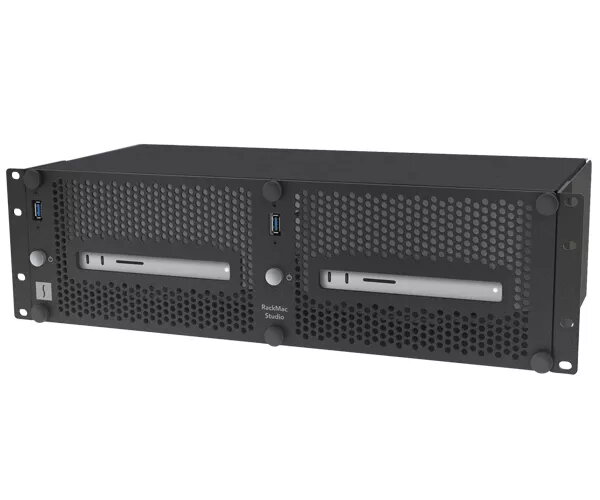
Mounting kit Sonnet RackMac Studio 19" Black
RackMac Studio is a rugged 3U steel rackmount enclosure designed to secure one or two Mac Studio computers in a 19" rack while providing easy front access to power buttons, front ports and SD card slots. The enclosure includes front-panel USB-A passthrough ports and a removable front panel for fast access, plus top openings that preserve Wi‑Fi and Bluetooth signals in most rack configurations. Ventilation and an open back maintain the Mac Studio thermal design, allowing cool air intake through the base and unobstructed exhaust out the rear. Beneath each Mac Studio the enclosure provides space for up to three Thunderbolt or USB SSDs (sold separately) or other thin bus-powered devices up to 3.2 in (width) × 0.75 in (height). With a 9.5 in mounting depth and firm rubber cushions to hold Macs during transport, RackMac Studio is also suitable for shallow travel racks and molded cases.
Constructed from durable steel for secure 19" rack mounting, the RackMac Studio preserves access to Mac Studio front controls and ports while enabling easy cable connection and removal without extracting the computers. Its ventilation design supports the Mac Studio thermal profile by allowing cool air intake and open rear exhaust, and top openings maintain wireless signal integrity. The enclosure also provides dedicated storage space for multiple SSDs under each computer and includes rubber cushions to secure devices during transport.
Install the RackMac Studio into a standard 19" rack using its mounting points, then place one or two Mac Studio computers into the enclosure and secure them with the supplied hardware. Use the removable front panel for daily access: press each Mac Studio’s dedicated front power button, connect USB devices via the front USB-A passthrough ports, and insert SD cards into the front slots without removing the computers. To add SSDs beneath a Mac Studio, remove the rear access panel, attach the supplied adhesive-backed magnet to the bottom of each SSD, insert the SSD into the designated bay, connect it to the computer, and reinstall the rear panel.
Position the RackMac Studio in the rack to minimize obstruction of wireless signals (top openings and rack position affect Wi‑Fi/Bluetooth performance). Ensure adequate rack airflow and avoid placing obstructive panels directly behind the enclosure. Use SSDs within the specified size limits and confirm they are bus-powered if you intend to rely on the enclosure’s internal bays for drive power.
{{highlightedFeature.featureTitle}}:
{{getProductFeatureValueById(product, highlightedFeature.featureId)}}