
Dreame vacuums for fast and efficient cleaning!
In cart {{totalProductsCount}} item(s)
Your cart is empty
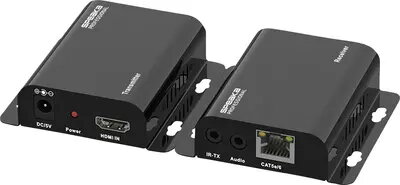
HDMI extender SpeaKa Professional SP-HDMIS-210 over home network (IP) — range 200 m
The SpeaKa Professional SP-HDMIS-210 is an IP-based HDMI extender designed to transmit HDMI audio and video signals over an existing home or small-office Ethernet network. It enables HDMI source and display devices to communicate across longer distances than standard HDMI cables allow by using network switches or direct Ethernet cabling, with a specified transmission reach up to 200 m. The device is intended for scenarios where routing a single long HDMI cable is impractical, allowing flexible placement of screens and sources while maintaining HDMI signal integrity over copper network infrastructure.
The extender uses IP transport to pass high-definition HDMI content through standard Ethernet infrastructure, reducing the need for dedicated long HDMI runs and minimizing installation complexity. With support for distances up to 200 m over CAT cabling and compatibility with typical home and small-office network setups, it facilitates distribution of audio and video with consistent latency and stable signal quality. The product simplifies cable management and allows integration with existing switches to create multi-room or multi-display arrangements without extensive rewiring.
Install the transmitter unit at the HDMI source and the receiver unit at the display. Connect each unit to the local Ethernet network using CAT cabling; direct connection or connection through network switches is supported. Power the units according to the supplied power instructions and ensure both ends are configured on the same network segment if required. Verify HDMI source resolution and audio settings to ensure compatibility with the display and adjust network routing or switch settings if multiple devices are present on the network to maintain optimal performance.
For reliable operation, use high-quality shielded CAT5e or CAT6 cabling, avoid running cables alongside strong electrical interference sources, and place network switches with sufficient bandwidth and low latency for video transport. Confirm that connected displays and source devices support the intended resolutions and audio formats. When deploying across multiple switches, ensure network topology minimizes hops and consider a dedicated VLAN or separate network segment for AV traffic to reduce congestion.
{{highlightedFeature.featureTitle}}:
{{getProductFeatureValueById(product, highlightedFeature.featureId)}}
{{ productComparisonGenerationError }}