
Leave your address - as soon as the price of the product goes down, you'll know about it right away
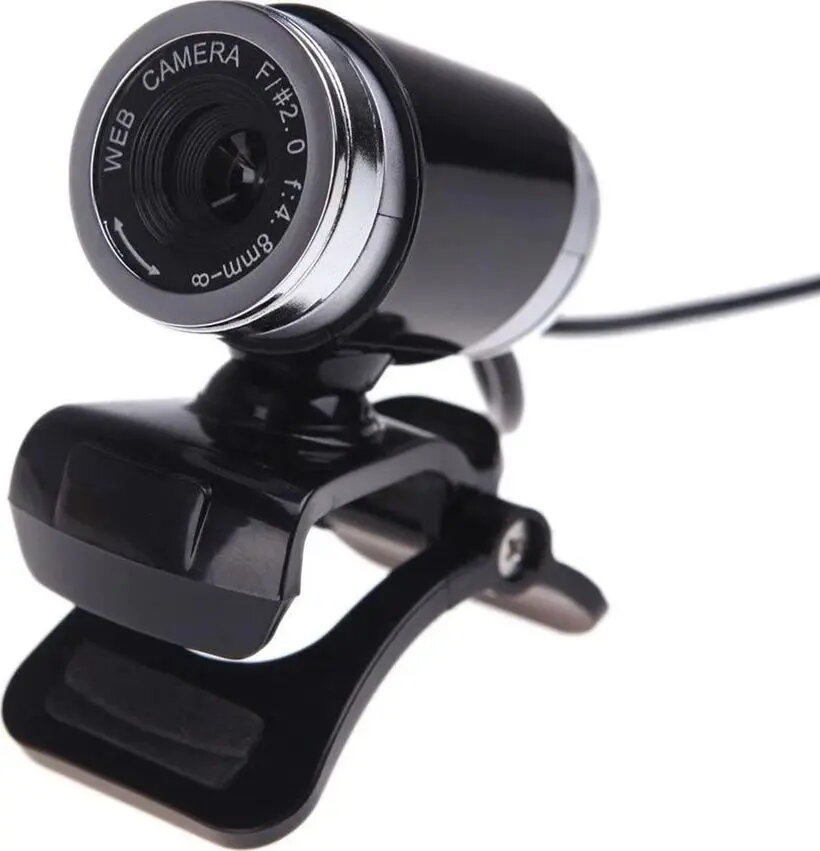
Web camera Strado A860 — USB plug-and-play, built-in microphone
In cart {{totalProductsCount}} item(s)
Your cart is empty
Web camera Strado A860 — USB plug-and-play, built-in microphone
Leave your address - as soon as the price of the product goes down, you'll know about it right away
Web camera Strado A860 — USB plug-and-play, built-in microphone
Strado A860 is a compact web camera designed for everyday video calls, online meetings and basic streaming. The camera connects via USB and supports plug-and-play operation, delivering straightforward setup without additional drivers on most operating systems. A built-in microphone captures voice for single-person conversations, remote learning and teleconferencing. The low-profile housing and adjustable clip make it simple to mount on monitors, laptop screens or place on a stable surface.
The Strado A860 provides reliable, no-fuss connectivity through a USB interface and plug-and-play compatibility, reducing setup time. Its integrated microphone eliminates the need for a separate audio device for basic voice capture. The camera’s compact size and adjustable mount allow flexible placement on a variety of displays. The design focuses on practical everyday use for home office and remote communication.
Attach the camera to the top edge of your monitor or laptop using the adjustable clip or place it on a flat surface. Connect the USB cable to an available USB port on your computer; most systems will recognize the device automatically and enable plug-and-play operation. Select the Strado A860 as the camera and microphone source in your video conferencing or streaming application settings. Adjust positioning and angle to frame the subject appropriately and ensure the microphone is close enough for clear voice capture.
For best results, use the camera in well-lit environments and position it at eye level to achieve natural framing. Close other applications that may use the microphone to avoid interference, and test audio and video settings in your conferencing app before important meetings. If low audio quality is experienced in noisy environments, consider using a dedicated headset or external microphone.
{{highlightedFeature.featureTitle}}:
{{getProductFeatureValueById(product, highlightedFeature.featureId)}}