
{{ totalProductsCount }}

In cart {{totalProductsCount}} item(s)

Total:
{{sum | formatAmount}}

Your cart is empty

header-product Superior Electronics SUPTRB008 Infrared Wireless Replacement Remote Control for Samsung Televisions Featuring Tactile Press Buttons and Single Device...

Superior Electronics SUPTRB008 Infrared Wireless Replacement Remote Control for Samsung Televisions Featuring Tactile Press Buttons and Single Device Support

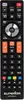
Superior Electronics SUPTRB008 Remote Control for Samsung Photo 1
Out of stock.
View similar!

Short description

The Superior Electronics SUPTRB008 is a dedicated replacement remote control designed for Samsung televisions. Utilizing a reliable infrared wireless interface, this device operates via traditional press buttons for effortless channel changing, volume adjustment, and menu navigation. Engineered to support one device, it provides a seamless user experience matching original manufacturer functionality. Ideal as a direct replacement for lost or damaged controllers, ensuring full compatibility with compatible Samsung TV models for daily home entertainment use.
Warranty: 2 Years
SKU: 12664277
delivery
Information regarding the items availability for purchase will be posted on this site
price
Item cost information will be published on this site
Together cheaper
{{product.price | formatAmount}}
{{product.title}}
{{productBundle.reference.specialPrice | formatAmount}}
{{productBundle.title}}
{{productBundlePreviousPrice | formatAmount}}
{{productBundleSpecialPrice | formatAmount}}

You saving {{productBundleYouSave | formatAmount}}

Product information

Description

The Superior Electronics SUPTRB008 is a dedicated replacement remote control designed specifically for Samsung televisions. This infrared wireless controller offers a straightforward solution for operating your television with traditional tactile press buttons, ensuring comfortable channel changing, volume adjustment, and menu navigation. Built for single-device support, it serves as a reliable alternative when an original remote is lost or broken.

Advantages

This replacement remote control provides seamless compatibility with supported Samsung television models without requiring complex programming or configuration. The classic press button layout ensures familiar and intuitive operation for users of all ages. Its robust construction and reliable infrared wireless interface deliver stable daily performance for your home entertainment setup.

Suitable for

  • Replacing a lost, damaged, or unresponsive original Samsung TV remote control
  • Controlling a single compatible Samsung television in a living room or bedroom
  • Users who prefer traditional tactile press buttons over touch-sensitive or pointer-based remotes

When it may not be suitable

This device is designed exclusively for Samsung televisions and cannot be programmed to control other brands or additional home theater equipment such as soundbars, cable boxes, or streaming media players. It does not support multi-device operation.

Key specifications

  • Brand compatibility: Samsung
  • Remote control proper use: TV
  • Interface: IR Wireless
  • Input type: Press buttons
  • Number of devices supported: 1
  • Product colour: Black
  • Rechargeable: No

How to use

Insert the required batteries into the battery compartment observing the correct polarity. Point the infrared transmitter directly toward the television receiver window and press the desired function buttons to operate the TV. No pairing or setup code entry is necessary for compatible television models.

What to consider before purchase

  • Verify that your television is a compatible Samsung model before acquiring this remote
  • Confirm that you only require control for a single device, as this model supports one device exclusively
  • Note that standard batteries are required and must be obtained separately

Usage recommendations

To ensure reliable operation, keep the infrared transmitter window clean and free from obstructions. Remove the batteries if the remote control will not be used for an extended period to prevent potential damage from battery leakage.

Specifications

Rechargeable: The device can be connected to a power supply in order to restore electrical energy in the battery.
No
Number of devices supported: The amount of devices that can be used with this product.
1
Brand compatibility: What other brands this brand can be used with.
Samsung
Interface: Interface ports to connect pieces of equipment. USB (Universal Serial Bus) has become the most popular wired interface to connect peripherals. USB 2.0 supports speeds up to 480 Mbit/s (USB 1: 12 Mbit/s). The interface FireWire is also known as the IEEE 1394 standard. Enhanced IDE (EIDE)is sometimes referred to as Fast ATA, Fast IDE or ATA-2.
IR Wireless
Input type: The way in which commands or signal are inputted in product.
Press buttons
Product colour: The colour e.g. red, blue, green, black, white.
Black
Remote control proper use: How the remote control should be used, and what it should be used for.
TV
All features

Packaging content

Manual:
Yes
Batteries included:
No

Weight & dimensions

Weight: Weight of the product without packaging (net weight). If possible, the net weight is given including standard accessories and supplies. Please note that sometimes the manufacturer leaves out the weight of accessories and/or supplies.
0.083 kg
Height: The measurement of the product from head to foot or from base to top.
205 mm
Depth: The distance from the front to the back of something.
20 mm
Width: The measurement or extent of something from side to side.
45 mm

Battery

Number of batteries supported: The number of batteries that can be used with the product.
2
Battery voltage: The voltage (V) of the battery.
1.5 V
Battery type: Description of battery supplied with the product, such battery form factor (e.g. AA/AAA).
AAA
Rechargeable: The device can be connected to a power supply in order to restore electrical energy in the battery.
No

Performance

Certification:
CE
On/off switch: The button which is pressed to switch the device on or off.
Yes
Number of devices supported: The amount of devices that can be used with this product.
1

Display

Built-in display: A display which is part of the product, so you do not need to attach another display.
No

Design

Input type: The way in which commands or signal are inputted in product.
Press buttons
Product colour: The colour e.g. red, blue, green, black, white.
Black
Brand compatibility: What other brands this brand can be used with.
Samsung
Remote control proper use: How the remote control should be used, and what it should be used for.
TV
Interface: Interface ports to connect pieces of equipment. USB (Universal Serial Bus) has become the most popular wired interface to connect peripherals. USB 2.0 supports speeds up to 480 Mbit/s (USB 1: 12 Mbit/s). The interface FireWire is also known as the IEEE 1394 standard. Enhanced IDE (EIDE)is sometimes referred to as Fast ATA, Fast IDE or ATA-2.
IR Wireless

Description

Machine translation.

Similar products

{{product.title}}
Show details Hide details

{{highlightedFeature.featureTitle}}:

{{getProductFeatureValueById(product, highlightedFeature.featureId)}}

{{product.price | formatAmount}}

Product comparison

The Superior Electronics SUPTRB008 replacement remote control is compared alongside several alternative remote controls from Superior Electronics and Samsung designed for home entertainment systems. The primary commonality across all options is their role as functional replacements for lost or damaged remotes, but they differ significantly in brand compatibility, supported device counts, and wireless interfaces such as infrared or Bluetooth.

⚙️ The table below compares the key technical characteristics and capabilities of the products, including brand compatibility, supported devices, connection interfaces, and input types.

FeatureSuperior Electronics SUPTRB008Superior Electronics Ready5Samsung BN59-01357B ECOSuperior Electronics SUPTRB014Superior Electronics FreedomSuperior Electronics SUPTBB002Practical significance
Device typeDedicated Samsung remoteUniversal remoteDedicated Samsung remoteUniversal learning remoteMulti-device universal remoteDedicated LG remoteDetermines which television brand the remote is initially optimized and laid out for.
Brand compatibilitySamsungUniversalSamsungMulti-brandMulti-brandLGDedicated models require no configuration for the specific brand, whereas universal models fit multiple makers.
Supported devices1 device1 device1 deviceMultiple devicesUp to 4 devices1 deviceSingle-device handsets keep daily use simple, while multi-device controllers consolidate whole AV systems.
InterfaceIR WirelessIR WirelessIR WirelessIR WirelessIR WirelessBluetoothInfrared is standard for most TVs, while Bluetooth may be required for specific wireless pairing features.

◎ The table below evaluates how well each product matches specific user needs, usage scenarios, and buyer profiles.

Use caseRecommended productWhy
Replacing an original remote for a Samsung TVSuperior Electronics SUPTRB008 or Samsung BN59-01357B ECOBoth models are built specifically for Samsung televisions, providing familiar navigation without complex setup.
Controlling mixed equipment or multiple AV devicesSuperior Electronics Freedom or Superior Electronics SUPTRB014Allows consolidating control of a TV, projector, DVD/Blu-ray player, or home cinema into a single handheld unit.
Controlling an LG televisionSuperior Electronics SUPTBB002Designed specifically for LG TVs with a matching layout and a Bluetooth interface for wireless connection.

The Superior Electronics SUPTRB008 is ideally suited for Samsung TV owners who need a straightforward, ready-to-use replacement remote for everyday entertainment without extra configuration. Choose it when you want a direct and dependable alternative to your original television controller. Alternative models are more suitable if you need to manage multiple AV devices simultaneously or operate equipment from different manufacturers.

Might be useful
{{product.manufacturerName}}
{{product.categoryName}}
{{product.title}}
{{product.specialPrice}}
{{product.price}}

Customer reviews

Customer questions

FAQ

What payment options are available?

AiO.lv offers several payment methods: Bank transfer. All transactions are 100% secure and encrypted.

Can this product be purchased for a company (with VAT)?

Yes. AiO.lv works with legal entities in Latvia and across Europe. The product price already includes VAT. For certain product categories, as well as for companies from other EU countries with a valid VAT number, a 0% VAT rate may apply. We issue the invoice immediately after the order is placed, support electronic BIS invoices, and automatically generate all necessary accounting documents. You can complete the purchase for a company online — simply select the company profile and choose bank transfer as the payment method during checkout.

What is the warranty period?

All Superior Electronics products come with an official 2 Years warranty. It covers all manufacturing defects and malfunctions that may occur during use. The warranty is valid at all authorized Superior Electronics service centers and through AiO.lv

Can the product be returned after purchase?

Yes, you can return the product within 14 days of purchase if you bought it as a consumer (not a legal entity). Returns are possible without giving any reason — the main condition is that the product retains its original appearance and full set of accessories. We will make the process as simple and convenient as possible: just contact our customer support team, and we will help you arrange the return.

Where should I contact for warranty service?

For warranty-related questions you can contact the AiO.lv (SIA VSPRO) customer support team. We will assist with consultation, warranty claim processing, and coordination with certified service centers.

How can I tell if this product suits my needs?

When making a choice, we recommend paying attention to the key features: rechargeable, number of devices supported, brand compatibility, interface, input type, product colour, remote control proper use, compatibility with your devices or usage conditions, material quality, functionality, and warranty terms. These characteristics will help you determine how well the model meets your needs.

Where can I download the instructions for Superior Electronics SUPTRB008 Remote Control for Samsung?

You can download the instructions in PDF format from the “Instructions” section on the product description page. The file contains complete information about installation, setup, and usage.
warranty
14-Day Return Policy
We are confident in our quality, but if the purchase doesn’t fit — you have 14 days to return the product with peace of mind.
shipping
Fast Delivery
Get your orders as quickly as possible — right to your door, parcel lockers, or pickup points across Latvia and the EU.
payment
Secure Payment
Pay the way you prefer: cash, VISA, MasterCard, Apple Pay, Google Pay, bank transfer, or 0% installment plan.
warranty
Quality Since 2008
AiO.lv has been on the market for over 18 years and has earned trust — with more than 6000 genuine positive reviews on Google.