Hurry and order now – up to 50% off!
In cart {{totalProductsCount}} item(s)
Your cart is empty
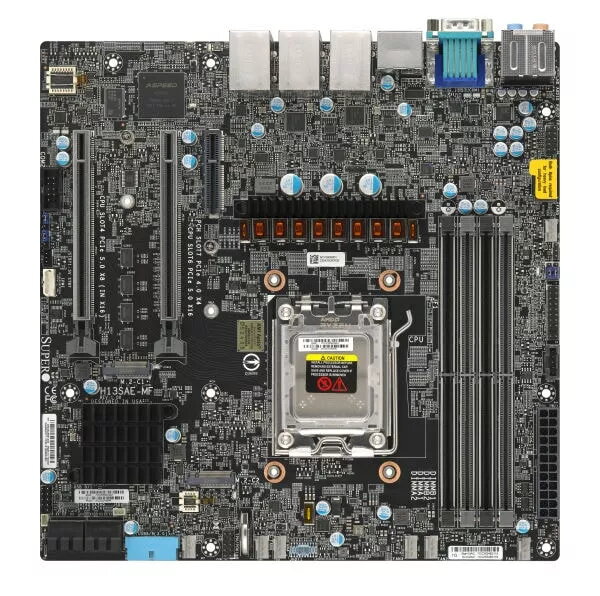
Motherboard Supermicro MBD-H13SAE-MF AMD B650 Socket AM5 micro ATX
The Supermicro MBD-H13SAE-MF is a professional-grade micro ATX motherboard engineered for reliability and performance in server environments. Built on the AMD B650 chipset with an AM5 socket, this board is specifically designed to support AMD EPYC 4004 series processors. It provides a stable foundation for demanding computing tasks, offering robust memory support and versatile storage connectivity options to meet the needs of modern server infrastructure.
This motherboard stands out due to its specialized design for server applications, ensuring high uptime and operational stability. The inclusion of the ASPEED AST2600 integrated graphics controller allows for efficient remote management and visual output without requiring a dedicated graphics card. Furthermore, the support for up to 192 GB of DDR4-SDRAM across four DIMM slots provides significant headroom for memory-intensive workloads, while the integrated RAID support for SATA III drives ensures data redundancy and performance optimization.
This motherboard may not be suitable for high-end gaming builds or workstations requiring advanced overclocking features, as the B650 chipset and server-oriented design prioritize stability over enthusiast-grade performance tweaks. Additionally, it is not compatible with processors outside the specified AMD EPYC 4004 series.
Installation should be performed in a standard micro ATX compatible server chassis. Begin by securing the motherboard using the appropriate standoffs to prevent electrical shorts. Install the compatible AMD EPYC 4004 processor into the AM5 socket, ensuring the locking mechanism is fully engaged. Insert DDR4 memory modules into the designated slots, following the motherboard manual for optimal dual-channel configuration. Connect your SATA storage drives and power supply cables, ensuring all connections are firm. Once hardware is installed, connect a monitor via the DisplayPort and proceed to configure the BIOS settings for your specific server environment.
For optimal performance and system longevity, ensure the server chassis has adequate airflow and that all firmware is updated to the latest version provided by the manufacturer.
{{highlightedFeature.featureTitle}}:
{{getProductFeatureValueById(product, highlightedFeature.featureId)}}
{{ productComparisonGenerationError }}