Save time and money with our discounts!
In cart {{totalProductsCount}} item(s)
Your cart is empty
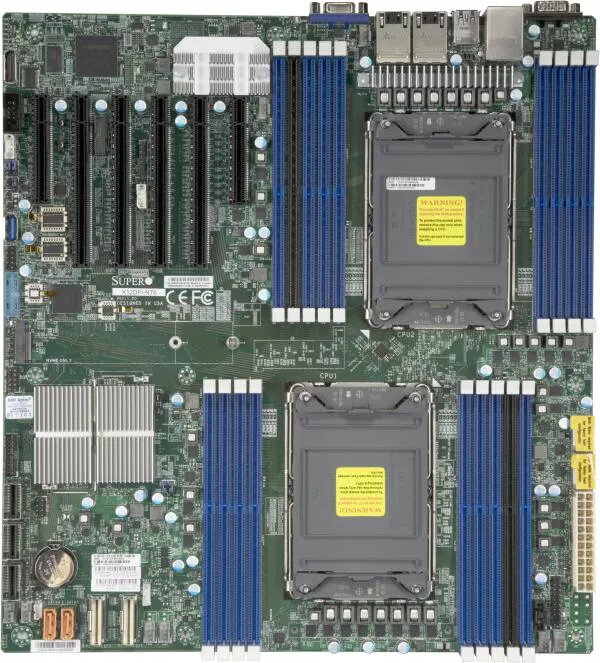
Supermicro X12DPi-N6 Motherboard, Intel C621A Chipset, LGA 4189 Socket, Extended ATX
The Supermicro X12DPi-N6 is a robust, high-performance server motherboard engineered for demanding enterprise environments and professional workstations. Built on the Intel C621A chipset, this board features dual LGA 4189 sockets, providing full support for 3rd Generation Intel Xeon Scalable processors. Its Extended ATX form factor allows for extensive hardware integration, making it a reliable foundation for complex computing tasks and data-intensive applications.
This motherboard offers exceptional scalability and memory capacity, supporting up to 4TB of DDR4-3200MHz memory across 18 DIMM slots, including compatibility with Intel Optane Persistent Memory. The inclusion of multiple PCI-E 4.0 slots ensures high-speed connectivity for expansion cards and storage devices. With its integrated Aspeed AST2600 graphics and dual Gigabit Ethernet ports, the board provides a comprehensive solution for server management and network reliability. The extensive SATA interface support with RAID capabilities further enhances data protection and storage flexibility.
This motherboard is designed for professional server chassis and may not fit into standard consumer desktop cases due to its Extended ATX form factor. It is not intended for casual home use or gaming builds, as it lacks features common in consumer-grade boards and requires specific server-grade power supplies and cooling solutions.
Installation requires a compatible Extended ATX server chassis and a power supply unit capable of supporting dual-processor configurations. Begin by mounting the motherboard securely in the chassis, ensuring all standoffs are correctly aligned. Install the processors into the LGA 4189 sockets, followed by the memory modules in the designated slots, paying close attention to the specific requirements for Intel Optane Persistent Memory. Connect the necessary power cables, storage drives, and networking peripherals. Once hardware is installed, configure the BIOS settings to match your specific storage and performance requirements before installing your server operating system.
Always ensure that the firmware is updated to the latest version provided by the manufacturer to maintain system stability and security. When using Intel Optane Persistent Memory, strictly follow the memory population rules specified in the technical documentation to ensure proper system operation.
{{highlightedFeature.featureTitle}}:
{{getProductFeatureValueById(product, highlightedFeature.featureId)}}
{{ productComparisonGenerationError }}