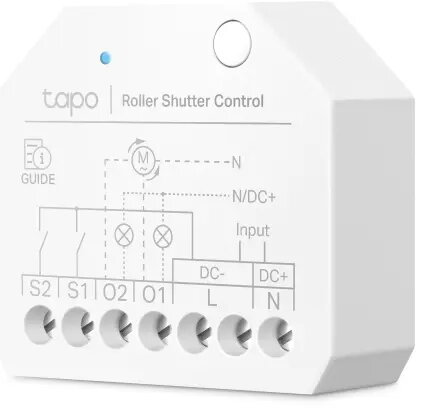
Tapo TP-Link Smart Switch Module S112 is a compact 7-channel switching actuator for AC-powered installations. It supports roller and switch modes to control roller shutters, lights, outlets and electric floor heating without replacing existing equipment. The module provides per-channel energy monitoring, Matter compatibility for broad platform integration, Bluetooth setup and control, and built-in protections to extend relay life.
Advantages
The S112 combines dual operation modes and seven switching channels in a small enclosure that fits standard EU boxes, allowing flexible installation behind switches or near fixtures. It supports separate control of two loads per channel group, scene triggering from an unused channel, and 2-way switch configurations without rewiring. Energy monitoring gives per-channel consumption data and simple charts for scheduling high-load devices during off-peak hours. Matter support and multi-voice assistant compatibility simplify integration with Apple Home, Alexa, Google Home, Samsung SmartThings and IFTTT. Zero-crossing protection reduces relay wear and significantly extends module lifespan, while Bluetooth access enables configuration and control even when Wi‑Fi is unavailable.
Suitable for
- Automating roller shutters and blinds
- Controlling lights and outlets in homes or small commercial spaces
- Managing electric underfloor heating or other AC loads up to 150 W per channel
- Creating scene triggers or 2-way light switches without rewiring
- Monitoring energy use and scheduling devices for off-peak operation
When it may not be suitable
The S112 is intended for AC installations and is limited to a maximum switching capacity of 150 W per channel; it may not be suitable for high-power appliances that exceed this rating. Installation requires basic electrical wiring and access to the switch box or nearby mounting location; if you cannot access wiring or need higher current capacity, choose a different actuator.
Key specifications
- Channels: 7 switching channels
- Maximum switching capacity: 150 W per channel
- Power type: AC
- Operating frequency: 2400 MHz (wireless), input frequency 50/60 Hz
- Modes: Roller mode and switch mode
- Connectivity: Matter support, Bluetooth control, compatibility with Apple Home, Alexa, Google Home, Samsung SmartThings and IFTTT
- Energy monitoring: Per-channel consumption reporting and scheduling
- Protection: Zero-crossing relay protection, obstacle detection in roller mode, relay failure detection
- Physical: Compact size designed to fit smallest EU backboxes
How to use
Install the S112 inside a suitable switch box or near the load following local electrical codes, connecting the AC supply and load wires to the corresponding terminals for each channel. Select roller or switch mode in the Tapo app and configure each channel, assign schedules, or create scenes. Pair the device via Bluetooth for initial setup if Wi‑Fi is unavailable, then add it to your Matter-compatible ecosystem or the Tapo App for remote control, voice commands and energy monitoring. Use an unused channel as a wireless scene trigger or pair with another smart switch for a 2-way circuit without rewiring.
What to consider before purchase
- Confirm load power per channel does not exceed 150 W
- Ensure access to the switch box or nearby installation location
- Verify compatibility with your smart home ecosystem (Matter, Bluetooth, or supported voice assistants)
- Check local electrical regulations and whether a qualified electrician is required for installation
Usage recommendations
For reliable operation, install the S112 in a properly sized EU backbox, configure relay protection features, and use the energy monitoring data to schedule high-power devices during off-peak hours. Use Bluetooth setup when network access is temporary or during router changes to avoid disassembly of the module.