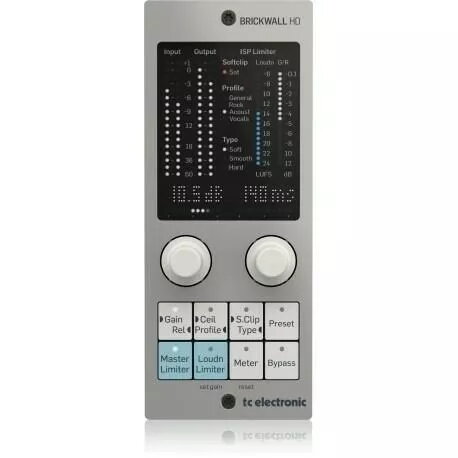
The TC Electronic Brickwall Plug HD-DT Physical Controller is a dedicated hardware interface designed to provide tactile, hands-on control over the Brickwall Plug HD-DT software. By bridging the gap between digital processing and physical interaction, this controller allows audio engineers and producers to adjust dynamics and limiting parameters with precision and speed. It eliminates the need for constant mouse navigation, offering a more intuitive and efficient workflow in both professional studio environments and live sound setups.
Advantages
This hardware controller significantly enhances the user experience by providing dedicated knobs for critical limiting functions. The tactile feedback ensures that adjustments are made with greater accuracy, allowing for real-time sound shaping that feels natural and responsive. Its robust design is built to withstand the demands of daily studio use, while the compact form factor ensures it integrates seamlessly into any workspace without cluttering the desk. By centralizing control, it helps maintain focus on the audio output rather than the software interface.
Suitable for
- Professional recording and mixing studios
- Live sound reinforcement and performance setups
- Mastering engineers requiring precise dynamic control
- Post-production facilities seeking faster workflow efficiency
When it may not be suitable
This controller is specifically engineered for the TC Electronic Brickwall Plug HD-DT software and will not function as a general-purpose MIDI controller for other plugins or hardware devices. If you do not use the Brickwall Plug HD-DT, this unit will not provide any functional utility.
Key specifications
- Dedicated hardware interface for Brickwall Plug HD-DT
- High-resolution tactile rotary controls
- USB connectivity for seamless integration
- Compact, durable desktop chassis
- Real-time parameter synchronization
How to use
To begin using the controller, connect the device to your computer via the provided USB cable. Ensure that the latest version of the Brickwall Plug HD-DT software is installed and updated on your workstation. Once connected, the plugin will automatically recognize the hardware, allowing you to map and adjust parameters directly from the physical knobs. You can then perform adjustments to your limiting and dynamics settings in real-time while monitoring the changes through your digital audio workstation.
What to consider before purchase
- Verify compatibility with your current operating system
- Ensure you have a free USB port available
- Confirm that you own or intend to use the Brickwall Plug HD-DT software
Usage recommendations
For optimal performance, place the controller in an easily accessible position on your desk to facilitate quick adjustments during critical mixing or mastering sessions. Keep the firmware updated to ensure full compatibility with the latest software releases.