{{ totalProductsCount }}

In cart {{totalProductsCount}} item(s)

Total:
{{sum | formatAmount}}

Your cart is empty

header-product TP-LINK Omada 10-Port Gigabit Easy Managed Switch with 8-Port PoE+ and 63W Power Budget, Fanless Desktop Steel Case

TP-LINK Omada 10-Port Gigabit Easy Managed Switch with 8-Port PoE+ and 63W Power Budget, Fanless Desktop Steel Case

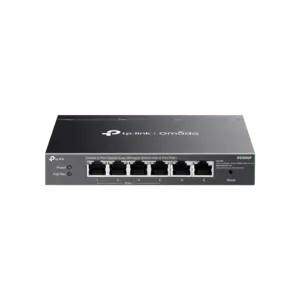
TP-LINK Omada 10-Port Gigabit Easy Managed Switch Photo 1
Out of stock.
View similar!

Short description

TP-LINK Omada 10-Port Gigabit Easy Managed Switch featuring 8 Gigabit PoE+ ports, 1 non-PoE port, and 1 combo RJ45/SFP port. Designed with a 63 W PoE power budget, fanless steel desktop case, and centralized management via Omada SDN Controller. Supports advanced networking features such as VLAN, QoS, IGMP Snooping, loopback detection, and port isolation for reliable business and office network deployments.
Warranty: 5 Years
SKU: 12708973
delivery
Information regarding the items availability for purchase will be posted on this site
price
Item cost information will be published on this site
Together cheaper
{{product.price | formatAmount}}
{{product.title}}
{{productBundle.reference.specialPrice | formatAmount}}
{{productBundle.title}}
{{productBundlePreviousPrice | formatAmount}}
{{productBundleSpecialPrice | formatAmount}}

You saving {{productBundleYouSave | formatAmount}}

Product information

Description

The TP-LINK Omada 10-Port Gigabit Easy Managed Switch with 8-Port PoE+ and 63W Power Budget is a reliable networking solution designed for business and office environments. This switch features 8 Gigabit PoE+ ports, 1 non-PoE Gigabit port, and 1 combo Gigabit RJ45/SFP port to accommodate various network expansion needs. Housed in a durable fanless desktop steel case, it operates silently while providing centralized management capabilities through the Omada SDN Controller and Omada App. It supports a range of advanced networking features including VLAN, QoS, IGMP Snooping, loopback detection, and port isolation to ensure secure and efficient data transmission.

Advantages

This managed switch offers silent operation due to its fanless steel desktop design, making it ideal for quiet office spaces where noise reduction is important. The inclusion of 8 PoE+ ports allows network administrators to power compatible devices such as IP cameras, VoIP phones, and access points directly through the Ethernet cable, reducing the need for extra power adapters and cabling. Centralized management via the Omada SDN platform simplifies network configuration, monitoring, and troubleshooting across multiple sites. Additionally, built-in security and traffic management tools like VLAN, QoS, and port isolation help optimize network performance and protect sensitive data.

Suitable for

  • Small to medium office network deployments
  • IP surveillance systems requiring Power over Ethernet
  • VoIP telephony setups in business environments
  • Wireless access point deployments requiring centralized management
  • Workspaces requiring silent networking equipment

When it may not be suitable

This switch may not be suitable for large-scale enterprise networks that require high-density fiber connections or advanced Layer 3 routing capabilities beyond the scope of an easy managed switch. Additionally, installations requiring a higher total PoE power budget exceeding 63W will need a different power sourcing equipment model.

Key specifications

  • 8 Gigabit PoE+ ports supporting 802.3at/af standards
  • 1 Gigabit non-PoE port
  • 1 Combo Gigabit RJ45/SFP port
  • 63W total PoE power budget
  • Fanless desktop steel case construction
  • Centralized management via Omada SDN Controller and Omada App
  • Advanced features: VLAN, QoS, IGMP Snooping, loopback detection, port isolation, port mirroring, Link Aggregation, flow control, storm control

How to use

To set up the switch, place the desktop steel case on a flat surface or mount it according to your workspace requirements. Connect the power adapter to a standard electrical outlet and power on the unit. Use Ethernet cables to connect your router to the non-PoE or combo port, and connect your PoE-enabled devices such as access points or security cameras directly to the 8 PoE+ ports. For advanced configuration, integrate the switch into your Omada SDN network architecture using the Omada Controller software or the Omada mobile application to configure VLANs, monitor traffic, and manage port settings.

What to consider before purchase

  • Verify that your connected devices operate within the total 63W PoE power budget
  • Check if your network architecture benefits from centralized Omada SDN management
  • Assess whether the port count of 10 ports meets your current and immediate expansion requirements
  • Confirm that basic layer 2 features like VLAN and QoS are sufficient for your networking needs
Usage recommendations: Position the switch in a well-ventilated area to ensure proper heat dissipation despite its fanless design. Regularly update the device firmware through the Omada SDN Controller to maintain optimal security and performance.

Description

Machine translation.

Similar products

{{product.title}}
Show details Hide details

{{highlightedFeature.featureTitle}}:

{{getProductFeatureValueById(product, highlightedFeature.featureId)}}

{{product.price | formatAmount}}
Might be useful
{{product.manufacturerName}}
{{product.categoryName}}
{{product.title}}
{{product.specialPrice}}
{{product.price}}

Customer reviews

Customer questions

FAQ

What payment options are available?

AiO.lv offers several payment methods: Bank transfer. All transactions are 100% secure and encrypted.

Can this product be purchased for a company (with VAT)?

Yes. AiO.lv works with legal entities in Latvia and across Europe. The product price already includes VAT. For certain product categories, as well as for companies from other EU countries with a valid VAT number, a 0% VAT rate may apply. We issue the invoice immediately after the order is placed, support electronic BIS invoices, and automatically generate all necessary accounting documents. You can complete the purchase for a company online — simply select the company profile and choose bank transfer as the payment method during checkout.

What is the warranty period?

All TP-LINK products come with an official 2 Years warranty. It covers all manufacturing defects and malfunctions that may occur during use. The warranty is valid at all authorized TP-LINK service centers and through AiO.lv

Can the product be returned after purchase?

Yes, you can return the product within 14 days of purchase if you bought it as a consumer (not a legal entity). Returns are possible without giving any reason — the main condition is that the product retains its original appearance and full set of accessories. We will make the process as simple and convenient as possible: just contact our customer support team, and we will help you arrange the return.

Where should I contact for warranty service?

For warranty-related questions you can contact the AiO.lv (SIA VSPRO) customer support team. We will assist with consultation, warranty claim processing, and coordination with certified service centers.
warranty
14-Day Return Policy We are confident in our quality, but if the purchase doesn’t fit — you have 14 days to return the product with peace of mind.
shipping
Fast Delivery Get your orders as quickly as possible — right to your door, parcel lockers, or pickup points across Latvia and the EU.
payment
Secure Payment Pay the way you prefer: cash, VISA, MasterCard, Apple Pay, Google Pay, bank transfer, or 0% installment plan.
warranty
Quality Since 2008 AiO.lv has been on the market for over 18 years and has earned trust — with more than 6000 genuine positive reviews on Google.