


Product specification Wi‑Fi adapter TP‑LINK Archer BE9300 — PCIe wireless card, Tri‑band 2.4/5/6 GHz, Wi‑Fi 7 (802.11be), up to 9300 Mbps, black
Description
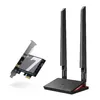
BE9300 Wi-Fi 7 Bluetooth 5.4 PCIe Adapter provides desktop computers with next-generation wireless connectivity. This PCIe card supports Wi-Fi 7 and Bluetooth 5.4, enabling higher throughput, broader channel utilization in the 6 GHz band, and reliable device pairing for peripherals. The adapter includes an external antenna base with magnetized feet and LED indicators for intuitive status feedback, plus a USB drive for offline driver installation.
Advantages
Wi-Fi 7 support allows wider channels and increased multi-stream throughput for faster wireless data transfer. The magnetized multi-directional antenna base helps achieve optimal signal placement and improved coverage. Integrated Bluetooth 5.4 ensures stable connections with controllers, headphones, keyboards and other accessories. On-device LED lighting provides an easy way to monitor network status, while the included USB drive simplifies installation without an active network connection.
Key specifications
- Model: BE9300 Wi-Fi 7 Bluetooth 5.4 PCIe Adapter
- Wi‑Fi standard: Wi‑Fi 7 (supports 6 GHz band)
- Bluetooth: Bluetooth 5.4
- Antennas: two multi‑directional high‑performance antennas with magnetized base
- Installation: PCIe card for desktop; drivers provided on included USB drive
- Security: WPA3 support
- LED indicators: base lighting with touch switch for status display
How to use
Install the BE9300 adapter into an available PCIe slot on your desktop motherboard, secure the card and connect the antenna cable(s) to the external antenna base. Position the magnetized antenna base on a metal or other suitable surface to maximize reception. Power on the computer and install drivers from the included USB drive if there is no network connection. After driver installation, pair Bluetooth devices through the operating system settings and connect to a Wi‑Fi network using standard network controls.
Recommendations
For best performance place the antenna base in an elevated position with minimal obstructions and ensure your router supports 6 GHz and Wi‑Fi 7 features. Keep firmware and drivers up to date and use WPA3 where available for improved security.
Specifications
- Wi-Fi standards:
- 802.11a, Wi-Fi 7 (802.11be), Wi-Fi 6E (802.11ax), Wi-Fi 6 (802.11ax), Wi-Fi 5 (802.11ac), Wi-Fi 4 (802.11n), 802.11g, 802.11b
- Component for:
- PC
- Antenna design:
- External
Ports & interfaces
- Connectivity technology:
- Wireless
- Interface:
- WLAN / Bluetooth
- Host interface:
- PCI Express
- Internal:
- Yes
Bandwidth
- Maximum data transfer rate:
- 9300 Mbit/s
Network
- Networking standards:
- IEEE 802.11ax, IEEE 802.11a, IEEE 802.11ac, IEEE 802.11b, IEEE 802.11n, IEEE 802.11g, IEEE 802.11be
Wireless LAN features
- Wi-Fi:
- Yes
- Wi-Fi band:
- Tri-band (2.4 GHz / 5 GHz / 6 GHz)
- Top Wi-Fi standard:
- Wi-Fi 7 (802.11be)
Antenna
- Antenna:
- Yes
Performance
- Security algorithms:
- WPA, WPA-PSK, WPA2, WPA2-PSK, WPA3
- Receiver sensitivity:
- 6 GHz: 11ax HE20 MCS0: -94 dBm; 11be EHT320 MCS13: -44dBm; 5 GHz: 11ac VHT20 MCS0: -94 dBm; 11be EHT160 MCS13: -48dBm; 2.4 GHz: 11n HT20 MSC0: -95 dBm; 11be EHT40 MSC13: -56dBm
Design
- LED indicators:
- Y
- Product colour:
- Black
Weight & dimensions
- Height:
- 21.5 mm
- Width:
- 95.2 mm
- Depth:
- 120.8 mm
Operational conditions
- Operating relative humidity (H-H):
- 10 - 90
- Storage temperature (T-T):
- -40 - 70
- Operating temperature (T-T):
- 0 - 40
- Storage relative humidity (H-H):
- 5 - 90
Certificates
- Certification:
- FCC/CE/IC/NCC/JRF/VCCI/BSMI
Packaging content
- Quick installation guide:
- Yes


