


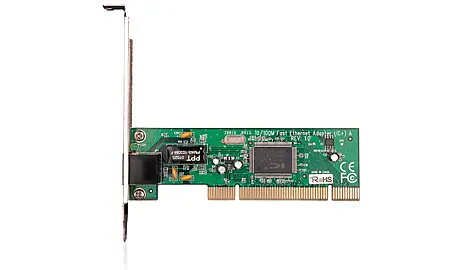
TP-Link TF-3200 10/100Mbps PCI Network Adapter
Markdown: Used, Grade A
Short description


Cheapest delivery:
Unisend LV
Product information
Description
The TP-Link TF-3200 10/100Mbps PCI Network Adapter is a reliable internal networking solution designed to provide stable wired connectivity for desktop computers. By utilizing a standard PCI interface, this network card allows users to establish or upgrade their PC's Ethernet capabilities, ensuring consistent data transfer for everyday internet access and local network tasks.
Advantages
This network adapter offers a cost-effective way to integrate or improve wired internet connectivity in older desktop systems. It features automatic speed detection, allowing it to seamlessly switch between 10Mbps and 100Mbps depending on the network environment. The card supports both half-duplex and full-duplex transfer modes, which helps maintain efficient data flow and reduces potential network congestion. Its design focuses on simplicity and compatibility, making it a straightforward hardware addition for users looking to maintain a dependable wired connection.
Suitable for
- Desktop computers requiring a wired Ethernet connection
- Upgrading legacy systems from 10Mbps to 100Mbps network speeds
- Standard home or office networking tasks
- Systems with available PCI expansion slots
This adapter is not suitable for modern computers that lack a physical PCI slot, such as most contemporary motherboards that have transitioned to PCIe interfaces. Additionally, it is not designed for high-speed fiber optic connections or gigabit networks, as it is limited to a maximum data transfer rate of 100Mbps.
Key specifications
- Connectivity technology: Wired
- Host interface: PCI
- Maximum data transfer rate: 100 Mbit/s
- Supported standards: IEEE 802.3, IEEE 802.3u, IEEE 802.3x
To use the TP-Link TF-3200, ensure your computer is powered off and disconnected from the power source. Open the computer case and insert the card firmly into an available PCI slot on the motherboard. Secure the bracket with a screw, close the case, and reconnect the power. Once the system boots, the operating system should detect the hardware, though you may need to install the appropriate drivers if they are not automatically recognized.
What to consider before purchase
- Verify that your motherboard has an available PCI slot
- Ensure your operating system is compatible with the hardware
- Confirm that your network requirements do not exceed 100Mbps
For optimal performance, ensure that the network cable used is of good quality and that the card is fully seated in the PCI slot to prevent intermittent connectivity issues.
Features
- Connectivity technology:
- Wired
- Host interface:
- PCI
- Maximum data transfer rate:
- 100 Mbit/s
Product comparison
The TP-Link TF-3200 network adapter is compared with several alternative wired and wireless network cards. All of them are designed to establish or improve network connectivity, but they differ in motherboard interface type, maximum data transfer rate, and connection type (wired or wireless). While the TP-Link TF-3200 focuses on basic tasks in desktop computers with a standard PCI slot, alternative options offer gigabit speeds, a PCI Express interface, wireless connectivity, or compatibility with other brands.
⚙️ The table below compares key technical characteristics of the models, including the host interface, maximum data transfer rate, supported networking standards, and connection type, to help you evaluate real-world performance differences.
| Parameter | TP-Link TF-3200 | TP-LINK TG-3269 | TP-Link TG-3468 | TP-Link TF-3239DL | HP W500 Mini PCI | GEMBIRD NIC-R1 | Practical conclusion |
|---|---|---|---|---|---|---|---|
| Connectivity technology | Wired | Wired | Wired | Wired | Wireless | Wired | Most models provide wired Ethernet, except for the wireless HP card. |
| Host interface | PCI | PCI | PCI Express | PCI | Mini PCI | PCI | TP-Link TF-3200, TG-3269, TF-3239DL, and Gembird use the legacy PCI slot, while TG-3468 requires a modern PCI Express slot. |
| Maximum data transfer rate | 100 Mbit/s | 1000 Mbit/s | 2000 Mbit/s | 100 Mbit/s | Not applicable (Wi-Fi b/g) | 100 Mbit/s | TF-3200, TF-3239DL, and Gembird are limited to basic 100 Mbit/s speeds, whereas TG-3269 and TG-3468 support gigabit speeds. |
◎ The suitability table below evaluates different usage scenarios and buyer needs for each network adapter model.
| Use case | Recommended product | Why |
|---|---|---|
| Basic internet access and office tasks on an older PC with an available PCI slot | TP-Link TF-3200 | Provides a stable wired connection up to 100 Mbit/s for standard everyday tasks. |
| High-speed file transfer and media on a PC with an older PCI slot | TP-LINK TG-3269 | Offers gigabit speed while maintaining compatibility with the standard PCI slot. |
| Gaming and demanding tasks on modern motherboards | TP-Link TG-3468 | Uses a faster PCI Express interface and delivers maximum speeds up to 2000 Mbit/s. |
| Upgrading an older laptop with Wi-Fi support | HP W500 Mini PCI | The only model featuring a wireless Mini PCI interface for portable systems. |
The TP-Link TF-3200 network adapter is best suited for users who need a straightforward, reliable wired connection up to 100 Mbit/s on a desktop computer with an available PCI slot. If you need higher speeds for data transfer or gaming, gigabit models are preferable, while modern motherboards will benefit more from a PCI Express version.


