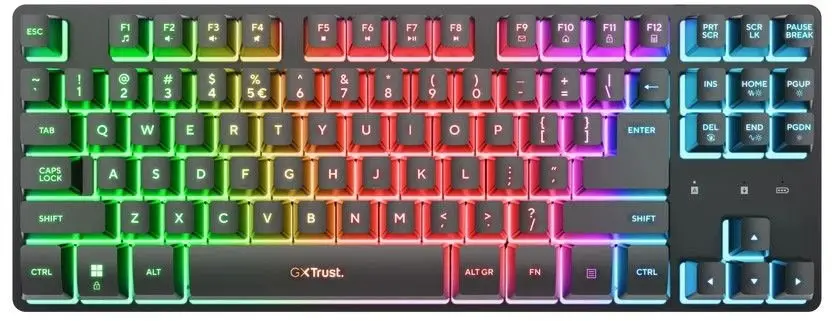
This product page focuses on the Trust GXT831 Thado TKL Wireless Gaming Keyboard, US Layout, Black. We will compare it with several alternatives from the same brand: the white wireless version Trust GXT831 Thado TKL Wireless Keyboard, USB, US Layout, White, wired models Keyboard Trust GXT 833 Thado, Gaming Keyboard Trust GXT 833W Thado Tenkeyless USB QWERTZ White RGB LED, and Trust GXT 864 Cada Mechanical Gaming Keyboard, TKL, USB, QWERTY, Black, as well as the ultra-compact Keyboard Trust GXT 867 Acira Gaming USB QWERTY US English Black. All items belong to the gaming keyboard category, but practical differences lie in the connection type, layout, switch mechanics, and color design.
⚙️ Below is a comparison of the key specifications of the reviewed keyboards, including connection type, form factor, layout, and design, to help you evaluate the practical differences between wireless and wired options.
| Parameter | Trust GXT831 Thado (Black, Wireless) | Trust GXT831 Thado (White, Wireless) | Trust GXT 833 Thado (Black/Silver) | Trust GXT 833W Thado (White, RGB) | Trust GXT 864 Cada (Mechanical) | Trust GXT 867 Acira (60% Form Factor) | Practical Significance |
|---|
| Connection Type | Wireless (USB receiver) | Wireless (USB receiver) | Wired (USB) | Wired (USB) | Wired (USB) | Wired (USB) | Wireless models provide freedom from cable clutter on the desk, while wired options eliminate the need for battery management. |
| Form Factor | TKL (Tenkeyless) | TKL (Tenkeyless) | TKL (Tenkeyless) | TKL (Tenkeyless) | TKL (Tenkeyless) | 60% (Ultra-compact) | TKL preserves navigation arrows, whereas the 60% model saves even more space by omitting a dedicated arrow cluster. |
| Layout and Language | US Layout | US Layout | Dutch | German (QWERTZ) | English (QWERTY) | US English (QWERTY) | The main product offers a standard US layout familiar to most users and optimized for general gaming tasks. |
| Backlight | Not specified | Not specified | Yes | Yes (RGB LED) | Yes (RGB LED) | Yes | Backlit modifications enhance usability in low-light environments and provide custom visual aesthetics. |
◎ The following table shows which product is most suitable for different user needs and usage scenarios based on connectivity and design.
| Use Case | Recommended Product | Why |
|---|
| Wireless gaming setup | Trust GXT831 Thado TKL Wireless Gaming Keyboard, US Layout, Black or white version | Ideal for users who value a clean, cable-free desktop environment and need flexible workspace placement. |
| Stable wired connection | Trust GXT 833 Thado or Trust GXT 864 Cada | Wired USB connectivity ensures zero signal latency and removes any concern about battery life. |
| Maximum desk space efficiency | Keyboard Trust GXT 867 Acira Gaming USB QWERTY US English Black | The 60% form factor leaves maximum room on the desk for broad mouse movements. |
| Tactile mechanical typing | Trust GXT 864 Cada Mechanical Gaming Keyboard, TKL, USB, QWERTY, Black | Mechanical switches deliver crisp, responsive tactile feedback preferred for intense gaming sessions. |
Trust GXT831 Thado TKL Wireless Gaming Keyboard, US Layout, Black differs from the alternatives primarily through its wireless connectivity combined with a space-saving TKL layout and standard US configuration. It is most suitable for gamers and daily users aiming for a clutter-free desk without sacrificing essential keys. Choose this model if wireless freedom and neat aesthetics are your top priorities, whereas wired or mechanical alternatives better suit stationary setups focused on hardwired performance.