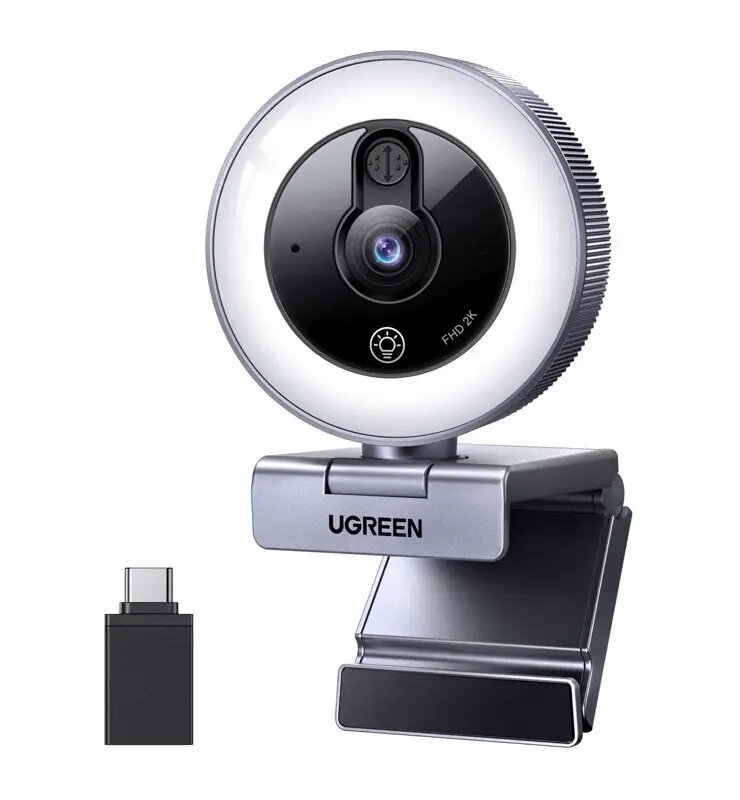
The webcam Webcam UGREEN CM910 — 2K 30FPS USB with LED lighting and built-in microphone is compared with several alternative models: Webcam UGREEN CM831 4K Ultra HD 30FPS USB, Webcam Hikvision iDS-UL4P 2K QHD 4MP USB-C with Auto Focus and Microphone — White, Webcam Genius FaceCam 2000X2 Full HD USB with Built-in Microphone, Webcam c-tech CAM-11FHD 1080P with built-in microphone — USB plug-and-play, and Webcam UMAX W5 5 MP built-in microphone autofocus USB connection. All these devices are designed for video calls, remote work, online learning, and streaming, connect via plug-and-play USB, and feature integrated microphones. The main practical differences among them lie in maximum video resolution, connection interface (USB or USB-C), autofocus availability, and extra hardware features like built-in LED lighting.
⚙️ Below is a comparison of key technical specifications, including video resolution, connection interface, illumination features, autofocus, and integrated audio properties, which determine the image quality and usability of each model in real-world conditions.
| Parameter | UGREEN CM910 | UGREEN CM831 | Hikvision iDS-UL4P | Genius FaceCam 2000X2 | c-tech CAM-11FHD | UMAX W5 | Practical significance |
|---|
| Resolution | 2K (30 FPS) | 4K Ultra HD (30 FPS) | 2K QHD (4MP) | Full HD (1080p) | 1080P (Full HD) | 5 MP | Higher resolution (2K and 4K) provides greater facial and background detail compared to basic Full HD, which is important for quality video conferences and content creation. |
| Lighting | Built-in LED lighting | None | None | None | None | None | The built-in light source on the UGREEN CM910 helps improve subject visibility in low indoor lighting without requiring a separate external lamp. |
| Interface | USB | USB | USB-C | USB | USB | USB | Most models use a standard USB connection for PCs and laptops, while the Hikvision is equipped with a modern USB-C port. |
| Autofocus | Not specified | Not specified | Autofocus | Not specified | Not specified | Autofocus | Autofocus in the Hikvision and UMAX W5 models helps keep the image sharp during movement, whereas fixed-focus models require staying at a specific distance. |
| Microphone | Built-in | Built-in | Built-in | Built-in | Built-in | Built-in | All reviewed cameras feature built-in microphones for basic voice pickup during calls without connecting external audio devices. |
◎ The table below evaluates how well each model suits various use cases, video detail requirements, and work environments to help you choose the best option for your needs.
| Use case | Recommended product | Why |
|---|
| Working in low-light environments | UGREEN CM910 | The built-in LED lighting helps illuminate the user's face during dark hours or in a poorly lit room. |
| Maximum image detail | UGREEN CM831 | 4K Ultra HD resolution delivers the highest video clarity among all presented options for professional broadcasts. |
| Modern laptops with USB-C ports | Hikvision iDS-UL4P | USB-C connection and autofocus make this model convenient for modern ultrabooks and dynamic video meetings. |
| Basic tasks for study and office | Genius FaceCam 2000X2 or c-tech CAM-11FHD | Standard Full HD resolution and simple USB setup fully cover daily video communication needs without paying for excess features. |
| Recording with active movement in frame | UMAX W5 | The 5 MP camera with autofocus keeps subjects sharp while moving in front of the lens. |
Webcam UGREEN CM910 — 2K 30FPS USB with LED lighting and built-in microphone is best suited for users who value improved 2K resolution detail and integrated lighting directly on the device for working in dim environments. Compared to alternatives from Genius and c-tech, it offers a sharper image and lighting, but it trails the UGREEN CM831 in maximum 4K resolution, the Hikvision camera in autofocus and modern USB-C connectivity, and the UMAX W5 in sensor resolution. Choose this model if you frequently make video calls in rooms with poor lighting and want to avoid using external lighting gear.