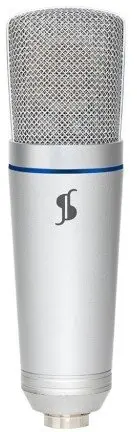
The Ulanzi STAGG SUM50 is a professional-grade USB studio microphone engineered to deliver high-fidelity audio for a wide range of digital content creation tasks. Designed with a focus on simplicity and performance, this microphone utilizes a direct USB connection to provide seamless plug-and-play compatibility with desktop and laptop computers, eliminating the need for complex external audio interfaces or preamps. Its robust build quality ensures long-term reliability, while the internal circuitry is optimized to capture clear, crisp, and natural sound, making it a dependable tool for both beginners and experienced creators.
Advantages
One of the primary benefits of the Ulanzi STAGG SUM50 is its ease of use, as the USB interface allows for immediate integration into any recording setup without requiring additional drivers or hardware. The microphone is constructed from durable materials that withstand the rigors of daily use, ensuring consistent performance over time. Furthermore, the high-quality internal components work to minimize background noise and distortion, resulting in professional-sounding audio that is suitable for broadcast-quality projects. Its compact and ergonomic design also makes it an excellent choice for users who need a portable yet powerful recording solution.
Suitable for
- Podcasting and audio blogging
- Live streaming on social media platforms
- Voice-over recording for videos and presentations
- Home studio music production
- Remote meetings and online communication
When it may not be suitable
This microphone may not be the ideal choice for professional studio environments that require XLR connectivity for integration with high-end mixing consoles or multi-channel audio interfaces. Additionally, users who need to record multiple sound sources simultaneously with individual gain control might find a single-channel USB microphone limiting for their specific workflow.
Key specifications
- Connection type: USB
- Compatibility: Plug-and-play for computers
- Application: Studio and multimedia recording
- Construction: Durable metal housing
- Audio quality: Clear and crisp sound reproduction
How to use
To begin using the Ulanzi STAGG SUM50, simply connect the provided USB cable to an available port on your computer. The operating system will automatically detect the device as an external audio input. Once connected, navigate to your computer's sound settings to select the microphone as your primary recording device. Adjust the input gain levels within your recording software or system settings to ensure the audio signal is clear and free from clipping. For optimal results, position the microphone at a consistent distance from the sound source, ideally using a pop filter to reduce plosive sounds.
What to consider before purchase
- Ensure your computer has an available USB port for connection
- Check if your recording software supports USB audio input devices
- Consider the need for additional accessories like a microphone stand or pop filter
- Verify the compatibility with your specific operating system
Usage recommendations
For the best audio quality, maintain a distance of approximately 15 to 20 centimeters from the microphone capsule and use a dedicated recording environment with minimal background noise to achieve professional results.