{{ totalProductsCount }}

In cart {{totalProductsCount}} item(s)

Total:
{{sum | formatAmount}}

Your cart is empty

header-product Universal Electronics One For All Roku TV Replacement Remote for Soundbar and TV, Black, Press-button, 1-device

Universal Electronics One For All Roku TV Replacement Remote for Soundbar and TV, Black, Press-button, 1-device

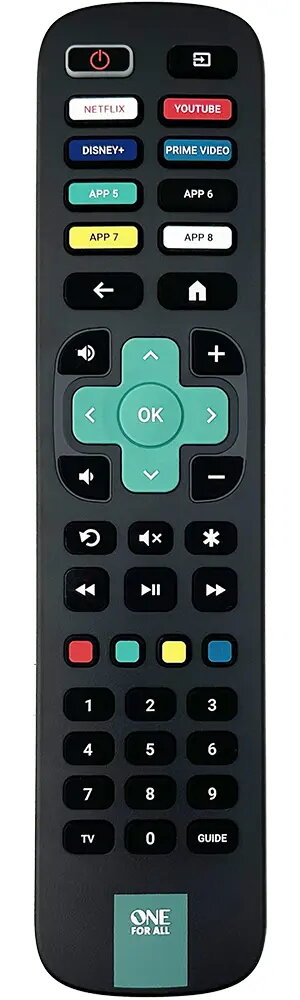
One For All Roku TV Replacement Remote — Universal Electronics Photo 1
Out of stock.
View similar!

Short description

Replacement remote control One For All by Universal Electronics for Roku TV systems, designed to operate a single device (TV or soundbar). Black press-button remote with standard controls for volume, navigation and playback. Not rechargeable, without backlight. Suited for replacing lost or damaged Roku-compatible remotes and basic remote control tasks.
Warranty: 2 Years
SKU: 12104739
Manufacturer: Universal Electronics
delivery
Information regarding the items availability for purchase will be posted on this site
price
Item cost information will be published on this site
Together cheaper
{{product.price | formatAmount}}
{{product.title}}
{{productBundle.reference.specialPrice | formatAmount}}
{{productBundle.title}}
{{productBundlePreviousPrice | formatAmount}}
{{productBundleSpecialPrice | formatAmount}}

You saving {{productBundleYouSave | formatAmount}}

Product information

Description

The Universal Electronics One For All Roku TV Replacement Remote is a black, press-button remote control designed to operate a single Roku TV or a soundbar. This replacement remote provides standard navigation, playback and volume controls plus dedicated app shortcut keys for common streaming services. It is a battery-powered, non-rechargeable unit without backlight, intended as a straightforward substitute for lost or damaged Roku-compatible remotes or as a basic remote for everyday TV and audio use.

Advantages

This One For All remote is preconfigured to work with Roku TV systems and requires no complex setup for most Roku models. It includes eight app shortcut keys and an App Carousel feature that lets you program up to 25 different apps for one-touch access. The remote also supports an Audio Feature that lets you control the volume and mute of a connected soundbar or audio receiver, so you can operate TV and audio as if they were a single device. A learning feature is available to capture additional commands from another remote, and the product comes in recyclable packaging.

Suitable for

  • Replacing a lost or damaged Roku TV remote
  • Controlling a single TV running Roku OS
  • Controlling a single soundbar or audio receiver with basic volume/mute functions
  • Users who prefer a simple, press-button remote without backlight

Key specifications

  • Colour: Black
  • Input type: Press buttons
  • Number of devices supported: 1
  • Backlight: No
  • Rechargeable: No (battery-powered)
  • Compatibility: Designed for Roku TV systems and compatible with soundbar speakers/TVs for basic control
  • Shortcut keys: 8 app shortcut keys; App Carousel supports programming of up to 25 apps

How to use

Insert the appropriate batteries and point the remote at the Roku TV or compatible soundbar. For most Roku TVs no setup is required; the remote will control standard Roku functions immediately. To program app shortcuts, follow the App Carousel instructions in the manual to assign preferred streaming apps. Use the SimpleSet procedure to pair the remote to other TV brands if required, or use the learning feature to transfer specific commands from an original remote. The Audio Feature allows you to set volume and mute control for a connected soundbar or receiver so both devices can be controlled with a single remote.

Usage recommendations

Store the remote in a dry place and replace batteries when response becomes intermittent. If you need extended functionality (backlight, multi-device control beyond one device, or rechargeable power), consider remotes with those specific features. Keep the user manual for App Carousel and SimpleSet instructions to program app shortcuts and pair with non-Roku TVs.

Specifications

Rechargeable: The device can be connected to a power supply in order to restore electrical energy in the battery.
No
Number of devices supported: The amount of devices that can be used with this product.
1
Backlight buttons:
No
Brand compatibility: What other brands this brand can be used with.
Roku
Input type: The way in which commands or signal are inputted in product.
Press buttons
Product colour: The colour e.g. red, blue, green, black, white.
Black
Remote control proper use: How the remote control should be used, and what it should be used for.
Soundbar speaker, TV
All features

Packaging data

Quantity per pack:
1 pc(s)

Battery

Number of batteries supported: The number of batteries that can be used with the product.
2
Battery type: Description of battery supplied with the product, such battery form factor (e.g. AA/AAA).
AAA
Battery technology: The type of battery in the device, e.g. nickel–cadmium (NiCd).
Alkaline
Rechargeable: The device can be connected to a power supply in order to restore electrical energy in the battery.
No
Built-in battery:
No

Performance

Plug and Play: Indicates whether this product supports is "plug and play". Plug and play is hardware or software that, after being installed ("plugged in"), can immediately be used ("played with"), as opposed to hardware or software which requires configuration.
Yes
Number of devices supported: The amount of devices that can be used with this product.
1

Display

Built-in display: A display which is part of the product, so you do not need to attach another display.
No

Design

Backlight buttons:
No
Customizable buttons:
Yes
Input type: The way in which commands or signal are inputted in product.
Press buttons
Product colour: The colour e.g. red, blue, green, black, white.
Black
Brand compatibility: What other brands this brand can be used with.
Roku
Remote control proper use: How the remote control should be used, and what it should be used for.
Soundbar speaker, TV

Description

Machine translation.

Similar products

{{product.title}}
Show details Hide details

{{highlightedFeature.featureTitle}}:

{{getProductFeatureValueById(product, highlightedFeature.featureId)}}

{{product.price | formatAmount}}
Might be useful
{{product.manufacturerName}}
{{product.categoryName}}
{{product.title}}
{{product.specialPrice}}
{{product.price}}

Customer reviews

Customer questions

FAQ

What payment options are available?

AiO.lv offers several payment methods: Bank transfer. All transactions are 100% secure and encrypted.

Can this product be purchased for a company (with VAT)?

Yes. AiO.lv works with legal entities in Latvia and across Europe. The product price already includes VAT. For certain product categories, as well as for companies from other EU countries with a valid VAT number, a 0% VAT rate may apply. We issue the invoice immediately after the order is placed, support electronic BIS invoices, and automatically generate all necessary accounting documents. You can complete the purchase for a company online — simply select the company profile and choose bank transfer as the payment method during checkout.

What is the warranty period?

All Universal Electronics products come with an official 2 Years warranty. It covers all manufacturing defects and malfunctions that may occur during use. The warranty is valid at all authorized Universal Electronics service centers and through AiO.lv

Can the product be returned after purchase?

Yes, you can return the product within 14 days of purchase if you bought it as a consumer (not a legal entity). Returns are possible without giving any reason — the main condition is that the product retains its original appearance and full set of accessories. We will make the process as simple and convenient as possible: just contact our customer support team, and we will help you arrange the return.

Where should I contact for warranty service?

For warranty-related questions you can contact the AiO.lv (SIA VSPRO) customer support team. We will assist with consultation, warranty claim processing, and coordination with certified service centers.

How can I tell if this product suits my needs?

When making a choice, we recommend paying attention to the key features: rechargeable, number of devices supported, backlight buttons, brand compatibility, input type, product colour, remote control proper use, compatibility with your devices or usage conditions, material quality, functionality, and warranty terms. These characteristics will help you determine how well the model meets your needs.

Where can I download the instructions for One For All Roku TV Replacement Remote — Universal Electronics?

You can download the instructions in PDF format from the “Instructions” section on the product description page. The file contains complete information about installation, setup, and usage.

warranty
14-Day Return Policy We are confident in our quality, but if the purchase doesn’t fit — you have 14 days to return the product with peace of mind.
shipping
Fast Delivery Get your orders as quickly as possible — right to your door, parcel lockers, or pickup points across Latvia and the EU.
payment
Secure Payment Pay the way you prefer: cash, VISA, MasterCard, Apple Pay, Google Pay, bank transfer, or 0% installment plan.
warranty
Quality Since 2008 AiO.lv has been on the market for over 18 years and has earned trust — with more than 6000 genuine positive reviews on Google.