


Toner cartridge Uprint CF294X compatible — high yield black, for HP printers
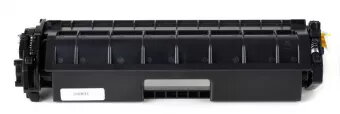
Short description

Cheapest delivery:
Unisend LV
Product information
Description
The Uprint CF294X compatible high-yield black toner cartridge is a replacement toner designed for monochrome laser printing in HP printers that accept the CF294X model. This cartridge delivers higher page yield than standard cartridges, helping to reduce the frequency of replacements for offices and home users who print large volumes of text documents. It is intended to provide consistent black output for business reports, invoices, forms and other mono print jobs while remaining compatible with standard printer settings.
Advantages
The high-yield design extends the number of pages printed per cartridge compared with standard-yield alternatives, lowering the total cost of ownership for frequent printing. The cartridge is manufactured to fit and operate with compatible HP printers without requiring changes to printer settings. It aims to produce sharp black text and uniform coverage on standard office papers, supporting consistent print quality over the cartridge lifetime.
Suitable for
- Bulk black-and-white document printing in small and medium offices
- Home office use with frequent printing of letters, invoices and reports
- Schools and administrative departments that require stable mono output
- Environments where reducing replacement frequency and maintenance time is important
Key specifications
- Colour: Black
- Yield: High-yield capacity suitable for extended printing runs
- Technology: Toner for monochrome laser printers
- Compatibility: Designed as a replacement for printers that accept the CF294X cartridge family
- Output type: Text and simple graphics optimized for office document clarity
How to use
Remove the cartridge from its packaging and gently shake it from side to side before installation to distribute the toner evenly. Follow your HP printer’s user guide to remove the empty cartridge and insert the replacement, ensuring it clicks into place. After installation, print a test page or run the printer’s calibration routine if available to confirm correct alignment and density. Dispose of the empty cartridge according to local recycling or waste regulations.
Usage recommendations
Store the cartridge in a cool, dry place away from direct sunlight and high humidity prior to installation. When printing important documents, select standard or normal quality in printer settings to balance sharpness and toner usage; use draft mode only for internal proofs to conserve toner. If you encounter streaks or uneven coverage, remove and reseat the cartridge and run a cleaning cycle from the printer menu.


