-
Display diagonal:
Size of the display for this product, measured diagonally, usually in inches.
-
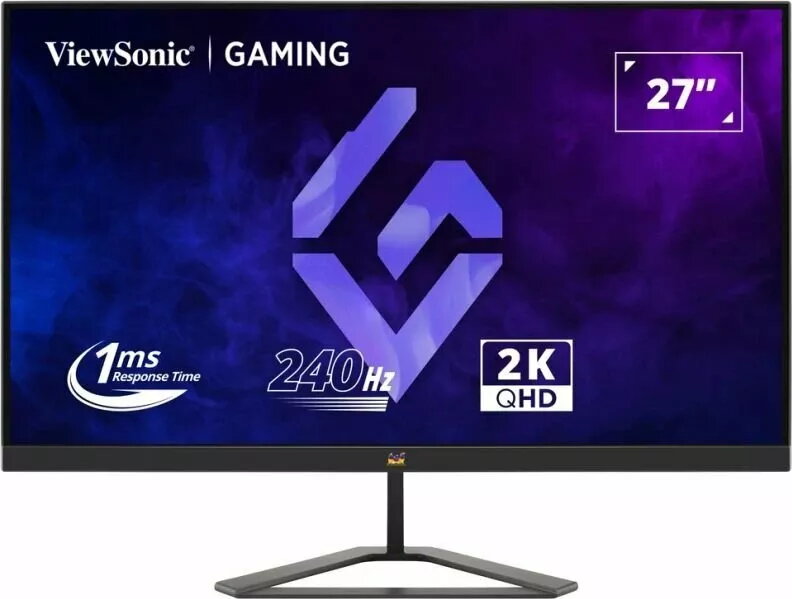
27 "
-
Display resolution:
The number of distinct pixels in each dimension that can be displayed. It is usually quoted as width × height, with the units in pixels: for example, "1024 × 768" means the width is 1024 pixels and the height is 768 pixels. The higher the number of pixels, the sharper the image.
-
2560 x 1440
-
HD type:
Type of supported High Definition (e.g. Full HD, 4K Ultra HD).
-
Quad HD
-
Panel type:
-
IPS
-
Display technology:
The technology used in the display e.g. plasma, LED.
-
LED
-
Power consumption (standby):
The amount of electricity that is consumed when the product is on standby.
-
0.5 W
-
Power consumption (typical):
Amount of power consumed by this model, often expressed in watts (W). Typical values that manufacturers give are power consumption when off, standby/suspended mode, typical use, maximum usage.
-
28 W
-
Energy efficiency class (HDR):
Energy efficiency class is a standard classification that is used all over Europe and which is understandable at first sight. Products can be efficiently compared according to classes, starting from A (the most energy efficient class), and ending with G (the most energy-intensive class). The classification of energy efficiency is based on annual energy consumption which is being calculated on the basis of several different parameters.
-
F
-
Energy efficiency class (SDR):
Energy efficiency class is a standard classification that is used all over Europe and which is understandable at first sight. Products can be efficiently compared according to classes, starting from A (the most energy efficient class), and ending with G (the most energy-intensive class). The classification of energy efficiency is based on annual energy consumption which is being calculated on the basis of several different parameters.
-
F
-
VESA mounting:
-
Yes
-
DisplayPorts quantity:
Number of DisplayPorts. A DisplayPort is a digital display interface developed by the Video Electronics Standards Association (VESA). The interface is primarily used to connect a video source to a display device such as a computer monitor, though it can also be used to carry audio, USB, and other forms of data.
-
1
-
Headphone out:
The socket for connecting headphones to the device.
-
Yes
-
HDMI:
HDMI (High-Definition Multimedia Interface) is a compact audio/video interface for transferring uncompressed video data and compressed/uncompressed digital audio data from a HDMI-compliant device ("the source device") to a compatible computer monitor, video projector, digital television, or digital audio device. HDMI is a digital replacement for existing analog video standards.
-
Yes
-
HDMI ports quantity:
The number of sockets (ports) for HDMI connections. HDMI (High-Definition Multimedia Interface) is a compact audio/video interface for transferring uncompressed video data and compressed/uncompressed digital audio data from a HDMI-compliant device ("the source device") to a compatible computer monitor, video projector, digital television, or digital audio device. HDMI is a digital replacement for existing analog video standards.
-
2
-
Built-in USB hub:
Whether or not the device features a USB hub to connect more than one other device via USB.
-
No
-
Market positioning:
Under which category can the device be positioned in the market, e.g. camera phone.
-
Gaming
-
AMD FreeSync:
The product includes AMD Freesync Technology for the dynamic synchronization of the graphic card and the monitor in order to avoid screen tearing.
-
Yes
-
Touchscreen:
A screen of a laptop, smartphone, etc., that responds to touch so you can control the interface using your fingers.
-
No
-
Native aspect ratio:
The aspect ratio is the ratio of the width of an image to its height. The native aspect ratio is the one which the projector/display is particularly designed for. Images shown in native aspect ratio will utilize the entire resolution of the display and achieve maximum brightness. Images shown in other than native aspect ratio will always have less resolution and less brightness than images shown in native aspect ratio.
-
16:9
-
Built-in speaker(s):
The device contains speaker(s) to produce sound.
-
No
-
Product colour:
The colour e.g. red, blue, green, black, white.
-
Black