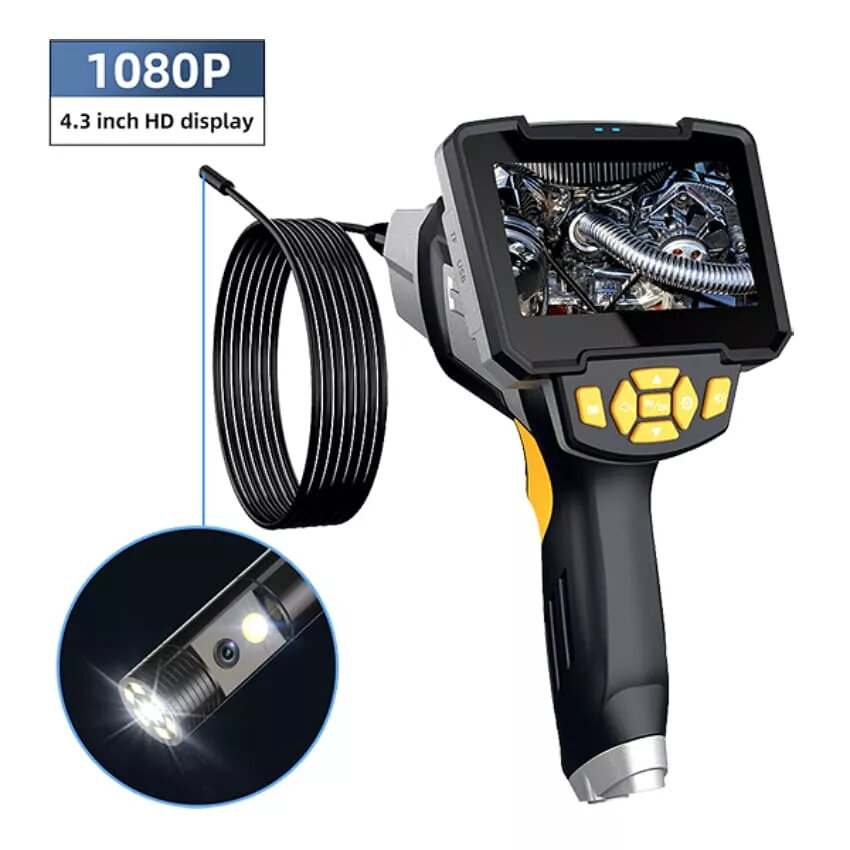
The W-STAR WSNF112D-5 is a professional-grade endoscope camera designed for high-definition visual inspections in confined or difficult-to-access spaces. Featuring a crisp 4.3-inch LCD screen, this device delivers clear 1080P HD imagery, allowing users to identify issues with precision. The unit is equipped with an 8mm dual-probe camera system and a 5-meter semi-rigid cable, providing the necessary flexibility and reach for complex diagnostic tasks in automotive, industrial, and residential settings.
Advantages
The primary benefit of this endoscope is its dual-lens configuration, which allows for seamless switching between front and side views without needing to reposition the probe. The semi-rigid cable is engineered to maintain its shape while navigating through pipes or engine compartments, ensuring stability during operation. With its integrated high-resolution display, the device functions as a standalone unit, eliminating the need for external smartphones or software installations. The robust construction and high-quality optics ensure reliable performance in demanding environments.
Suitable for
- Automotive engine diagnostics and cylinder inspection
- Plumbing and drain pipe maintenance
- HVAC system and ventilation duct checks
- Industrial machinery and equipment troubleshooting
- Home improvement and wall cavity inspections
When it may not be suitable
This device is not intended for medical or veterinary use on humans or animals. It is also not suitable for use in high-pressure environments, deep underwater exploration, or areas containing explosive gases or corrosive chemicals that could damage the camera head or cable.
Key specifications
- Display: 4.3-inch LCD screen
- Resolution: 1080P HD
- Probe diameter: 8mm
- Lens type: Dual probe (front and side)
- Cable length: 5 meters
- Cable type: Semi-rigid
How to use
To operate the W-STAR WSNF112D-5, ensure the device is fully charged before use. Connect the probe cable to the main unit securely. Power on the device using the dedicated button and insert the semi-rigid cable into the target area. Use the controls on the main unit to toggle between the front and side lenses as needed. Adjust the brightness of the built-in LED lights to optimize visibility in dark environments. View the live feed directly on the LCD screen and use the capture functions if you need to save images or videos for further analysis.
What to consider before purchase
- Ensure the 8mm probe diameter is compatible with the access points you intend to inspect.
- Verify that the 5-meter cable length is sufficient for your specific reach requirements.
- Consider the lighting conditions of your workspace, as the built-in LEDs are designed for close-range illumination.
Usage recommendations: Always clean the camera lens with a soft, non-abrasive cloth after use to maintain image clarity. Store the device in a cool, dry place and avoid bending the semi-rigid cable at sharp angles to prevent internal damage.