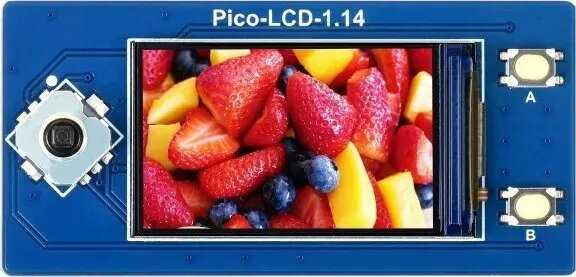
The Waveshare 1.14" IPS LCD display 240x135 SPI for Raspberry Pi Pico is a compact color display module with a 240×135 pixel resolution and an SPI interface. Designed for integration with Raspberry Pi Pico and other microcontrollers, the module provides IPS wide viewing angles and is suited for displaying text, icons, simple graphics and lightweight graphical user interfaces. Its small footprint and low pin count make it appropriate for portable instruments, IoT endpoints and embedded prototypes where space and GPIO availability are constrained.
Advantages
This 1.14-inch IPS LCD combines a relatively high pixel density with an SPI interface that minimizes required GPIO lines, enabling efficient connection to Raspberry Pi Pico and similar boards. The IPS panel provides stable color and wide viewing angles for clear visibility from different directions. The module's compact form factor supports integration into space-limited designs, while its native resolution is sufficient for legible text and simple graphical elements in control panels, status displays and compact user interfaces.
Suitable for
- Raspberry Pi Pico projects requiring a small color display
- Portable instruments and handheld devices with limited PCB area
- IoT endpoints showing status, sensor readings or simple GUIs
- Prototyping and educational electronics projects
Key specifications
- Display size: 1.14 inches (diagonal)
- Resolution: 240 × 135 pixels
- Panel type: IPS for wide viewing angles
- Interface: SPI (Serial Peripheral Interface)
- Color: full-color RGB display
- Typical use: text, icons, simple graphics and GUI elements
- Compatibility: compatible with microcontrollers such as Raspberry Pi Pico
How to use
Connect the module to a Raspberry Pi Pico using the SPI signals, power and ground according to the display's pinout. Install or include appropriate driver libraries for your development environment to initialize the display, set orientation and manage pixel drawing or text rendering. Use the SPI interface settings (clock, mode and chip-select) that match the display driver requirements. In software, initialize the display before sending frame or primitive drawing commands and use double buffering or minimal redraws when possible to reduce SPI traffic and improve perceived responsiveness.
Usage recommendations
For reliable operation, supply stable power within the module's rated voltage range and keep wiring short to reduce signal integrity issues on SPI lines. Use library examples provided by the manufacturer or community for Raspberry Pi Pico to verify wiring and initialization; adjust contrast/rotation settings in software to match your mechanical mounting. If the display is used in battery-powered devices, reduce SPI update frequency or update only changed regions to save power.