JBL speakers and headphones for pure and deep sound!
In cart {{totalProductsCount}} item(s)
Your cart is empty
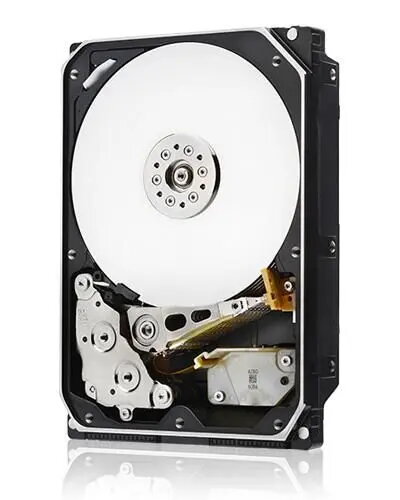
Western Digital 10TB 7.2K 3.5-inch SAS 12Gb/s Enterprise Hard Drive
The Western Digital 10TB 7.2K 3.5-inch SAS 12Gb/s Enterprise Hard Drive is a high-capacity storage solution engineered specifically for demanding data center environments and server infrastructures. With a robust 3.5-inch form factor and a spindle speed of 7200 RPM, this drive delivers the consistent performance and reliability required for mission-critical applications. The integration of a 12Gb/s SAS interface ensures high-speed data transfer rates, making it an ideal choice for organizations that need to manage large volumes of data efficiently while maintaining system stability in multi-drive configurations.
This enterprise-grade hard drive offers significant benefits for professional IT environments, primarily through its massive 10TB capacity which allows for dense storage consolidation. The 7200 RPM rotational speed provides a balanced approach between power efficiency and high-speed data access. Furthermore, the SAS 12Gb/s interface is designed for enterprise-level reliability, offering superior error correction and data integrity features compared to standard consumer drives. Its architecture is optimized for 24/7 operation, ensuring that it can handle the continuous read and write cycles typical of modern server workloads.
This drive is not suitable for standard desktop computers or laptops, as it requires a SAS controller interface which is typically not present on consumer-grade motherboards. Additionally, it is not designed for portable external enclosures or environments where low acoustic noise is a primary requirement, as enterprise drives are optimized for performance and durability rather than silent operation.
To install this drive, ensure your server or storage array is powered down and disconnected from the power source. Insert the drive into a compatible 3.5-inch drive bay and secure it using the appropriate mounting hardware. Connect the SAS data cable and the power supply cable to the drive. Once installed, initialize the drive through your server's operating system or RAID controller management software to format it and make it available for data storage.
Usage recommendations: For optimal performance and longevity, ensure that the server environment is properly ventilated and maintained within the manufacturer's recommended temperature range. Regularly monitor the drive's health status using SMART diagnostics provided by your server management software.
{{highlightedFeature.featureTitle}}:
{{getProductFeatureValueById(product, highlightedFeature.featureId)}}
{{ productComparisonGenerationError }}