Powerful EcoFlow stations for energy anywhere!
In cart {{totalProductsCount}} item(s)
Your cart is empty
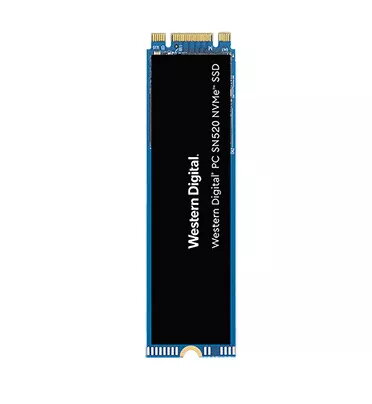
SanDisk SDAPNUW-512G Internal SSD 512 GB M.2 PCI Express 3.0 NVMe
The SanDisk SDAPNUW-512G is a high-performance internal solid state drive designed to enhance the speed and efficiency of modern computing systems. Featuring a 512 GB capacity and the compact M.2 form factor, this drive utilizes the PCI Express 3.0 NVMe interface to provide rapid data transfer rates. It is engineered to replace traditional storage solutions, offering significantly faster boot times, quicker application loading, and improved overall system responsiveness for both desktop PCs and portable laptops.
This SSD leverages advanced NVMe architecture to deliver superior performance compared to standard SATA drives. By integrating an in-house controller and 3D NAND technology, it ensures reliable data management and long-term durability. The drive is optimized for low power consumption, making it an excellent choice for battery-powered devices where energy efficiency is critical. Its compact design allows for easy installation in ultra-thin notebooks and tablets without compromising on storage capacity or speed.
This drive may not be suitable for systems that lack an M.2 slot or do not support the NVMe protocol, such as older motherboards that only feature SATA interfaces. Additionally, users requiring massive storage capacities for high-end video editing or large-scale server applications may find the 512 GB capacity insufficient for their specific needs.
To install the drive, ensure your computer is powered off and disconnected from the power source. Locate the M.2 slot on your motherboard, insert the SSD at a slight angle, and secure it using the appropriate mounting screw. Once installed, initialize the drive through your operating system's disk management utility to format it for use. If you are replacing a primary boot drive, you will need to clone your existing data or perform a clean installation of your operating system.
For optimal performance and longevity, ensure that your system's firmware and drivers are updated to the latest versions. It is also recommended to maintain at least 10-15% of free space on the drive to allow the controller to manage data efficiently and maintain high write speeds.
{{highlightedFeature.featureTitle}}:
{{getProductFeatureValueById(product, highlightedFeature.featureId)}}
{{ productComparisonGenerationError }}