
Dreame vacuums for fast and efficient cleaning!
In cart {{totalProductsCount}} item(s)
Your cart is empty
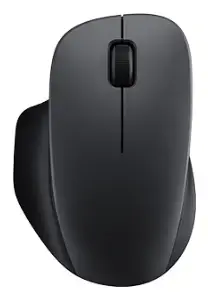
Xiaomi Wireless Comfort Edition Mouse, 1200 DPI, Right-Handed, Black
The Xiaomi Wireless Comfort Edition Mouse is an ergonomic peripheral specifically designed for right-handed users, focusing on daily productivity and long-term comfort. This device utilizes reliable 2.4GHz RF wireless technology to ensure a stable connection without the clutter of cables. With its precise 1200 DPI optical sensor, it provides consistent tracking performance suitable for a variety of office and home computing tasks.
The mouse features a meticulously contoured asymmetrical shape that provides comprehensive palm and thumb support, effectively reducing hand strain during extended periods of use. Its quiet TTC buttons are engineered to minimize noise, fostering a distraction-free environment ideal for shared workspaces. The exterior is finished with a fine sandblasted matte texture that offers a comfortable grip, while the large silicone scroll wheel ensures smooth and effortless navigation through documents and web pages. Furthermore, the inclusion of PTFE mouse feet reduces friction, allowing for fluid movement across most surfaces, and the integrated nano receiver storage ensures the component remains secure during transport.
This mouse is not designed for high-performance gaming or professional graphic design work that requires adjustable DPI settings or additional programmable side buttons. It is exclusively intended for right-handed users and will not provide a comfortable experience for left-handed individuals.
To begin using the mouse, open the battery compartment and insert the required batteries. Remove the integrated nano receiver from its storage slot and plug it into an available USB port on your computer. Once the receiver is connected, the device will automatically pair with your system. The mouse is designed for plug-and-play functionality, requiring no additional software installation for basic operations.
For the best performance and longevity, use high-quality batteries and operate the mouse on a flat, clean surface. If the cursor movement becomes erratic, ensure the optical sensor on the bottom is free from dust or debris.
{{highlightedFeature.featureTitle}}:
{{getProductFeatureValueById(product, highlightedFeature.featureId)}}
The Xiaomi Wireless Comfort Edition Mouse is compared with several alternative peripheral devices from manufacturers CORSAIR, Lenovo, CANYON, and Logitech. All reviewed products are wireless mice designed for right-handed or general use, but they differ significantly in their intended purpose, sensor resolution, number of additional buttons, and connectivity options.
⚙️ In the specifications comparison table below, we will compare parameters such as connection type, optical sensor resolution in DPI, button count, ergonomics, and the primary purpose of each device to highlight the technical and practical differences between Xiaomi's office model and the gaming or multi-purpose alternatives.
| Parameter | Xiaomi Wireless Comfort Edition Mouse | CORSAIR IRONCLAW WIRELESS SE | Corsair SABRE v2 PRO Wireless | Lenovo 350 Fan Edition | CANYON OnClick 17 | Logitech Alternativ 910-007295 | Practical conclusion |
|---|---|---|---|---|---|---|---|
| Device type | Office wireless mouse | Gaming wireless mouse | Gaming wireless mouse | Office wireless mouse | Office ergonomic mouse | Gaming wireless mouse | Xiaomi, Lenovo, and CANYON models are focused on daily office productivity, while CORSAIR and Logitech are built for gaming and demanding workflows. |
| Connectivity | RF Wireless | RF Wireless, Bluetooth, USB Type-C | RF Wireless, Bluetooth, USB Type-C | Bluetooth | RF Wireless | RF Wireless | CORSAIR and Corsair offer maximum connectivity flexibility with three modes, whereas Xiaomi and CANYON rely on standard RF wireless connections. |
| Sensor resolution | 1200 DPI | 26000 DPI | 33000 DPI | 1600 DPI | 1600 DPI | 32000 DPI | Esports-grade mice deliver massive DPI ceilings for pinpoint tracking, while office options maintain moderate, fixed DPI levels for steady work. |
| Button count | 2 buttons and a scroll ring | 10 programmable buttons | 4 buttons and a scroll wheel | Standard set | 6 buttons | 8 buttons | Gaming mice include extra customizable keys for macros, whereas Xiaomi offers a streamlined and minimalist control layout. |
◎ In the suitability and use cases table below, we will evaluate which user tasks and working profiles best align with each of the discussed mouse models.
| Use case | Recommended product | Why |
|---|---|---|
| Daily office work and studying | Xiaomi Wireless Comfort Edition Mouse | Provides baseline comfort, reliability, and a professional look for standard productivity tasks without paying extra for advanced gaming features. |
| Fast-paced and competitive gaming | Corsair SABRE v2 PRO Wireless | Offers an ultra-high sensor resolution of up to 33000 DPI, swift tracking, and comfortable handling for intense gaming sessions. |
| Multi-device workflows and flexible connectivity | CORSAIR IRONCLAW WIRELESS SE | Supports tri-mode connectivity and features 10 programmable buttons, making it versatile for complex games and advanced PC tasks. |
| Bluetooth-based office setup without a dongle | Lenovo 350 Fan Edition | Connects directly via Bluetooth to save USB ports on a laptop and maintain a clutter-free workspace. |
| Reducing wrist fatigue during long work hours | CANYON OnClick 17 | Features an ergonomic shape with six buttons designed to minimize wrist strain during extended computing sessions. |
The Xiaomi Wireless Comfort Edition Mouse is ideally suited for users who need a straightforward, reliable, and professional-looking tool for everyday office or home tasks. Unlike gaming flagships with high DPI metrics and numerous buttons, it avoids unnecessary complexity. You should choose the Xiaomi model if you are looking for a classic working mouse with core capabilities, whereas alternatives from CORSAIR, Logitech, or CANYON will be more suitable for gaming, macro-heavy workflows, or specific ergonomic and connectivity requirements.