Filters you can trust. Pure water every day.
In cart {{totalProductsCount}} item(s)
Your cart is empty
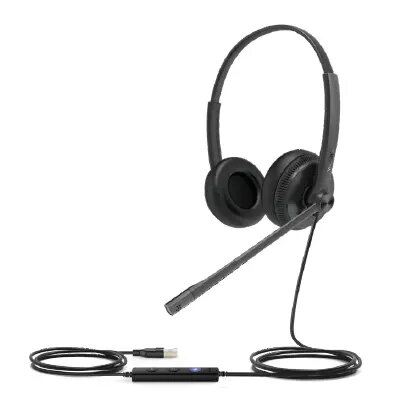
Wired Headset Yealink UH34 Lite by Yealink — single-ear, USB-C/USB-A compatible cable
The Yealink UH34 Lite wired single-ear headset is designed for professional communication in office, contact centre and remote work environments. It connects via USB with a cable compatible with USB-C and USB-A ports, offering plug-and-play setup for PCs and soft clients. The headset features a lightweight head-band design with supra-aural ear coupling, inline hand-held controller with LED indicator, and a flexible boom microphone to support clear voice transmission during calls and conferencing.
The UH34 Lite provides a balance of comfort and functionality with soft ear cushions and an ultra-lightweight construction that reduces fatigue during long shifts. Wired USB connectivity ensures a stable audio connection and straightforward installation without additional drivers. The inline controller gives quick access to call controls including answer, end, reject and mute/unmute. Passive noise reduction and a high signal-to-noise ratio speaker contribute to clear speech intelligibility in typical office and contact-centre conditions.
This single-ear UH34 Lite model may not be appropriate for users who prefer binaural (both-ear) listening or who require active noise cancelling to isolate loud environments. It is a wired headset with a 1.2 m cable, so it is not intended for situations requiring wireless mobility or long-distance movement away from the connected device.
Connect the headset to a computer or compatible device using the included USB-C/USB-A compatible cable. The UH34 Lite is plug-and-play for most operating systems and soft clients; once connected, position the head-band for comfortable fit with the supraaural ear cushion over the ear and adjust the boom microphone toward the mouth. Use the inline controller to answer, end or reject calls and to mute/unmute the microphone. For fleet or multiple-device management, Yealink USB Connect and Yealink Device Management Platform/Cloud Service can be used to view device information and perform firmware updates.
For best voice clarity, position the boom microphone about 1–2 cm from the corner of your mouth and keep the microphone aligned with your mouth. Use the inline controller during calls to manage mute and call answering without switching applications. If you manage multiple UH34 Lite units, use Yealink Device Management Platform or USB Connect to apply firmware updates and monitor device status.
{{highlightedFeature.featureTitle}}:
{{getProductFeatureValueById(product, highlightedFeature.featureId)}}
{{ productComparisonGenerationError }}