
Save time and money with our discounts!
In cart {{totalProductsCount}} item(s)
Your cart is empty
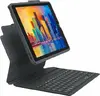
Bluetooth keyboard Zagg for Apple iPad 10.9 (10th Gen) — Zagg Keyboard Pro
Zagg Keyboard Pro is a Bluetooth keyboard designed specifically for the Apple iPad 10.9-inch (10th generation). The accessory combines a full-size keyboard layout with a protective cover, providing a compact typing solution that attaches to and complements the tablet without adding unnecessary bulk. The keyboard pairs wirelessly via Bluetooth to the compatible iPad model and offers a familiar typing experience for drafting emails, editing documents, and browsing the web.
The Bluetooth connection ensures a cable-free setup and stable input across typical working distances. The full-size keys and standard layout reduce typing errors and improve speed compared with on-screen keyboards. The integrated protective cover shields the iPad display from scratches and light impacts during transport. The lightweight, slim design keeps the combined setup portable while maintaining tactile key feedback for extended typing sessions.
Open the protective cover and position the iPad in the keyboard frame or magnetic dock according to the cover design. Turn on the keyboard and activate Bluetooth on the iPad. Select the keyboard from the iPad Bluetooth settings to pair; once paired, the keyboard is ready for typing. Use native iPadOS shortcuts mapped to function keys where available. When not in use, close the cover to protect the screen and conserve battery life.
Charge the keyboard according to the manufacturer’s instructions and keep Bluetooth updated on the iPad for reliable pairing. Clean keys and cover with a soft, dry cloth; avoid liquids. For best performance, ensure iPadOS is up to date and verify keyboard firmware compatibility if prompted.
{{highlightedFeature.featureTitle}}:
{{getProductFeatureValueById(product, highlightedFeature.featureId)}}
{{ productComparisonGenerationError }}