Dreame vacuums for fast and efficient cleaning!
In cart {{totalProductsCount}} item(s)
Your cart is empty
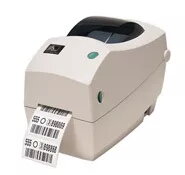
Zebra TLP2824 Plus Label Printer, Direct Thermal and Thermal Transfer, 203 DPI, 102 mm/sec
The Zebra TLP2824 Plus is a compact desktop label printer engineered for versatility and efficiency in professional environments. Supporting both direct thermal and thermal transfer printing technologies, this device provides high-quality output for barcodes, text, and graphics. Its space-saving design makes it an ideal solution for workstations where desk space is limited, while its robust 32-bit RISC processor ensures rapid formatting and quick first-label output.
This printer offers significant operational benefits through its user-friendly OpenACCESS design, which simplifies media loading and monitoring. The inclusion of co-resident EPL and ZPL programming languages ensures seamless integration into existing workflows. With its auto-sensing serial port and intuitive setup utilities, the printer minimizes downtime during installation. The durable construction and reliable performance make it a dependable asset for businesses requiring consistent label production.
This printer may not be suitable for high-volume industrial manufacturing environments that require continuous 24/7 operation or printing on extremely wide labels exceeding 56 mm. It is also not intended for applications requiring high-resolution graphics or specialized industrial-grade label materials that are not compatible with standard desktop thermal transfer ribbons.
To begin using the Zebra TLP2824 Plus, connect the device to your computer using the appropriate interface cable and install the Zebra Setup Utilities software. Open the printer cover using the OpenACCESS mechanism to load your label media and thermal transfer ribbon if required. Ensure the media is properly aligned using the clear media window. Once powered on, the printer will automatically detect the media settings, allowing you to begin printing immediately via your preferred software application.
For optimal print quality and to extend the lifespan of the printhead, ensure that you use genuine Zebra media and ribbons. Regularly clean the printhead and platen roller to prevent adhesive buildup and maintain consistent print clarity.
{{highlightedFeature.featureTitle}}:
{{getProductFeatureValueById(product, highlightedFeature.featureId)}}
{{ productComparisonGenerationError }}