Powerful EcoFlow stations for energy anywhere!
In cart {{totalProductsCount}} item(s)
Your cart is empty
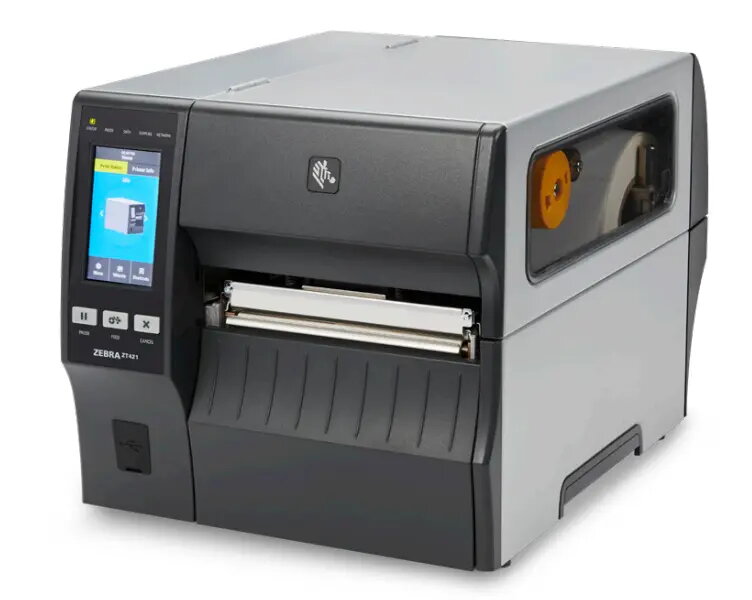
Zebra ZT421 Industrial Label Printer, Direct Thermal/Thermal Transfer, 203 DPI, 305 mm/sec, Ethernet, Bluetooth
The Zebra ZT421 is a high-performance industrial label printer engineered for demanding environments where reliability and speed are critical. Featuring a robust all-metal frame and a convenient bi-fold door, this printer is built to withstand heavy-duty use while providing easy access for maintenance. It supports both direct thermal and thermal transfer printing methods, offering versatility for various labeling requirements. With a print speed of up to 305 mm/sec and a resolution of 203 DPI, it ensures efficient, high-volume production without compromising on quality.
The ZT421 stands out due to its user-friendly design, highlighted by a 4.3-inch full-color touch display that provides intuitive navigation and clear, color-coded status alerts. Its open architecture and advanced connectivity options, including Ethernet, Bluetooth 4.1, and USB, allow for seamless integration into existing IT infrastructures. The printer is designed for longevity and adaptability, featuring tool-less print head and platen roller replacement to minimize downtime. Furthermore, the inclusion of Zebra’s Print DNA suite simplifies management and troubleshooting, ensuring that your operations remain productive and efficient.
This printer may not be the ideal choice for small office environments or home use due to its large footprint and industrial-grade construction. Its weight and size are optimized for stationary industrial workstations rather than portable or desktop applications.
To begin using the Zebra ZT421, place the unit on a stable, flat surface and connect it to your power source and network via the desired interface. Use the side-loading supply path to install your media and ribbon, following the clear, color-coded guides inside the printer. Once loaded, power on the device and use the 4.3-inch touch display to configure your settings. You can manage print jobs and monitor printer status directly through the interface or via Zebra’s Print DNA software suite. For troubleshooting, the dynamic QR codes on the display provide immediate access to web-based support and instructional videos.
Regularly clean the print head and platen roller to maintain optimal print quality and extend the lifespan of your device. Utilize the color-coded status alerts on the display to proactively address maintenance needs before they cause operational delays.
{{highlightedFeature.featureTitle}}:
{{getProductFeatureValueById(product, highlightedFeature.featureId)}}
{{ productComparisonGenerationError }}