Hurry and order now – up to 50% off!
In cart {{totalProductsCount}} item(s)
Your cart is empty
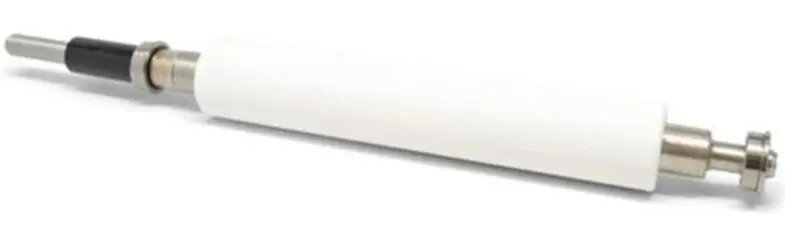
Zebra P1083320-103 Media Rewind Roller for ZT610 and ZT610R Printers
The Zebra P1083320-103 Media Rewind Roller is a high-quality, genuine replacement component specifically engineered for Zebra ZT610 and ZT610R industrial label printers. This roller is a critical part of the printer's media handling system, designed to facilitate the smooth and precise rewinding of labels after they have been printed. By ensuring consistent tension and alignment, this component helps maintain the overall operational integrity of your printing equipment, preventing media jams and ensuring that labels are wound tightly and evenly for subsequent application or processing.
Using a genuine Zebra rewind roller provides significant benefits for industrial printing operations. It is manufactured to exact factory specifications, ensuring a perfect fit and seamless integration with your existing ZT610 or ZT610R printer hardware. This precision engineering minimizes the risk of mechanical failure and reduces downtime, allowing for continuous, high-volume label production. Furthermore, the durable construction of this roller ensures long-lasting performance even in demanding warehouse or manufacturing environments, ultimately protecting your investment and maintaining the high print quality expected from Zebra industrial printers.
This component is not suitable for use with printer models outside of the ZT610 and ZT610R series. Attempting to install this roller in incompatible hardware may result in mechanical damage or improper media handling.
To install the media rewind roller, first ensure that the printer is powered off and disconnected from the power source. Open the printer media compartment and locate the existing rewind assembly. Carefully remove the old or damaged roller according to the service manual instructions for your specific printer model. Align the new P1083320-103 roller into the designated position, ensuring it is securely seated and rotates freely. Once installed, perform a test run with a small amount of media to verify that the rewinding mechanism operates smoothly and that the labels are being wound correctly without skewing.
Usage recommendations: Regularly inspect the rewind roller for signs of wear or debris buildup to maintain optimal printer performance. Clean the roller surface periodically with an approved cleaning agent to ensure consistent grip and prevent label slippage.
{{highlightedFeature.featureTitle}}:
{{getProductFeatureValueById(product, highlightedFeature.featureId)}}
{{ productComparisonGenerationError }}