-
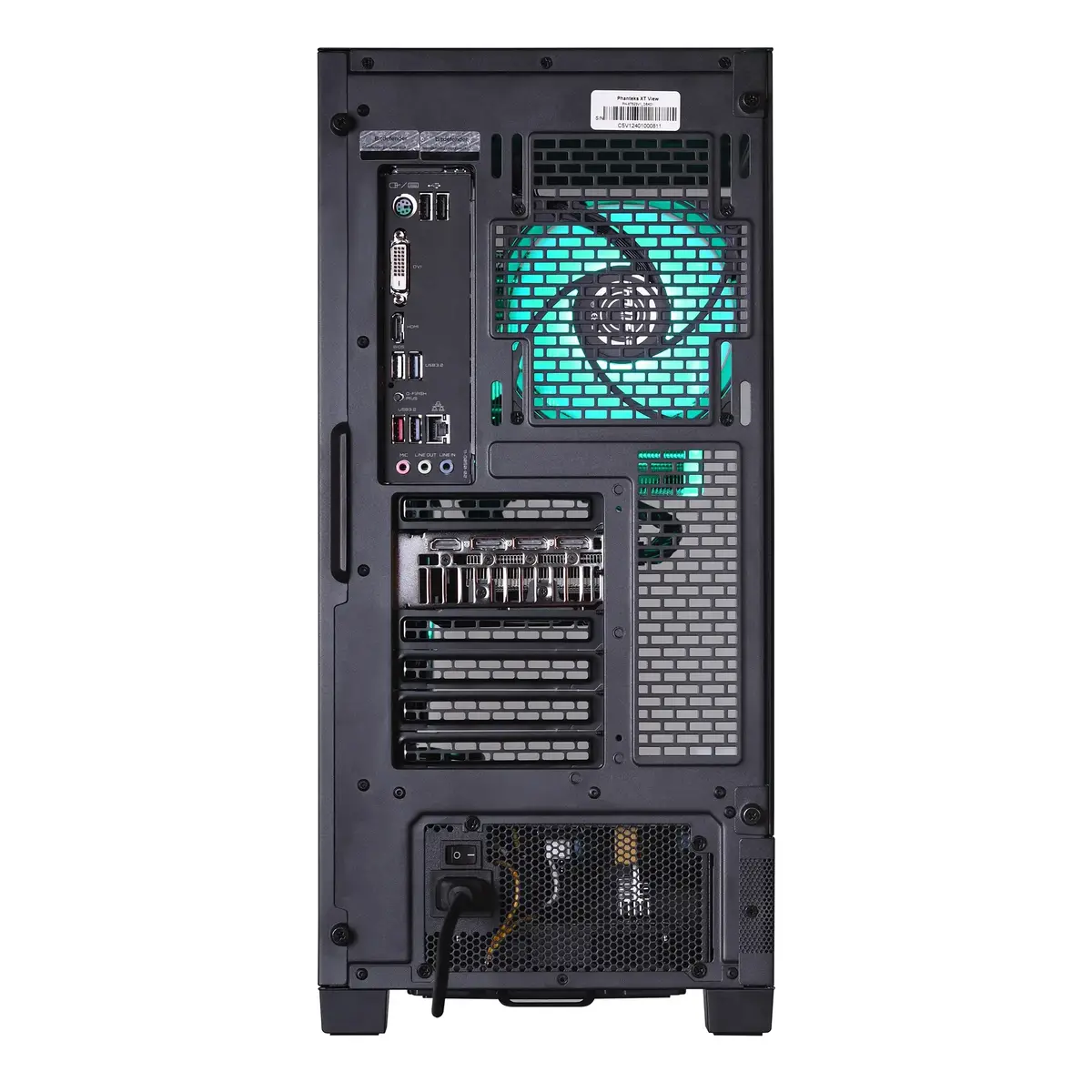
Number of rear audio ports:
-
3
-
Number of front audio ports:
-
1
-
Number of front USB ports:
-
2
-
Number of rear USB ports:
-
6
-
Number of SATA III connectors:
Serial ATA (Advanced Technology Attachment) (SATA) is a computer bus interface that connects host bus adapters to mass storage devices such as hard disk drives and optical drives. SATA III (revision 3.x) interface, formally known as SATA 6Gb/s, is a third generation SATA interface running at 6.0Gb/s. The bandwidth throughput, which is supported by the interface, is up to 600MB/s. This interface is backwards compatible with SATA 3 Gb/s interface.
-
4
-
S/PDIF out port:
S/PDIF (Sony/Philips Digital Interconnect Format) is a digital audio interconnect used in consumer audio equipment over relatively short distances. The signal is transmitted over either a coaxial cable with RCA connectors or a fibre optic cable with TOSLINK connectors.
-
No
-
Serial ports quantity:
The number of serial ports in a computer or peripheral. A serial port is a serial communication physical interface through which information transfers in or out one bit at a time. The term "serial port" usually identifies hardware more or less compliant to the RS-232 standard, intended to interface with a modem or with a similar communication device. In modern computers and peripherals, serial ports have largely been replaced by USBs and other interfaces.
-
0
-
PS/2 ports quantity:
The number of PS/2 connectors for keyboards and mice. Its name comes from the IBM Personal System/2.
-
1
-
eSATA ports quantity:
The number of ports (interfaces) for eSATA. eSATA is a a computer bus interface that connects host bus adapters to mass storage devices such as hard disk drives and optical drives.
-
0
-
Thunderbolt 3 ports quantity:
-
0
-
Firewire (IEEE 1394) ports:
Number of IEEE 1394/FireWire ports (connecting interfaces) in the device. The IEEE 1394 interface is a serial bus interface standard for high-speed communications and isochronous real-time data transfer. It was developed in the late 1980s and early 1990s by Apple, who called it FireWire. The 1394 interface is comparable to USB though USB has more market share. Apple first included FireWire in some of its 1999 models, and most Apple computers since the year 2000 have included FireWire ports, though, as of 2013, only the 800 version (IEEE-1394b).
-
0
-
DC-in jack:
The socket/plug where the DC electricity supply connects to the device.
-
No
-
Combo headphone/mic port:
-
Yes
-
Headphone outputs:
Number of sockets /ports where headphones are connected.
-
1
-
Microphone in:
The socket where a microphone is connected to the device.
-
Yes
-
DVI port:
Digital Visual Interface (DVI) is a video display interface to connect a video source to a display device, such as a computer monitor.
-
No
-
VGA (D-Sub) ports quantity:
Number of VGA (D-Sub) ports (connecting interfaces) in the device. The VGA (D-Sub) connector is a 15 pin connector between a computer and a monitor. It was first introduced in 1987 by IBM.
-
0
-
HDMI ports quantity:
The number of sockets (ports) for HDMI connections. HDMI (High-Definition Multimedia Interface) is a compact audio/video interface for transferring uncompressed video data and compressed/uncompressed digital audio data from a HDMI-compliant device ("the source device") to a compatible computer monitor, video projector, digital television, or digital audio device. HDMI is a digital replacement for existing analog video standards.
-
1
-
Thunderbolt 4 ports quantity:
-
0
-
Intel® Thunderbolt 4:
-
No
-
USB 3.2 Gen 2x2 Type-C ports quantity:
-
0
-
USB4 Gen 3x2 ports quantity:
-
0
-
USB 2.0 ports quantity:
Number of USB 2.0 ports (connecting interfaces) in the device. USB 2.0 was released in April 2000 (now called "Hi-Speed"), adding higher maximum signaling rate of 480 Mbit/s (effective throughput up to 35 MB/s or 280 Mbit/s), USB 2.0 ports are usually black.
-
0
-
Mini DisplayPorts quantity:
-
0
-
DisplayPorts quantity:
Number of DisplayPorts. A DisplayPort is a digital display interface developed by the Video Electronics Standards Association (VESA). The interface is primarily used to connect a video source to a display device such as a computer monitor, though it can also be used to carry audio, USB, and other forms of data.
-
3
-
USB4 Gen 2x2 ports quantity:
-
0
-
USB 3.2 Gen 2 (3.1 Gen 2) Type-C ports quantity:
Number of USB 3.1 (3.1 Gen 2) ports with Type-C connector. USB 3.1 (3.1 Gen 2) is USB interface version which supports transfer rate up to 10 Gbit/s (SuperSpeed+). USB Type-C connector has symmetrical design architecture and compatible with Thunderbolt 3 interface.
-
0
-
USB 3.2 Gen 2 (3.1 Gen 2) Type-A ports quantity:
-
2
-
Ethernet LAN (RJ-45) ports:
Number of Ethernet LAN (RJ-45) ports (connecting interfaces) in the device. Ethernet LAN (RJ-45) ports allow a computer to connect to the ethernet.
-
1
-
USB 3.2 Gen 1 (3.1 Gen 1) Type-C ports quantity:
Number of USB 3.0 (3.1 Gen 1) ports with Type-C connector. USB 3.0 (3.1 Gen 1) is USB interface version which supports transfer rate up to 5 Gbit/s (SuperSpeed). USB Type-C connector has symmetrical design architecture and compatible with Thunderbolt 3 interface.
-
1
-
USB 3.2 Gen 1 (3.1 Gen 1) Type-A ports quantity:
-
5