{{ totalProductsCount }}

In cart {{totalProductsCount}} item(s)

Total:
{{sum | formatAmount}}

Your cart is empty

header-product ATX to 2×USB 3.0 cable Akyga AK-CA-58 — internal ATX header to two USB 3.0 ports, black/blue

ATX to 2×USB 3.0 cable Akyga AK-CA-58 — internal ATX header to two USB 3.0 ports, black/blue

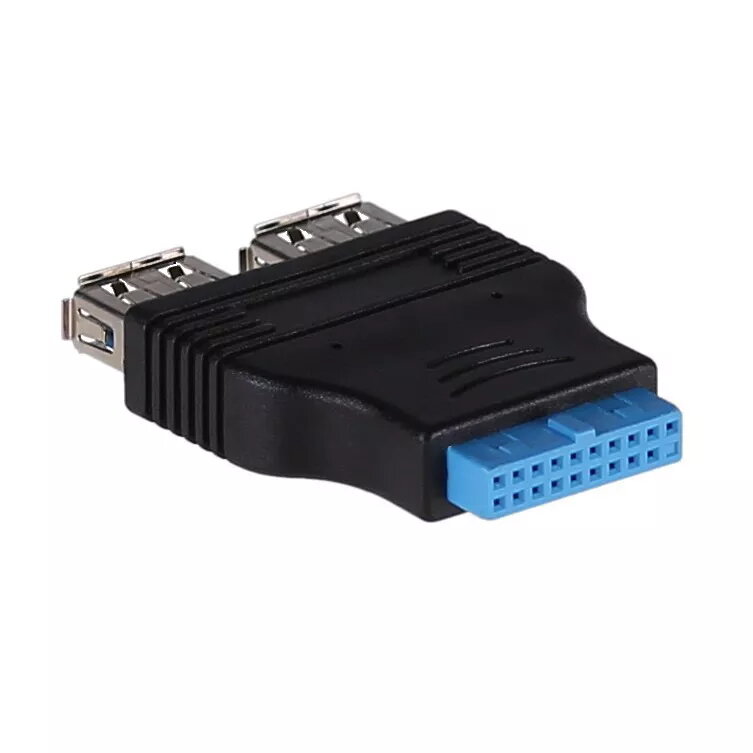
Akyga AK-CA-58 ATX to 2×USB 3.0 cable Photo 1
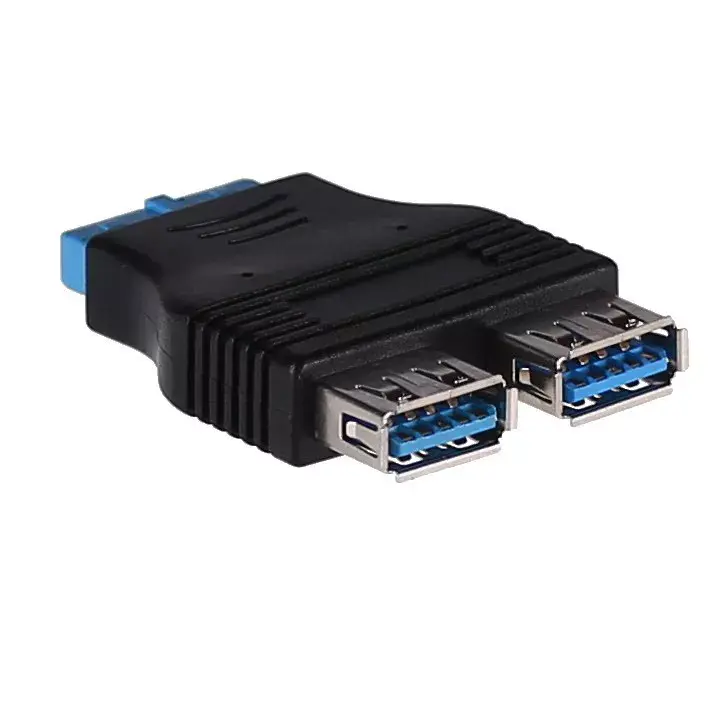
Akyga AK-CA-58 ATX to 2×USB 3.0 cable Photo 2
Akyga AK-CA-58 ATX to 2×USB 3.0 cable Photo 1
Akyga AK-CA-58 ATX to 2×USB 3.0 cable Photo 2
Out of stock.
View similar!

Short description

Akyga AK-CA-58 is an internal adapter cable that converts a motherboard ATX header to two USB 3.0 ports. It provides connection from an ATX-style internal connector to standard USB 3.0 interfaces, available in black and blue. Suitable for adding front-panel or internal USB 3.0 connections in desktop PCs and workstations.
Warranty: 1 Year
SKU: 981677
Manufacturer: Akyga
delivery
Information regarding the items availability for purchase will be posted on this site
price
Item cost information will be published on this site
Together cheaper
{{product.price | formatAmount}}
{{product.title}}
{{productBundle.reference.specialPrice | formatAmount}}
{{productBundle.title}}
{{productBundlePreviousPrice | formatAmount}}
{{productBundleSpecialPrice | formatAmount}}

You saving {{productBundleYouSave | formatAmount}}

Product information

Description

Akyga AK-CA-58 is an internal adapter cable that converts a motherboard ATX-style 19-pin USB 3.0 header into two external USB 3.0 Type-A ports. The cable is designed in black with blue connector inserts and allows adding front-panel or internal USB 3.0 connections in desktop PCs and workstations. It connects to a standard 19-pin USB 3.0 header on a motherboard or expansion card and provides two accessible Type-A sockets for high-speed data transfer and device charging within the chassis.

Advantages

The adapter supports native USB 3.0 signaling by preserving the standard 19-pin pinout, minimizing compatibility issues with modern motherboards and USB 3.0 devices. Its compact, flexible cable routing simplifies installation behind front panels or into drive bays. The black cable with blue port inserts provides clear visual identification of SuperSpeed USB 3.0 connectors while maintaining a neutral appearance inside the case. The design requires no additional drivers and relies on the motherboard or host controller for power and performance.

Suitable for

  • Adding two front-panel USB 3.0 Type-A ports to a desktop computer
  • Connecting internal USB 3.0 devices or hubs to a motherboard header
  • Upgrading older cases to expose USB 3.0 ports without changing the motherboard
  • Workstation builds that need additional accessible USB 3.0 connections

Key specifications

  • Connector type (motherboard side): 19-pin internal USB 3.0 header
  • Connector type (device side): two USB 3.0 Type-A female ports
  • Interface: USB 3.0 (SuperSpeed) compatible
  • Colour: black cable with blue port inserts
  • Cable orientation: internal adapter cable for chassis mounting

How to use

Power off the PC and open the case. Locate a free 19-pin USB 3.0 header on the motherboard or an available header on a compatible expansion card. Align the 19-pin connector of the adapter with the motherboard header and press gently until it seats firmly; ensure pin alignment to avoid damage. Route the cable to the front panel or desired mounting location and secure the Type-A ports in the drive bay bracket or panel opening. Close the case and power on the computer; the two USB 3.0 ports will be available through the host controller without needing separate drivers when a compatible operating system is used.

Usage recommendations

For optimal SuperSpeed performance, connect USB 3.0 devices directly to the ports and avoid routing the cable alongside power lines to reduce interference. Verify the motherboard header is USB 3.0 (19-pin) and that the host controller supports the connected devices’ bandwidth and power requirements.

Specifications

Connector 1:
ATX
Connector 2:
USB
Weight:
0.0175 kg
Product colour:
Black, Blue
All features
Storage temperature (T-T):
0 - 60
Operating temperature (T-T):
0 - 50
Height:
10 mm
Width:
50 mm
Depth:
35 mm
Hot-swap:
Yes
Connector 1 gender:
Female
Connector 2 gender:
Male

Packaging data

Package weight:
19.3 g
Package depth:
70 mm
Package height:
11 mm
Package width:
110 mm

Features

Connector 1:
ATX
Connector 1 form factor:
Straight
Connector 2:
USB
Connector 2 form factor:
Straight
Product colour:
Black, Blue
Weight:
0.0175 kg

Description

Machine translation. Load original

{{highlightedFeature.featureTitle}}:

{{product.title}}
{{product.price}}

{{getProductFeatureValueById(product, highlightedFeature.featureId)}}

Might be useful
{{product.manufacturerName}}
{{product.categoryName}}
{{product.title}}
{{product.specialPrice}}
{{product.price}}

Customer reviews

Customer questions

FAQ

What payment options are available?

AiO.lv offers several payment methods: Bank transfer. All transactions are 100% secure and encrypted.

Can this product be purchased for a company (with VAT)?

Yes. AiO.lv works with legal entities in Latvia and across Europe. The product price already includes VAT. For certain product categories, as well as for companies from other EU countries with a valid VAT number, a 0% VAT rate may apply. We issue the invoice immediately after the order is placed, support electronic BIS invoices, and automatically generate all necessary accounting documents. You can complete the purchase for a company online — simply select the company profile and choose bank transfer as the payment method during checkout.

What is the warranty period?

All Akyga products come with an official 2 Years warranty. It covers all manufacturing defects and malfunctions that may occur during use. The warranty is valid at all authorized Akyga service centers and through AiO.lv

Can the product be returned after purchase?

Yes, you can return the product within 14 days of purchase if you bought it as a consumer (not a legal entity). Returns are possible without giving any reason — the main condition is that the product retains its original appearance and full set of accessories. We will make the process as simple and convenient as possible: just contact our customer support team, and we will help you arrange the return.

Where should I contact for warranty service?

For warranty-related questions you can contact the AiO.lv (SIA VSPRO) customer support team. We will assist with consultation, warranty claim processing, and coordination with certified service centers.

How can I tell if this product suits my needs?

When making a choice, we recommend paying attention to the key features: connector 1, connector 2, weight, product colour, compatibility with your devices or usage conditions, material quality, functionality, and warranty terms. These characteristics will help you determine how well the model meets your needs.

warranty
14-Day Return Policy We are confident in our quality, but if the purchase doesn’t fit — you have 14 days to return the product with peace of mind.
shipping
Fast Delivery Get your orders as quickly as possible — right to your door, parcel lockers, or pickup points across Latvia and the EU.
payment
Secure Payment Pay the way you prefer: cash, VISA, MasterCard, Apple Pay, Google Pay, bank transfer, or 0% installment plan.
warranty
Quality Since 2008 AiO.lv has been on the market for over 18 years and has earned trust — with more than 6000 genuine positive reviews on Google.