

JBL speakers and headphones for pure and deep sound!
In cart {{totalProductsCount}} item(s)
Your cart is empty
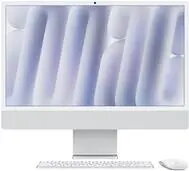
Computer Apple iMac 24'' Silber CTO M4 8-Core 8GB 256GB GPU macOS
The Apple iMac 24-inch in silver is a high-performance all-in-one desktop computer designed to streamline your digital workspace. Powered by the advanced M4 8-Core processor, this machine delivers efficient computing power for everyday tasks, professional workflows, and multimedia consumption. The integrated 8GB of RAM and 256GB SSD storage ensure quick system responsiveness and fast data access, while the stunning Retina display provides vibrant colors and sharp detail for an immersive viewing experience.
The primary benefit of this iMac is its seamless integration of hardware and software, which results in a highly stable and intuitive user experience. The M4 chip architecture offers a significant balance between power consumption and processing speed, making it suitable for demanding applications without excessive heat or noise. Its compact, all-in-one design reduces cable clutter, while the high-resolution display is ideal for color-accurate work. Furthermore, the inclusion of Gigabit Ethernet provides a reliable, high-speed wired network connection for stable data transfers.
This model may not be the ideal choice for users requiring heavy-duty 3D rendering, complex video editing of high-bitrate 4K or 8K footage, or advanced software development that demands more than 8GB of unified memory. Additionally, users who prefer to upgrade their internal components over time will find the integrated architecture restrictive.
To begin using your iMac, connect the power cable and any necessary peripherals to the ports located on the back of the device. Press the power button to initiate the setup process, where the macOS assistant will guide you through language selection, network configuration, and user account creation. Once configured, you can manage your applications through the Launchpad or App Store and organize your files using Finder.
To maintain optimal performance, keep your macOS updated to the latest version and ensure the ventilation area at the bottom of the display remains unobstructed to allow for proper cooling during intensive tasks.
{{highlightedFeature.featureTitle}}:
{{getProductFeatureValueById(product, highlightedFeature.featureId)}}
{{ productComparisonGenerationError }}
