
Hurry and order now – up to 50% off!
In cart {{totalProductsCount}} item(s)
Your cart is empty
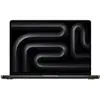
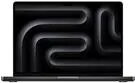
Laptop Apple MacBook Pro 14" M4 Pro 14-Core CPU 48GB RAM 2TB SSD 20-Core GPU
The Apple MacBook Pro 14" M4 Pro combines a 14-core CPU and a 20-core GPU with 48GB of unified memory and a 2TB solid-state drive to deliver high sustained performance in a compact chassis. Its 14-inch display with Nanotexture glass produces accurate color and reduced reflections for critical visual work, while the fan and thermal system keep the processor and GPU at working temperature during prolonged workloads. The laptop runs macOS and supports a wide range of professional applications for video editing, 3D rendering, software development, and content creation.
High-performance silicon architecture enables fast single-threaded and multi-threaded processing, while the integrated 20-core GPU accelerates graphics tasks and hardware-accelerated video encoding/decoding. The 48GB of unified memory reduces data transfer overhead between CPU and GPU, improving responsiveness in large projects. A 2TB NVMe SSD provides rapid file access and ample local storage for video libraries and project files. The 14-inch form factor balances portability and screen real estate, and the Nanotexture glass option reduces glare for studio and field use.
Start by charging the laptop fully and setting up the macOS user account following the on-screen prompts. Install required professional applications either from the App Store or via developer distribution channels, and import your media or project files onto the internal SSD or an approved external drive. Use system settings to configure display color profile and energy preferences to match your workflow, and connect peripherals such as external monitors, storage, or audio interfaces via the available Thunderbolt/USB-C ports. For best performance, keep macOS and app software up to date and manage background processes when running intensive tasks.
For sustained heavy workloads, operate the MacBook Pro on AC power and place it on a flat, ventilated surface to ensure optimal thermal performance. Use calibrated color profiles for color-critical work and consider external high-speed storage when working with very large video files. Regularly back up important projects to a secondary drive or cloud service to prevent data loss.
{{highlightedFeature.featureTitle}}:
{{getProductFeatureValueById(product, highlightedFeature.featureId)}}
{{ productComparisonGenerationError }}
