

Filters you can trust. Pure water every day.
In cart {{totalProductsCount}} item(s)
Your cart is empty
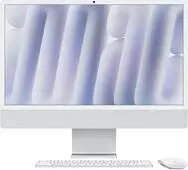
Computer Apple iMac 24" Silver M4-10C-CPU 24GB 1TB SSD 10C-GPU
The Apple iMac 24" Silver with M4 10-core CPU and 10-core GPU combines a slim, all-in-one design with high-performance components. Equipped with 24GB of unified memory and a 1TB solid-state drive, this iMac delivers fast application loading, smooth multitasking and responsive graphics performance. The 24-inch Retina display offers accurate color reproduction and sharp detail for photo editing, design work and media consumption. macOS integration ensures optimized power management and compatibility with a broad ecosystem of creative and productivity apps.
This iMac provides balanced performance for both CPU- and GPU-intensive tasks thanks to the M4 processor with ten CPU cores and ten GPU cores. The 24GB of unified memory improves multitasking and reduces data transfer delays between processor and graphics. A 1TB SSD offers large, fast storage for projects, media libraries and system files, while the slim silver enclosure and integrated display save desk space compared with separate tower and monitor setups. Built-in macOS features and system optimizations contribute to reliable operation and straightforward updates.
Unpack the iMac and place it on a stable desk surface with adequate ventilation. Connect the power cable and any required peripherals such as keyboard and mouse. On first startup, follow the macOS setup assistant to create a user account, configure Wi‑Fi and restore data from a backup or migration assistant if needed. Install or update essential applications from the App Store or trusted vendors. Use the System Settings app to adjust display, energy and privacy settings to match your workflow. Regularly back up important files using Time Machine or another backup solution.
For optimal performance, keep macOS and installed applications up to date, maintain at least 15–20% free storage space on the SSD, and use external drives for large media archives. Position the iMac at eye level to reduce neck strain and calibrate the display when precise color accuracy is required for professional work.
{{highlightedFeature.featureTitle}}:
{{getProductFeatureValueById(product, highlightedFeature.featureId)}}
{{ productComparisonGenerationError }}
