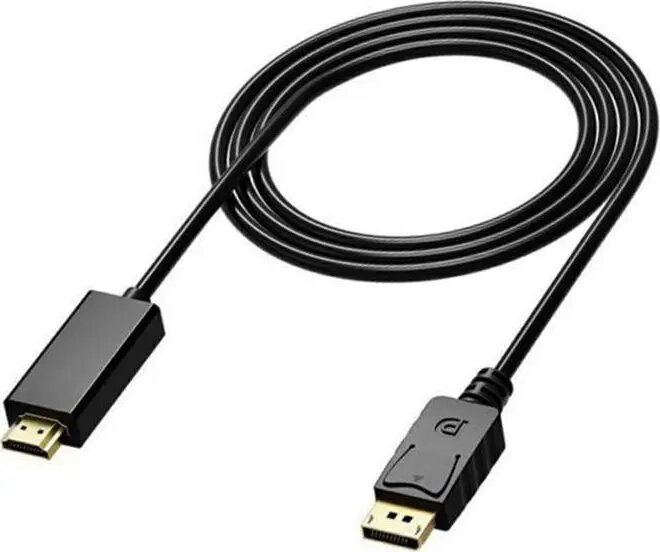
The Aptel DisplayPort to HDMI cable 1.8m (model 4297-uniw) in black provides a wired connection that transmits video and audio from a DisplayPort output to an HDMI input. The cable is designed to link computers, laptops or graphics cards equipped with DisplayPort to HDMI-capable monitors, HDTVs and projectors. With a 1.8 m length, it offers moderate reach for desktop, meeting room and living-room setups while maintaining a single-cable connection for both picture and sound.
Advantages
This Aptel cable supports a straightforward digital signal conversion from DisplayPort to HDMI without requiring external power or adapters. The single-cable design carries both video and audio signals, simplifying connections between devices. Its 1.8 m length is a practical compromise between flexibility and tidiness, allowing placement of source and display devices within a typical home or office layout. The black jacket provides a neutral appearance that fits common AV installations.
Suitable for
- Connecting desktop PCs or laptops with DisplayPort output to HDMI monitors or TVs
- Linking graphics cards to external displays for gaming or content creation (where a passive cable is sufficient)
- Connecting a computer to a projector for presentations in meeting rooms or classrooms
- Home entertainment setups where a DisplayPort source must feed an HDMI HDTV or AV receiver
When it may not be suitable
The cable performs a physical DisplayPort-to-HDMI connection and is intended for standard digital signal transmission. It may not be suitable if you require active conversion for certain DisplayPort++ or older DP dual-mode implementations, specialized multi-stream transport (MST) daisy-chaining functionality, or if you need explicit support for the latest high-bandwidth HDMI features beyond what the connected devices negotiate. For very long runs beyond 1.8 m or for signal extension over network cabling, alternative solutions should be considered.
Key specifications
- Cable type: DisplayPort (source) to HDMI (display)
- Length: 1.8 m
- Color: Black
- Signal: Digital video and audio over a single cable
- Use: Unidirectional from DisplayPort source to HDMI sink
How to use
Connect the DisplayPort end to the DisplayPort output on your computer, laptop or graphics card, and plug the HDMI end into the HDMI input of the monitor, TV or projector. Power on both devices and select the appropriate HDMI input on the display. The connected devices will negotiate supported resolution and audio settings automatically; you may need to adjust display resolution or audio output settings in your operating system or graphics driver if the picture or sound does not appear as expected.
What to consider before purchase
- Verify that your source device has a native DisplayPort output and your display accepts HDMI input.
- Confirm the maximum resolution and refresh rate supported by your devices and that a passive cable meets your bandwidth needs.
- Ensure 1.8 m length is sufficient for your setup and cable routing requirements.
Usage recommendations
For reliable operation, avoid tight bends near the connectors and route the cable away from high-interference sources. If you experience handshake or compatibility issues, test with alternate ports or update the source device's graphics drivers. For higher resolutions or longer distances, consider active adapters or higher-spec cabling.