{{ totalProductsCount }}

In cart {{totalProductsCount}} item(s)

Total:
{{sum | formatAmount}}

Your cart is empty

Empty image ARMOR TERRA AIO 2420 All-in-One Desktop Computer

ARMOR TERRA AIO 2420 All-in-One Desktop Computer

Product description is under construction. Specify the parameters, price and delivery options before buying!
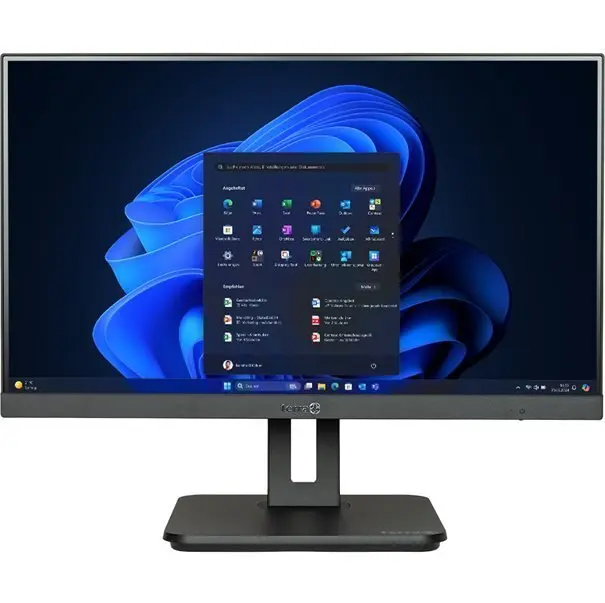
ARMOR TERRA AIO 2420 All-in-One Desktop Photo 1
Out of stock.
View similar!

Short description

The ARMOR TERRA AIO 2420 is an all-in-one desktop computer designed for efficient office and home use. This integrated system combines a display and computing hardware into a single space-saving unit, reducing cable clutter and simplifying workspace organization. It provides reliable performance for daily computing tasks, multimedia consumption, and professional applications, offering a clean and modern aesthetic for any environment.
Warranty: 2 Years
SKU: 12425609
Manufacturer: ARMOR
delivery
Information regarding the items availability for purchase will be posted on this site
price
Item cost information will be published on this site
Together cheaper
{{product.price | formatAmount}}
{{product.title}}
{{productBundle.reference.specialPrice | formatAmount}}
{{productBundle.title}}
{{productBundlePreviousPrice | formatAmount}}
{{productBundleSpecialPrice | formatAmount}}

You saving {{productBundleYouSave | formatAmount}}

Product information

Description

The ARMOR TERRA AIO 2420 is a versatile all-in-one desktop computer engineered to streamline your workspace by integrating high-performance computing components directly into a sleek, high-definition display. This unified design eliminates the need for a separate bulky tower, significantly reducing cable clutter and providing a clean, minimalist aesthetic suitable for both professional office environments and modern home setups. By combining essential hardware into one compact unit, it offers a reliable solution for users who prioritize efficiency, space management, and consistent performance for everyday digital tasks.

Advantages

The primary benefit of the ARMOR TERRA AIO 2420 is its space-saving form factor, which allows it to fit comfortably on smaller desks or in areas where traditional desktop towers would be impractical. Its integrated architecture simplifies the initial setup process, requiring fewer connections and reducing the complexity of cable management. Furthermore, the system is optimized for a balance of power and energy efficiency, ensuring that it remains quiet and cool during standard operation. The modern design language ensures that the device complements various interior styles while providing a stable platform for multitasking and media consumption.

Suitable for

  • General office productivity and document management
  • Web browsing and communication tasks
  • Multimedia consumption and streaming
  • Educational purposes and remote learning
  • Home office organization

When it may not be suitable

This all-in-one system is not intended for high-end professional gaming or intensive 3D rendering tasks that require dedicated, high-wattage graphics cards. Additionally, because the components are integrated into a single chassis, users looking for extensive hardware upgradeability or modular customization may find this unit limiting compared to traditional desktop towers.

Key specifications

  • Integrated display and computing unit
  • Compact, space-saving chassis design
  • Optimized for daily office and home applications
  • Reduced cable connectivity requirements
  • Modern, minimalist aesthetic

How to use

To begin using the ARMOR TERRA AIO 2420, place the unit on a stable, flat surface with adequate ventilation space around the rear and sides. Connect the provided power cable to the unit and a grounded electrical outlet. Attach your preferred peripherals, such as a keyboard and mouse, to the available ports. Once connected, press the power button located on the chassis to initiate the operating system. Follow the on-screen prompts to complete the initial software configuration and network setup.

What to consider before purchase

  • Available desk space for the display unit
  • Specific software requirements for your professional tasks
  • Need for future internal hardware upgrades
  • Connectivity requirements for external peripherals

Usage recommendations

For optimal performance and longevity, ensure the ventilation vents remain unobstructed at all times. It is recommended to keep the display surface clean using a soft, dry microfiber cloth and to perform regular software updates to maintain system security and stability.

Description

Machine translation. Load original

Similar products

{{product.title}} Show details Hide details

{{highlightedFeature.featureTitle}}:

{{getProductFeatureValueById(product, highlightedFeature.featureId)}}

{{product.price | formatAmount}}
Might be useful
{{product.manufacturerName}}
{{product.categoryName}}
{{product.title}}
{{product.specialPrice}}
{{product.price}}

Customer reviews

Customer questions

FAQ

What payment options are available?

AiO.lv offers several payment methods: Bank transfer, Leasing for legal entities. All transactions are 100% secure and encrypted.

Can this product be purchased for a company (with VAT)?

Yes. AiO.lv works with legal entities in Latvia and across Europe. The product price already includes VAT. For certain product categories, as well as for companies from other EU countries with a valid VAT number, a 0% VAT rate may apply. We issue the invoice immediately after the order is placed, support electronic BIS invoices, and automatically generate all necessary accounting documents. You can complete the purchase for a company online — simply select the company profile and choose bank transfer as the payment method during checkout.

What is the warranty period?

All ARMOR products come with an official 2 Years warranty. It covers all manufacturing defects and malfunctions that may occur during use. The warranty is valid at all authorized ARMOR service centers and through AiO.lv

Can the product be returned after purchase?

Yes, you can return the product within 14 days of purchase if you bought it as a consumer (not a legal entity). Returns are possible without giving any reason — the main condition is that the product retains its original appearance and full set of accessories. We will make the process as simple and convenient as possible: just contact our customer support team, and we will help you arrange the return.

Where should I contact for warranty service?

For warranty-related questions you can contact the AiO.lv (SIA VSPRO) customer support team. We will assist with consultation, warranty claim processing, and coordination with certified service centers.

warranty
14-Day Return Policy We are confident in our quality, but if the purchase doesn’t fit — you have 14 days to return the product with peace of mind.
shipping
Fast Delivery Get your orders as quickly as possible — right to your door, parcel lockers, or pickup points across Latvia and the EU.
payment
Secure Payment Pay the way you prefer: cash, VISA, MasterCard, Apple Pay, Google Pay, bank transfer, or 0% installment plan.
warranty
Quality Since 2008 AiO.lv has been on the market for over 18 years and has earned trust — with more than 6000 genuine positive reviews on Google.