
Hurry and order now – up to 50% off!
In cart {{totalProductsCount}} item(s)
Your cart is empty
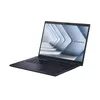
Asus ExpertBook B3 B3404CVA Laptop, 14-inch WUXGA, Intel Core i5-1335U, 8GB RAM, 512GB SSD, Intel UHD Graphics, No OS, Black
The Asus ExpertBook B3 B3404CVA is a professional-grade 14-inch laptop engineered to meet the demands of modern business environments. Featuring a crisp WUXGA display and powered by the Intel Core i5-1335U processor, this device balances performance and portability. With 8GB of RAM and a 512GB SSD, it ensures quick data access and efficient multitasking for daily office operations. The sleek black chassis is built for durability, making it a reliable companion for professionals who require a stable and responsive computing tool.
This laptop offers a significant advantage through its combination of high-speed storage and a capable processor, which together minimize downtime during intensive tasks. The 14-inch WUXGA screen provides a larger workspace compared to standard displays, enhancing productivity when working with documents or spreadsheets. Its robust construction is designed to withstand the rigors of daily travel, while the inclusion of Intel UHD Graphics supports clear visual output for presentations and media. By shipping without a pre-installed operating system, the device allows users to deploy their preferred software environment, ensuring full compatibility with specific corporate infrastructure requirements.
This laptop is not intended for high-end gaming or professional-grade video editing, as the integrated Intel UHD Graphics are optimized for productivity rather than intensive graphical rendering. Additionally, users who require a pre-configured system with an operating system ready to use out of the box may find the lack of an OS inconvenient.
To begin using the Asus ExpertBook B3, first install your preferred operating system using an external bootable drive. Once the OS is installed, download and install the necessary drivers from the official manufacturer website to ensure all hardware components function correctly. Connect the device to a power source during the initial setup to prevent interruptions. After the software environment is configured, you can connect your peripherals and begin your professional tasks.
For optimal performance and longevity, keep the laptop firmware updated and ensure the ventilation vents remain unobstructed during operation. Using a protective sleeve during transport is recommended to maintain the condition of the chassis.
{{highlightedFeature.featureTitle}}:
{{getProductFeatureValueById(product, highlightedFeature.featureId)}}
{{ productComparisonGenerationError }}
