
JBL speakers and headphones for pure and deep sound!
In cart {{totalProductsCount}} item(s)
Your cart is empty
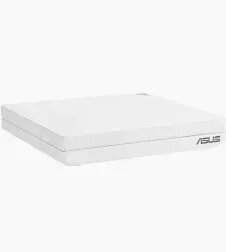
ASUS RT-AX57 Go WiFi 6 Travel Router, AX3000 Dual-Band, 1x Gigabit WAN/LAN, USB 3.2
The ASUS RT-AX57 Go is a high-performance WiFi 6 travel router engineered to provide seamless and reliable internet connectivity wherever you are. Combining the efficiency of the AX3000 dual-band standard with a compact, portable design, this device ensures that you can maintain high-speed wireless performance whether you are in a hotel, a temporary office, or at home. It features a versatile Gigabit WAN/LAN port and a USB 3.2 interface, allowing for flexible network configurations and easy integration with various devices.
This travel router offers significant benefits for users who prioritize mobility without compromising on network speed or security. By utilizing WiFi 6 technology, it provides increased capacity and reduced latency, ensuring stable connections even in crowded environments. Its compact form factor makes it an ideal companion for frequent travelers, while the inclusion of a USB 3.2 port adds functionality for tethering or file sharing. The device is built to handle demanding tasks, providing a robust networking solution that fits easily into any travel bag.
This router may not be the optimal choice for large-scale enterprise environments or expansive homes that require extensive mesh coverage across multiple floors. Users with a high number of wired devices may find the single Gigabit port limiting compared to standard desktop routers.
To set up the ASUS RT-AX57 Go, connect your internet source to the Gigabit WAN/LAN port using an Ethernet cable. Once powered on, access the router's web interface or the mobile app to configure your wireless settings, including the SSID and security password. The device can be used as a standalone router, a wireless access point, or a travel bridge to extend existing networks. Ensure the firmware is updated through the management interface to maintain optimal performance and security.
For the best performance, place the router in an open area away from physical obstructions and other electronic devices that may cause signal interference. Always keep the device firmware updated to benefit from the latest security patches and feature enhancements.
{{highlightedFeature.featureTitle}}:
{{getProductFeatureValueById(product, highlightedFeature.featureId)}}
{{ productComparisonGenerationError }}
