
{{ totalProductsCount }}

In cart {{totalProductsCount}} item(s)

Total:
{{sum | formatAmount}}

Your cart is empty

header-product WLAN Stick AVM FRITZ!WLAN Stick AC 430 MU-MIMO
46.49 €

WLAN Stick AVM FRITZ!WLAN Stick AC 430 MU-MIMO

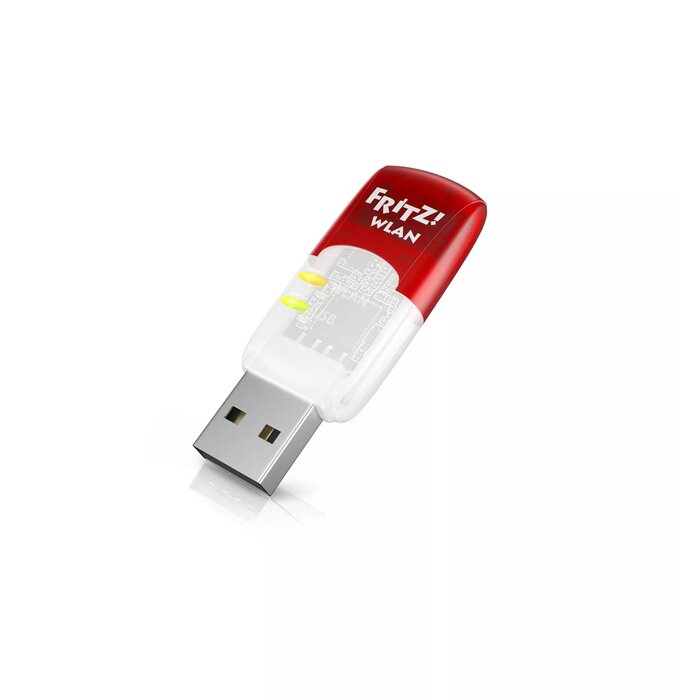
WLAN Stick AVM FRITZ!WLAN Stick AC 430 MU-MIMO Photo 1
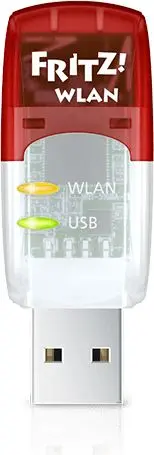
WLAN Stick AVM FRITZ!WLAN Stick AC 430 MU-MIMO Photo 2
WLAN Stick AVM FRITZ!WLAN Stick AC 430 MU-MIMO Photo 1
WLAN Stick AVM FRITZ!WLAN Stick AC 430 MU-MIMO Photo 2
Keep track of price changes You keep track of price changes
Watch the price drop

Leave your address - as soon as the price of the product goes down, you'll know about it right away

You keep track of price changes

WLAN Stick AVM FRITZ!WLAN Stick AC 430 MU-MIMO

{{email}}
You keep track of price changes

WLAN Stick AVM FRITZ!WLAN Stick AC 430 MU-MIMO

{{email}}
{{selectedOffer && selectedOffer.price | formatAmount}}

Short description

The FRITZ!WLAN Stick AC 430 MU-MIMO offers dual-band connectivity with speeds up to 433 Mbit/s. It features both wired and wireless connectivity options via USB. Ideal for enhancing your Wi-Fi experience, it supports 2.4 GHz and 5 GHz bands, ensuring stable and fast internet access for your devices.
Available at price 46.49 €: 42 pcs.
Total available for order: 87 pcs.
Warranty: 2 Years
SKU: 405175
Manufacturer: AVM
free shipment

Cheapest delivery:

Unisend LV

Pick-up points

Unisend LV

Cost

1.79 €

Deliver

{{selectedOffer.parcelStationDeliveryString}}

Customer service center
2b. Kengaraga str., Riga, Latvia, LV-1063
21.09.2026 {{selectedOffer.officeDeliveryString}}
free
Courier Delivery Please note that in case of a large parcel additional delivery costs may apply!
24.09.2026 {{selectedOffer.courierDeliveryString}}
From 4.99 € (Weight: 0.16 kg)
Parcel couriers
Unisend LV / Venipak Pickup LV / Venipak Locker LV / Latvijas Pasts pakomāts / DPD Paku skapis / Omniva LV / Latvijas Pasts nodaļa
24.09.2026 {{selectedOffer.parcelStationDeliveryString}}
From 1.79 €
payment
Payment Methods:
Bank transfer, Bank cards on-line, Apple Pay, Google Pay
Together cheaper
{{product.price | formatAmount}}
{{product.title}}
{{productBundle.reference.specialPrice | formatAmount}}
{{productBundle.title}}
{{productBundlePreviousPrice | formatAmount}}
{{productBundleSpecialPrice | formatAmount}}

You saving {{productBundleYouSave | formatAmount}}

Product information

Description

The AVM FRITZ!WLAN Stick AC 430 MU-MIMO is a compact USB WLAN adapter that adds dual-band wireless capability to computers and other USB-equipped devices. Supporting both 2.4 GHz and 5 GHz bands and a maximum data transfer rate of up to 433 Mbit/s, the stick implements modern IEEE 802.11 standards including 802.11ac and MU-MIMO technology to improve throughput and multi-device performance. The device connects via a USB host interface and can be used where an external WLAN connection is needed or to upgrade older systems to current wireless standards.

Advantages

The FRITZ!WLAN Stick AC 430 MU-MIMO provides dual-band operation that reduces interference and offers higher throughput on the 5 GHz band while retaining compatibility with 2.4 GHz networks. MU-MIMO support helps maintain performance when multiple clients are active. The USB form factor simplifies installation and portability, and the adapter supports a broad set of IEEE 802.11 standards for compatibility with many routers and access points.

Suitable for

  • Upgrading laptops or desktops without integrated 5 GHz WLAN
  • Stable wireless connections for streaming video and online conferencing
  • Temporary or portable WLAN access on travel or at remote work locations
  • Connecting older devices to modern 802.11ac networks

Key specifications

  • Connectivity technology: Wired & Wireless
  • Host interface: USB
  • Maximum data transfer rate: 433 Mbit/s
  • Supported frequency bands: 2.4 GHz and 5 GHz
  • Networking standards: IEEE 802.11b/g/n/ac and 802.11i security
  • MU‑MIMO support for improved multi-client throughput

How to use

Plug the FRITZ!WLAN Stick AC 430 MU-MIMO into an available USB port on your device and allow the operating system to detect the adapter. Install any vendor drivers or utilities if prompted to ensure full functionality and compatibility with your router. Use the system’s network manager to scan for available SSIDs, select the desired network, and enter the network password to establish a secure connection. Choose the 5 GHz band when available for higher throughput or 2.4 GHz for extended range and legacy compatibility.

Usage recommendations

Place the adapter in a USB port with clear line-of-sight to the router when possible and avoid physical obstructions to optimize signal strength. For stationary setups, use a rear USB port or a USB extension cable to reduce electromagnetic interference. Keep device drivers up to date to ensure security and the best performance with MU‑MIMO and 802.11ac features.

Specifications

Connectivity technology: The technology that enables connectivity of the device, e.g. wired or wireless.
Wired & Wireless
Interface: Interface ports to connect pieces of equipment. USB (Universal Serial Bus) has become the most popular wired interface to connect peripherals. USB 2.0 supports speeds up to 480 Mbit/s (USB 1: 12 Mbit/s). The interface FireWire is also known as the IEEE 1394 standard. Enhanced IDE (EIDE)is sometimes referred to as Fast ATA, Fast IDE or ATA-2.
WLAN
Host interface: Interface that enables a host controller to communicate with a driver.
USB
Maximum data transfer rate: The maximum speed with which data can be transmitted from one device to another.
433 Mbit/s
Networking standards: The way in which the network is working, e.g. IEEE 802.11a, IEEE 802.11b, IEEE 802.11g.
IEEE 802.11b, IEEE 802.11g, IEEE 802.11i, IEEE 802.11n, IEEE 802.11ac
All features
Wi-Fi standards: The type of wireless local area network (LAN). It can be ad-hoc, where units in a network communicate peer-to-peer, or Infrastructure, where units communicate with each other via an access point A LAN interconnects computers in a small area e.g. home, school or office.
802.11a, Wi-Fi 4 (802.11n), 802.11g, 802.11b, Wi-Fi 5 (802.11ac)
Component for: What this product is used as a part of (component for).
PC/Laptop
Antenna design:
Internal

Ports & interfaces

Connectivity technology: The technology that enables connectivity of the device, e.g. wired or wireless.
Wired & Wireless
Interface: Interface ports to connect pieces of equipment. USB (Universal Serial Bus) has become the most popular wired interface to connect peripherals. USB 2.0 supports speeds up to 480 Mbit/s (USB 1: 12 Mbit/s). The interface FireWire is also known as the IEEE 1394 standard. Enhanced IDE (EIDE)is sometimes referred to as Fast ATA, Fast IDE or ATA-2.
WLAN
Host interface: Interface that enables a host controller to communicate with a driver.
USB
Internal: The product is built in.
No

Bandwidth

Maximum data transfer rate: The maximum speed with which data can be transmitted from one device to another.
433 Mbit/s

Network

Networking standards: The way in which the network is working, e.g. IEEE 802.11a, IEEE 802.11b, IEEE 802.11g.
IEEE 802.11b, IEEE 802.11g, IEEE 802.11i, IEEE 802.11n, IEEE 802.11ac

Wireless LAN features

Wi-Fi: Popular technology that allows an electronic device to exchange data or connect to the internet wirelessly using radio waves.
Yes
Wi-Fi band: The frequency bands the product features.
Dual-band (2.4 GHz / 5 GHz)
WLAN data transfer rates supported:
11, 54, 150, 433
Bandwidth (second):
5 GHz
Bandwidth (first):
2.4 GHz

Antenna

Antenna:
Yes

Performance

Windows operating systems supported: Windows vesions wich can be used with the device.
Yes

System requirements

Minimum storage drive space: The minimum hard disk space required to store or run a computer program or operating system.
5 MB
Minimum RAM: The lowest RAM (memory) required to run a computer program or operating system.
64 MB

Packaging content

Quick installation guide:
Yes

Description

Machine translation. Load original

Similar products

{{product.title}}
Show details Hide details

{{highlightedFeature.featureTitle}}:

{{getProductFeatureValueById(product, highlightedFeature.featureId)}}

{{product.price | formatAmount}}

Product comparison

In this comparison, the main product WLAN Stick AVM FRITZ!WLAN Stick AC 430 MU-MIMO is evaluated alongside several similar alternative adapters. All devices provide wireless network connectivity across 2.4 GHz and 5 GHz bands, but they differ in connection interfaces, maximum data transfer speeds, and physical designs. The main technical distinctions lie between USB connectivity versus internal PCI Express installation, as well as varying speed capabilities among the models.

⚙️ The specifications comparison below evaluates host interfaces, maximum data transfer rates, supported network standards, and frequency bands.

ParameterWLAN Stick AVM FRITZ!WLAN Stick AC 430 MU-MIMOWireless USB Adapter FRITZ! Stick AC 430 MU-MIMONetwork Card DeLOCK 61000Internal WLAN Adapter TP-Link Archer T2ENetwork Card Tenda U9DeLOCK Wi-Fi 6 Dual Band WLAN USB Stick AX1800Practical conclusion
Host interfaceUSBUSBUSBPCI ExpressUSBUSBMost adapters use USB for easy external connection, whereas the TP-Link model requires internal installation inside a desktop PC.
Maximum data transfer rate433 Mbit/s433 Mbit/s433 Mbit/s433 Mbit/s433 Mbit/s1775 Mbit/sThe DeLOCK AX1800 model provides significantly higher data transfer speeds through advanced Wi-Fi 6 technology, while the other options share baseline speeds.
Networking standardsIEEE 802.11b, g, i, n, acIEEE 802.11n, g, b, ac, iIEEE 802.11n, g, b, ac, aIEEE 802.11ac, n, g, b, aIEEE 802.11g, n, ac, a, bIEEE 802.11a, ac, ax, b, g, nAll devices support standard dual-band connectivity, with the DeLOCK AX1800 adding newer AX standard compatibility.

◎ The suitability and use cases table below helps determine which product fits specific user requirements and deployment scenarios.

Use caseRecommended productWhy
Standard laptop or desktop Wi-Fi upgrade via USBWLAN Stick AVM FRITZ!WLAN Stick AC 430 MU-MIMOProvides reliable dual-band wireless connectivity with MU-MIMO support through a simple USB port.
Internal desktop PC setupInternal WLAN Adapter TP-Link Archer T2EUses a PCI Express interface designed specifically for internal installation within desktop computer chassis.
High-speed networking with modern Wi-Fi 6 supportDeLOCK Wi-Fi 6 Dual Band WLAN USB Stick AX1800Delivers vastly superior maximum transfer speeds compared to standard speed adapters.
WLAN Stick AVM FRITZ!WLAN Stick AC 430 MU-MIMO differs from closely related alternatives mainly through brand branding, while sharing identical performance characteristics with the alternative FRITZ adapter. It is best suited for users looking for a straightforward, portable dual-band USB Wi-Fi adapter. Buyers may prefer alternatives if they require an internal PCI Express card like the TP-Link model or need maximum throughput provided by the advanced Wi-Fi 6 DeLOCK stick.
Might be useful
{{product.manufacturerName}}
{{product.categoryName}}
{{product.title}}
{{product.specialPrice}}
{{product.price}}
Stock data
Warehouse Stock Delivery to the store Store Price
WH94 42 21.09.2026 Best delivery
46.49 €
WH357 35 21.09.2026 Best delivery
46.99 €
Available only for legal entities
Warehouse Stock Delivery to the store Store Price
WH109 10 05.10.2026
47.99 €
46.49 €
Stock: 42
Delivery Date: 21.09.2026 Best delivery
Warehouse: WH94
46.99 €
Stock: 35
Delivery Date: 21.09.2026 Best delivery
Warehouse: WH357
Available only for legal entities
47.99 €
Stock: 10
Delivery Date: 05.10.2026
Warehouse: WH109

Customer reviews

Customer questions

FAQ

How much does the WLAN Stick AVM FRITZ!WLAN Stick AC 430 MU-MIMO cost, and is it available for purchase?

The price is 46.49 € (valid at the time of publication and already includes all taxes). The item is available for order — 87 pcs. are in stock, and you can place your purchase right now with delivery across Latvia and Europe or choose pickup at the Riga collection point. We offer favorable purchase terms, including the option to split the payment into convenient monthly installments. Availability and price are updated in real time, so we recommend placing your order in advance.

If I order this product today, when will I receive my order?

If you place your order today, delivery will be as fast and convenient as possible. You will be able to pick up your order on 21.09.2026 at the Riga pickup point or choose delivery across Latvia and Europe. We carefully inspect every purchase and pack it securely for safe transportation.

What payment options are available?

AiO.lv offers several payment methods: Bank transfer, Bank cards on-line, Apple Pay, Google Pay. All transactions are 100% secure and encrypted.

Can this product be purchased for a company (with VAT)?

Yes. AiO.lv works with legal entities in Latvia and across Europe. The product price already includes VAT. For certain product categories, as well as for companies from other EU countries with a valid VAT number, a 0% VAT rate may apply. We issue the invoice immediately after the order is placed, support electronic BIS invoices, and automatically generate all necessary accounting documents. You can complete the purchase for a company online — simply select the company profile and choose bank transfer as the payment method during checkout.

What is the warranty period?

All AVM products come with an official 2 Years warranty. It covers all manufacturing defects and malfunctions that may occur during use. The warranty is valid at all authorized AVM service centers and through AiO.lv

Can the product be returned after purchase?

Yes, you can return the product within 14 days of purchase if you bought it as a consumer (not a legal entity). Returns are possible without giving any reason — the main condition is that the product retains its original appearance and full set of accessories. We will make the process as simple and convenient as possible: just contact our customer support team, and we will help you arrange the return.

Where should I contact for warranty service?

For warranty-related questions you can contact the AiO.lv (SIA VSPRO) customer support team. We will assist with consultation, warranty claim processing, and coordination with certified service centers.

How can I tell if this product suits my needs?

When making a choice, we recommend paying attention to the key features: connectivity technology, interface, host interface, maximum data transfer rate, networking standards, compatibility with your devices or usage conditions, material quality, functionality, and warranty terms. These characteristics will help you determine how well the model meets your needs.
warranty
14-Day Return Policy We are confident in our quality, but if the purchase doesn’t fit — you have 14 days to return the product with peace of mind.
shipping
Fast Delivery Get your orders as quickly as possible — right to your door, parcel lockers, or pickup points across Latvia and the EU.
payment
Secure Payment Pay the way you prefer: cash, VISA, MasterCard, Apple Pay, Google Pay, bank transfer, or 0% installment plan.
warranty
Quality Since 2008 AiO.lv has been on the market for over 18 years and has earned trust — with more than 6000 genuine positive reviews on Google.