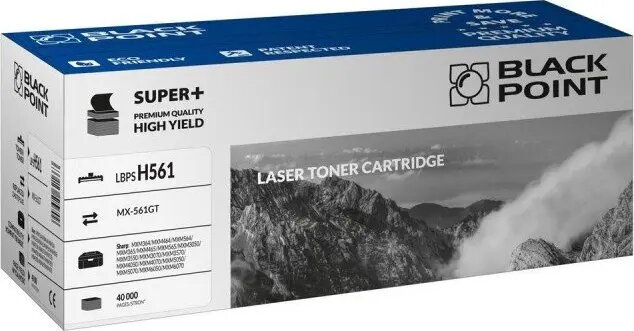
BLACKPOINT BLSHMX561GTBCBW is a black replacement toner cartridge compatible with MX-561GT series laser printers. It supplies black toner for monochrome printing and is offered as an aftermarket alternative to original cartridges. The cartridge is intended for routine office and home use where standard black-and-white documents, reports and drafts are required. Installation is straightforward and the product is designed to work with printers that accept MX-561GT type consumables.
Advantages
The cartridge provides a consistent source of black toner for everyday monochrome printing, with a focus on ease of replacement and predictable print performance. As an aftermarket option, it aims to deliver reliable page yields for standard document workflows while maintaining compatibility with printers that use the MX-561GT family. The unit is manufactured to fit form and function expectations for direct drop-in replacement.
Suitable for
- Printing black-and-white reports, invoices and internal documents
- Home office and small business print tasks with moderate monthly volume
- Replacing depleted black toner in printers that accept MX-561GT compatible cartridges
When it may not be suitable
This replacement cartridge is intended for printers that explicitly accept MX-561GT compatible consumables; it may not function correctly or be supported in models outside that compatibility range. For high-volume, mission-critical printing where OEM service agreements or guaranteed page yields are required, an original manufacturer cartridge may be more appropriate.
Key specifications
- Colour: Black
- Technology: Toner for laser printing
- Compatibility: Designed for use in printers compatible with MX-561GT series cartridges
- Intended use: Monochrome document and report printing
How to use
Turn off the printer and open the cartridge access panel according to the printer user manual. Remove the empty cartridge following the manufacturer's recommended procedure, unpack the replacement cartridge and gently shake it side-to-side to distribute toner if instructed by the included leaflet. Insert the replacement into the correct slot until it seats securely and close the access panel. Power the printer on and run a short test print or alignment procedure if prompted by the device to confirm correct installation.
What to consider before purchase
- Verify printer compatibility with MX-561GT type replacement cartridges before ordering
- Check expected page yield and compare with your monthly printing volume
- Confirm warranty or support implications when using aftermarket consumables
Usage recommendations
Store the cartridge in a cool, dry place away from direct sunlight and extreme temperatures. Handle the cartridge by its designated grips to avoid contact with the toner surface. If streaks or print quality issues appear after installation, perform a printer cleaning cycle and reseat the cartridge; if problems persist, test with an alternate cartridge to isolate the cause.