
Leave your address - as soon as the price of the product goes down, you'll know about it right away
Network adapter BLOW 86-060 USB-C to RJ45 Ethernet + HDMI K-03
In cart {{totalProductsCount}} item(s)
Your cart is empty
Network adapter BLOW 86-060 USB-C to RJ45 Ethernet + HDMI K-03
Leave your address - as soon as the price of the product goes down, you'll know about it right away
Network adapter BLOW 86-060 USB-C to RJ45 Ethernet + HDMI K-03
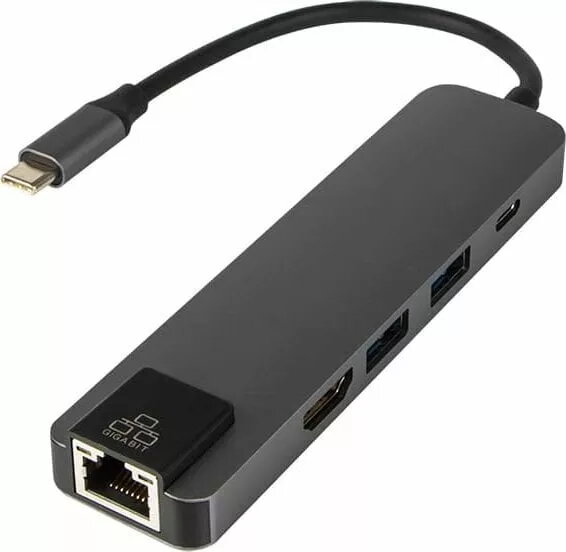
The BLOW 86-060 USB-C to RJ45 Ethernet + HDMI K-03 network adapter provides a compact way to add a wired LAN connection and an external HDMI display output to devices with a USB-C port. The adapter is intended for laptops, tablets and other USB-C equipped computers that need a stable Ethernet connection and the ability to connect to HDMI monitors or projectors without requiring internal ports or docking stations.
This adapter combines gigabit-capable wired networking and HDMI video output in a small, portable housing that is easy to carry for business travel or mobile work. It eliminates the need to rely on Wi‑Fi for data-sensitive tasks and enables direct connection to external displays for presentations or multi-monitor setups. The plug-and-play design reduces setup time and works with devices that support USB-C video and data transfer.
Connect the adapter's USB-C plug to the host device's USB-C port that supports data and video. Attach an Ethernet cable to the RJ45 port to establish a wired network connection, and connect an HDMI cable from the adapter to an external monitor or projector to enable video output. The adapter is typically plug-and-play; if required, install drivers provided by the device manufacturer or operating system. Configure network settings or display arrangement in the host operating system as needed.
For reliable network performance, use a quality Ethernet cable and place the host device in a well-ventilated position to avoid overheating. Verify that the host device's USB-C port supports video output (DisplayPort Alt Mode) when using HDMI output. When traveling, disconnect cables before storing the adapter to prevent strain on ports.
{{highlightedFeature.featureTitle}}:
{{getProductFeatureValueById(product, highlightedFeature.featureId)}}