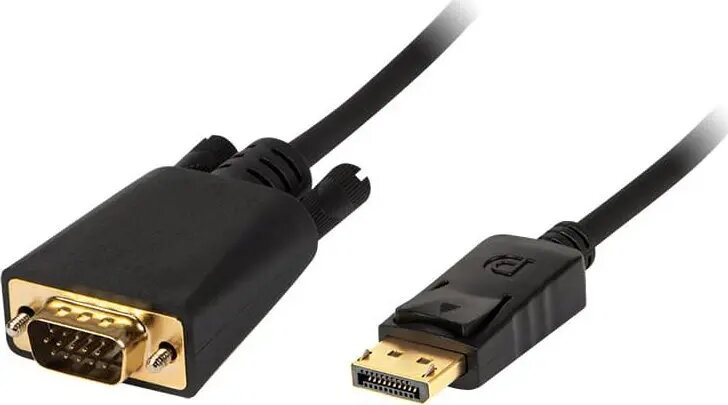
The BLOW DisplayPort to VGA cable is a reliable connectivity solution designed to bridge the gap between modern devices featuring a DisplayPort output and older display hardware equipped with a VGA input. With a length of 1.8 meters, this cable provides sufficient reach for most desktop and office configurations, ensuring a stable and clear signal transmission for your monitors, projectors, or televisions.
The primary advantage of this cable is its seamless plug-and-play functionality, which eliminates the need for complex software installations or external power adapters. By converting the digital DisplayPort signal into an analog VGA format, it allows users to utilize legacy monitors or projectors with newer computers, effectively extending the lifespan of existing hardware. The robust construction ensures durability, while the precise engineering maintains signal integrity during daily use in professional or home environments.
Suitable for
- Connecting a PC or laptop with DisplayPort to a VGA monitor
- Linking computers to older projectors for presentations
- Extending a desktop workspace using a secondary legacy display
- Home multimedia setups requiring analog video output
When it may not be suitable
This cable is a unidirectional adapter designed specifically to transmit signals from a DisplayPort source to a VGA display. It will not function in reverse, meaning it cannot be used to connect a VGA source to a DisplayPort monitor.
Additionally, because VGA is an analog signal format, this cable does not support high-definition digital audio transmission. If your setup requires audio output, you will need to use a separate cable for sound.
Key specifications
- Cable length: 1.8 meters
- Input interface: DisplayPort
- Output interface: VGA (D-Sub)
- Signal type: Digital to Analog conversion
- Compatibility: Standard DisplayPort enabled devices
How to use
To use the cable, simply insert the DisplayPort connector into the output port of your computer or graphics card. Connect the VGA end of the cable to the input port of your monitor, projector, or television. Once both ends are securely connected, turn on your devices. The computer should automatically detect the external display, allowing you to configure your screen settings through your operating system's display menu.
What to consider before purchase
- Ensure your computer has a DisplayPort output and your monitor has a VGA input
- Verify that your display resolution requirements are compatible with VGA limitations
- Confirm that you have a separate audio solution if sound is required for your setup
Usage recommendations
For the best performance, ensure that both connectors are fully inserted into their respective ports. Avoid bending the cable at sharp angles or placing heavy objects on it to maintain the integrity of the internal wiring and ensure a consistent video signal.