Save time and money with our discounts!
In cart {{totalProductsCount}} item(s)
Your cart is empty
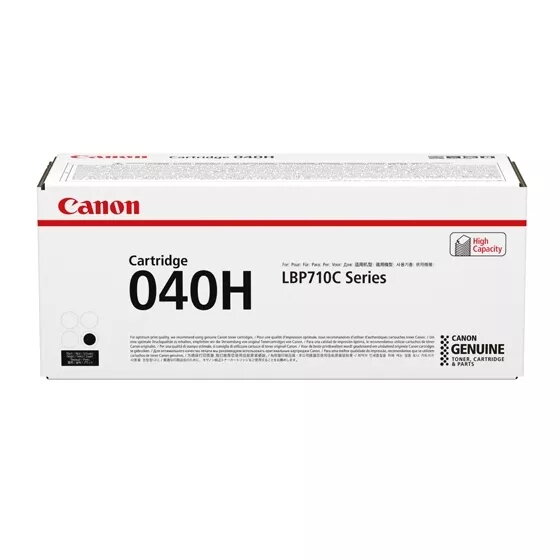
Toner cartridge Canon 040H original Black, laser printing, 1 pc
Original Canon 040H black toner cartridge delivers black toner for laser printing in compatible Canon monochrome printers. Supplied as a single cartridge, it is intended for text documents, reports and business prints where clear, consistent black output is required. The cartridge is designed for straightforward replacement and integration with Canon laser printers that accept this size and form factor.
The Canon 040H original toner cartridge provides consistent black density across pages and is manufactured to match Canon quality standards. As an original supply, it supports reliable page yield and predictable print performance when used in compatible devices. The single-cartridge format simplifies ordering and inventory for environments that require occasional or regular monochrome printing.
This toner cartridge is designed solely for black monochrome laser printing and is not applicable for colour printing needs. It may not be suitable for printers that do not accept this cartridge size or form factor; compatibility should be confirmed with the printer model before purchase.
Switch off the printer and allow it to cool briefly if recently used. Open the printer's front or top cover according to the printer manual, remove any empty cartridge, and unpack the replacement Canon 040H toner cartridge. Gently shake the cartridge side-to-side to distribute the toner evenly if recommended by the printer manual, remove any protective seals, and insert the cartridge into the designated slot until it clicks into place. Close the printer cover, power the device on if needed, and run a test print or alignment procedure as directed by the printer to confirm correct installation and print quality.
Store the cartridge in a cool, dry place away from direct sunlight and avoid exposing it to extreme temperatures. Use genuine Canon supplies to maintain printer reliability and to ensure consistent print density. Follow the printer manufacturer's instructions for handling and replacement to prevent toner spills or damage to the printer.
{{highlightedFeature.featureTitle}}:
{{getProductFeatureValueById(product, highlightedFeature.featureId)}}
{{ productComparisonGenerationError }}