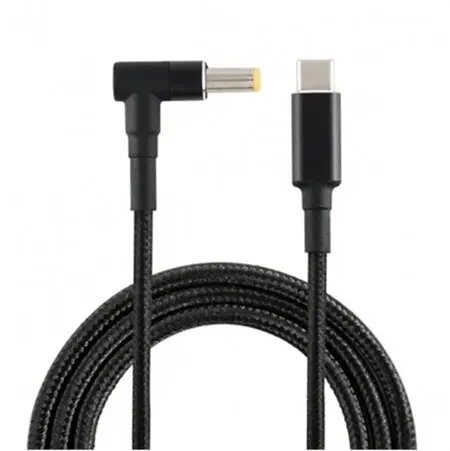
The CANYON USB-C to Lenovo 4.0 x 1.7 mm Laptop Power Cable provides a direct connection between a USB-C power source and Lenovo notebooks that accept a 4.0 x 1.7 mm barrel input. With support for 18.5–20V output and up to 100W power delivery, this 1.8 m cable is intended as a replacement or spare charging lead for home, office, and travel use. It connects a USB-C PD (Power Delivery) charger or power bank to compatible Lenovo laptops without requiring the original manufacturer’s adapter.
Advantages
This cable allows convenient use of widely available USB-C PD chargers to power Lenovo laptops with a 4.0 x 1.7 mm barrel jack, reducing the need to carry a dedicated bulky laptop adapter. The 100W power capability supports sustained charging for many modern notebooks while the 1.8 m length offers flexible placement and comfortable working distance. The design is intended for simple plug-and-play operation with no additional setup required.
Suitable for
- Replacing a lost or damaged Lenovo barrel-style charging cable
- Using a USB-C PD charger or power bank to charge compatible Lenovo laptops
- Home, office, and travel charging where a lighter or more compact solution is preferred
When it may not be suitable
This cable is only suitable for Lenovo notebooks that specifically accept a 4.0 x 1.7 mm barrel connector and expect an input voltage in the 18.5–20V range. It may not work with Lenovo models that require a different barrel size, a proprietary smart pin, or voltages outside the specified range. If a laptop requires communication with a manufacturer-specific AC adapter for certain features, those features may not be available when using a USB-C to barrel cable.
Key specifications
- Connector A: USB-C (PD input)
- Connector B: Lenovo barrel 4.0 x 1.7 mm
- Output voltage range: 18.5–20 V
- Maximum power delivery: up to 100 W
- Cable length: 1.8 m
- Intended use: laptop power/charging
How to use
Connect the USB-C end to a compatible USB-C PD charger or power bank that can supply the required voltage and power. Plug the 4.0 x 1.7 mm barrel connector into the laptop’s power input jack until it seats securely. Ensure the power source is set to or capable of supplying 18.5–20V and that total wattage available meets the laptop’s requirements. Monitor device charging and temperature during first use to confirm compatibility.
What to consider before purchase
- Confirm your Lenovo laptop uses a 4.0 x 1.7 mm barrel input and accepts 18.5–20V charging
- Verify the USB-C power source can provide up to 100W and negotiate the required voltage via Power Delivery
- Check whether any laptop features depend on the original manufacturer’s adapter or data communication over the adapter
Usage recommendations
Use a high-quality USB-C PD charger and avoid drawing more power than the charger can supply. If the laptop does not charge or behaves unexpectedly, stop using this cable and consult the laptop manufacturer’s guidance. For travel, store the cable coiled without sharp bends to preserve connector integrity.