
Save time and money with our discounts!
In cart {{totalProductsCount}} item(s)
Your cart is empty
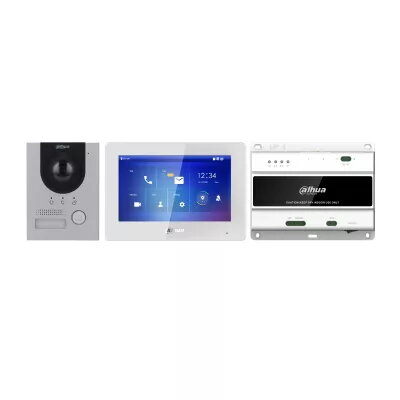
Dahua Technology DHI-KTD01(F) Video Intercom System with 7-inch TFT Display and 2 MP Camera
The Dahua Technology DHI-KTD01(F) is a professional-grade video intercom system designed to provide reliable security and communication for residential and commercial properties. This comprehensive kit features a high-quality 7-inch TFT display that offers a clear 1024 x 600 resolution, ensuring that visitors are easily identifiable. The outdoor station is equipped with a 2 MP CMOS camera capable of 1280 x 720 resolution, providing crisp video monitoring even in challenging conditions. Built with durability in mind, the outdoor unit is rated IP65, making it resistant to dust and water ingress, which ensures consistent performance in various weather conditions.
This video intercom system stands out due to its robust construction and versatile connectivity options. The integration of SIP and P2P network protocols allows for seamless communication and remote access, providing users with flexibility in how they manage their entry points. The high-resolution display and camera combination ensures that security monitoring is both effective and user-friendly. Furthermore, the system is engineered for long-term reliability, offering a stable solution for access control that integrates well into modern smart building infrastructures.
This system may not be the ideal choice for large-scale industrial facilities that require integration with complex, multi-layered enterprise security management software. Additionally, it is not designed for environments where extreme physical vandalism is a constant threat, as it is primarily optimized for standard residential and commercial access control.
Installation should be performed by a qualified technician to ensure all wiring and network configurations are correctly established. Once installed, the indoor monitor serves as the central hub for viewing the camera feed, communicating with visitors, and unlocking the door. Users can interact with the interface via the touchscreen to manage settings, view history, or initiate calls. For remote functionality, ensure the device is connected to a stable network and configured according to the provided software guidelines.
Regularly clean the camera lens and the display screen with a soft, dry cloth to maintain image clarity. Periodically check the network connection and firmware updates to ensure the system remains secure and functional.
{{highlightedFeature.featureTitle}}:
{{getProductFeatureValueById(product, highlightedFeature.featureId)}}
{{ productComparisonGenerationError }}